By Tyler Morgan | Technology Content Writer
Summarize this blog post with: ChatGPT | Perplexity | Claude | Grok
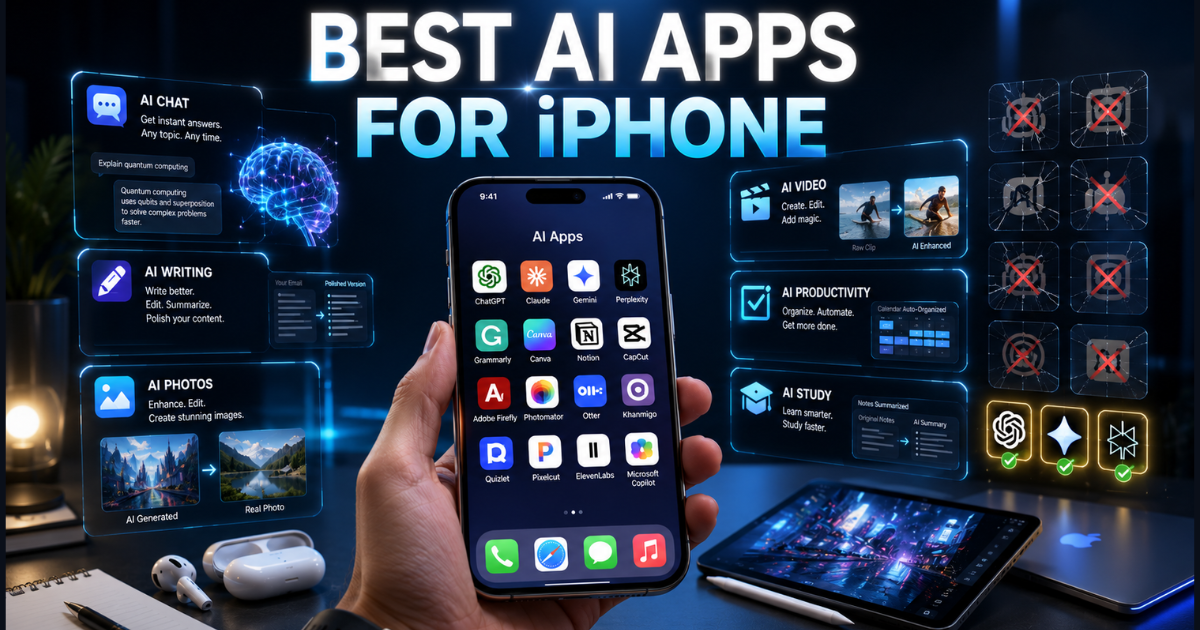
If you’ve opened the App Store lately, you’ve probably noticed something annoying: every single productivity, photo, or writing app now claims to be “powered by AI.” Half of them are just a chatbot wrapper slapped onto an old app, and the other half genuinely change how you use your phone. I spent several weeks testing the best AI apps for iPhone across chat, writing, photos, video, productivity, and studying — so you can skip the disappointing ones and go straight to what actually works.
Key Takeaways
- AI apps for iPhone in 2026 span six practical categories: chatbots, writing, photo editing, video editing, productivity, and study tools.
- Apple Intelligence now handles a lot of everyday tasks natively — writing tools, photo cleanup, notification summaries — which genuinely reduces how many third-party apps you need.
- Third-party apps like ChatGPT, Claude, and Perplexity still beat Apple’s built-in tools on depth, customization, and raw reasoning power.
- Free AI apps cover most casual needs fine; paid tiers mostly buy you speed, higher usage limits, and fewer “you’ve hit your daily limit” walls.
- Students get the most value from AI study apps like Khanmigo and Quizlet AI, while professionals lean harder on productivity tools like Notion AI and Otter.
- Privacy and offline access vary a lot between apps — this matters more than most “best of” lists admit.
- The smartest approach isn’t picking one app that does everything. It’s matching two or three specialized apps to your actual daily tasks.
What Are AI Apps for iPhone?
AI apps for iPhone are applications that use artificial intelligence to help with writing, photo editing, research, transcription, and everyday productivity, either through Apple’s built-in Apple Intelligence features or through separately downloaded third-party tools. The distinction matters more than people realize. Apple’s native tools — Writing Tools, Genmoji, Visual Intelligence — run largely on-device and ship with iOS itself. Third-party apps like ChatGPT, Claude, and Perplexity, on the other hand, usually connect to cloud-based models with their own interface, subscription, and data policy.
If you want the full rundown straight from the source, Apple’s official Apple Intelligence page breaks down exactly which features are available and on which devices.
In practice, the line between the two has gotten blurry, and honestly, that’s a good thing. I regularly draft a quick reply using Apple’s on-device Writing Tools, then hand the same paragraph to ChatGPT when I want something sharper or more creative. That kind of mixed workflow — native AI for quick edits, third-party AI for heavier lifting — has become normal rather than the exception.
As AI capabilities on personal devices keep expanding, so does scrutiny from lawmakers — if you’re curious about the policy side of things, we broke down why governments are racing to regulate AI before it’s too late, which adds useful context to why privacy features keep becoming a bigger selling point for apps like these.
On-Device AI vs. Cloud-Based AI
This is worth understanding before you download anything. On-device AI processes your request directly on the iPhone’s chip, while cloud AI sends the request to a remote server and sends back a response. On-device tools tend to be faster for simple tasks, work offline, and keep your data local. Cloud tools tend to have more powerful models, better reasoning, and features that update far more often — because the model behind them isn’t tied to your phone’s hardware.
For example, Apple’s Writing Tools can rewrite a text message with the phone in airplane mode. ChatGPT can’t do that — it needs a connection because the actual model runs on OpenAI’s servers, not your phone. Neither approach is “better” across the board; they’re just built for different jobs.
Why Do AI Apps Matter So Much in 2026?

AI apps matter because they’ve quietly moved from novelty to genuine utility — the kind of feature you’d notice immediately if it disappeared. A few years ago, “AI-powered” was mostly marketing. Now, it’s the difference between spending twenty minutes cleaning up meeting notes and having a transcript with action items ready in the time it takes to grab coffee.
The App Store’s AI category has grown fast, and competition has done what competition usually does: pushed quality up and prices down. Several of the apps below now offer free tiers that would’ve been paywalled entirely a couple of years back. That’s genuinely useful for people who want to try AI tools without committing to a subscription immediately — but it also means the field is crowded, and not every app on the shelf deserves a spot on your home screen.
How I Tested and Ranked These Apps
I didn’t just skim App Store descriptions or read marketing copy — I ran each app through real, repeated daily tasks over several weeks. Chatbots got tested on the same set of questions, drafting requests, and research prompts, so I could compare responses apples-to-apples. Photo and video apps got real camera roll content, not curated demo images, because that’s a much better test of how an app handles messy real-world lighting and clutter.
I also weighed pricing against actual usefulness. An app with impressive editing tools but a mandatory $15/month subscription ranked lower than a free alternative that got 90% of the job done. Here’s the thing about most “best AI app” roundups: they rank apps by feature count. I ranked them by whether I’d actually keep using them after the novelty wore off.
| Evaluation Factor | Why It Matters |
|---|---|
| Response quality | Accuracy and usefulness of what the app actually produces. |
| Speed | How long you wait for a usable result. |
| Ease of use | Whether a non-technical person can start using the app within minutes. |
| Apple Intelligence compatibility | How well the app integrates with native iOS features and workflows. |
| Privacy | Where your data goes, how it is processed, and how long it is retained. |
| Offline support | Whether the app continues working without an internet connection. |
| Value for cost | How the features compare against the subscription price and overall value. |
The 25 Best AI Apps for iPhone, by Category
AI Chatbots
Chatbots remain the most-used AI category on iPhone, and for good reason — they handle everything from quick factual questions to long-form drafting. ChatGPT leads here because of its sheer versatility across writing, coding, and research. Claude stands out for longer, more nuanced conversations and document analysis — if you’re feeding it a 40-page PDF, it holds context better than most competitors. Gemini integrates tightly with Gmail and Google Docs, which makes it the obvious pick if your digital life already runs through Google.
Microsoft Copilot makes the most sense for people living inside Word, Excel, and Outlook daily. Perplexity has carved out its own lane as an AI-powered search engine that actually cites its sources — genuinely useful when you need to double-check a claim rather than just take the answer at face value.
If you want a deeper head-to-head than we have room for here, we put together a full ChatGPT vs Claude vs Gemini vs Perplexity vs Copilot vs DeepSeek vs Grok comparison that breaks down pricing, strengths, and use cases across all seven assistants in far more detail.
AI Writing Apps
Writing apps polish grammar, tone, and clarity without rewriting your voice entirely — at least, the good ones do. Grammarly is still the most reliable option for catching grammar and tone issues across Mail, Messages, and third-party apps. Notion AI builds writing help directly into your notes, which is genuinely convenient if you already organize your life in Notion rather than a separate notes app. Wordtune is narrower in scope — it’s best for rewriting individual sentences for tone, which makes it a solid pick for non-native English speakers polishing emails.
AI Photo Editing
This category has seen the biggest jump in actual capability over the last couple of years. Adobe Firefly brings generative fill and background removal into a familiar Adobe interface — if you’ve used Photoshop before, the learning curve is nearly zero. Photomator feels more native to iOS and handles one-tap adjustments impressively well without requiring a subscription to do the basics. Canva blends AI editing with design templates, which suits people who need polished graphics fast rather than pixel-perfect photo retouching. Pixelcut is built specifically for product photography — background swaps and shadow generation for people selling on Etsy or Shopify.
AI Video Editing
Short-form video has driven most of the demand here. CapCut AI leads with auto-captioning, scene detection, and one-tap effects built for TikTok and Reels — it’s the one I’d recommend to someone just starting out with content creation. InShot AI is simpler and geared toward beginners who don’t want a steep learning curve. Luma AI is the outlier — more experimental, better for generative 3D and cinematic effects than quick social clips.
AI Productivity Apps
Notion combines databases, docs, and AI summarization into one workspace, which makes it the closest thing to an all-in-one productivity hub on this list. Otter transcribes and summarizes meetings automatically — genuinely one of the bigger time-savers for remote workers who sit in back-to-back calls. Read AI goes a step further and analyzes meeting sentiment and engagement, while Motion auto-schedules your calendar around deadlines and priorities rather than just blocking time reactively.
If Notion, Otter, and Motion caught your attention, it’s worth checking out our roundup of 10 AI productivity tools that will actually transform your daily workflow, which digs into real before-and-after time savings rather than just listing features.
AI Study Apps
Khanmigo functions more like a patient tutor than a homework-answer machine — it walks students through problems step-by-step instead of just handing over the solution, which matters if the goal is actually learning the material. Quizlet AI generates practice tests and flashcards from uploaded notes, saving the tedious manual-entry step. Socratic uses the iPhone camera to help with homework problems on the spot, which is handy for a quick check but shouldn’t replace actually working through the material.
Which AI App Is Best for Your Specific Use Case?
“Best overall” rarely means “best for you.” A student and a small business owner need completely different tools, so here’s how the picks break down by use case.
| Use Case | Top Pick | Why It Wins |
|---|---|---|
| Best for Students | Khanmigo | Step-by-step tutoring instead of simply providing answers, helping students understand concepts more effectively. |
| Best for Business | Notion AI | Combines documents, tasks, notes, and AI assistance into one powerful productivity workspace. |
| Best Free AI App | Perplexity | Offers a generous free plan with cited, verifiable answers and excellent web research capabilities. |
| Best Paid AI App | Claude | Excels at handling long documents, complex reasoning, and detailed writing tasks with high accuracy. |
| Best AI Image Generator | Adobe Firefly | Produces high-quality images with commercial-safe generative AI features and excellent editing tools. |
| Best AI Voice Assistant | Siri (with Apple Intelligence) | Provides deep, system-level integration with iOS for a seamless hands-free experience. |
| Best AI Photo Editor | Photomator | Delivers a native iPhone experience with powerful AI-based photo enhancements and editing tools. |
| Best AI Writer | Grammarly | Reliable grammar correction, tone suggestions, and writing assistance across apps and browsers. |
Is ChatGPT Actually Better Than Apple Intelligence?
ChatGPT and Apple Intelligence solve different problems, so “better” really depends on what you’re trying to do. Apple Intelligence is built for quick, on-device tasks — rewriting a text message, summarizing a long email thread, cleaning up a photo — without ever leaving the app you’re already in. If you need a fast tone adjustment before hitting send, Apple’s Writing Tools handle it right inside Messages.
ChatGPT pulls ahead on deeper research, longer creative writing, and multi-step reasoning. Drafting a full blog outline or working through a complicated technical problem plays to its strengths in a way Apple’s on-device model isn’t really built for. From what I’ve seen, most people end up using both — Apple Intelligence for quick in-app edits, ChatGPT (or Claude) for the heavier lifting.
Apple Intelligence vs. Third-Party AI Apps: What’s the Real Difference?
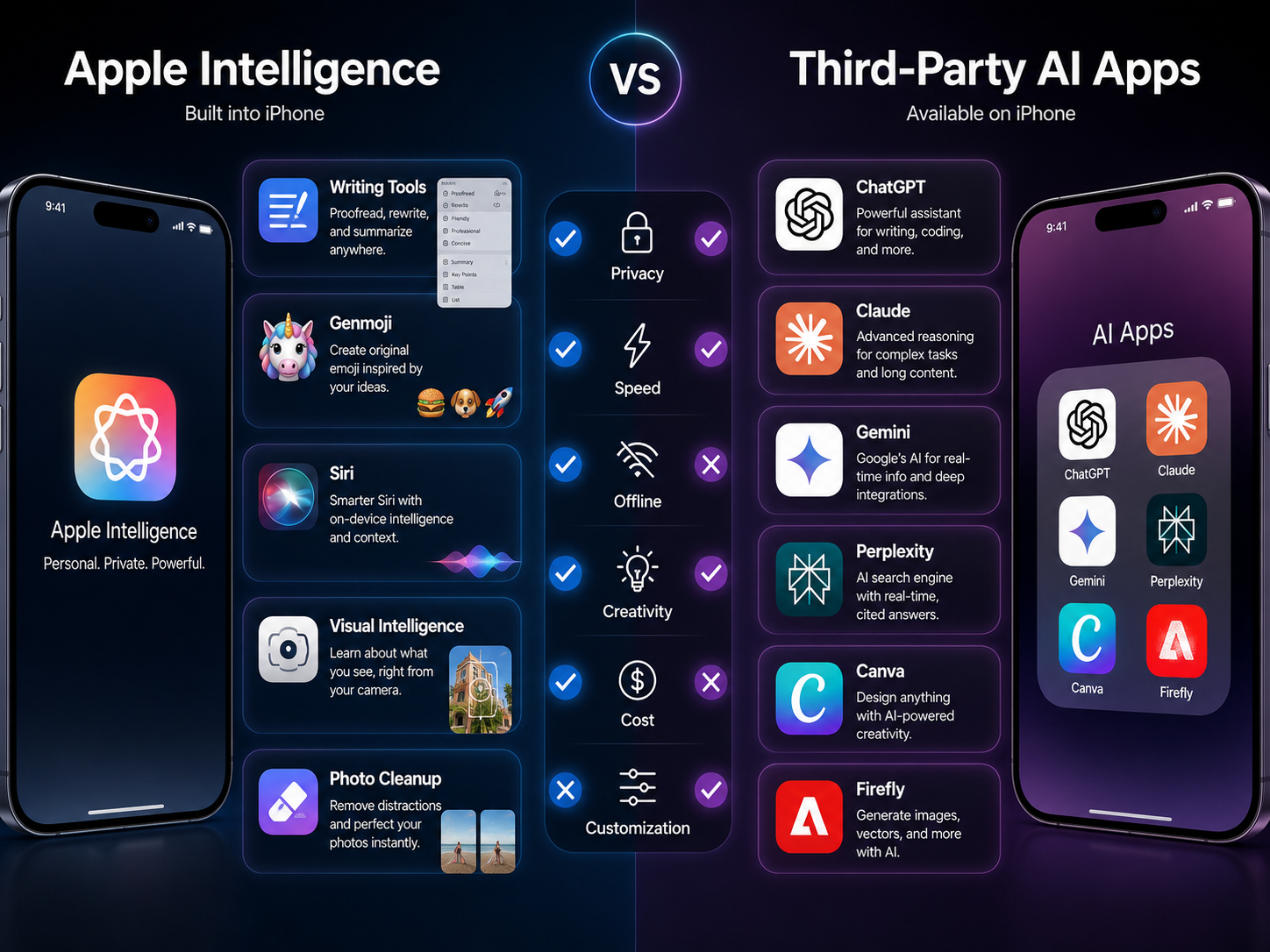
Apple Intelligence is Apple’s built-in suite of AI features woven directly into iOS — Writing Tools, photo cleanup, notification summaries, and Siri improvements, mostly processed on-device. Third-party AI apps like ChatGPT, Claude, and Perplexity are separately downloaded and typically rely on cloud-based processing with their own dedicated interfaces. Choosing between the two really comes down to weighing privacy and offline access against the deeper capabilities third-party apps offer.
For a broader (less technical) look at how Apple frames privacy across its products, Apple’s privacy features page is a useful companion to the Private Cloud Compute details above.
| Dimension | Apple Intelligence | Third-Party AI Apps |
|---|---|---|
| Privacy | Strong on-device processing with a privacy-first design that minimizes cloud data usage. | Privacy varies depending on each provider’s data collection, storage, and retention policies. |
| Offline Features | Many core AI features continue to work directly on supported iPhones without an internet connection. | Most AI apps rely on cloud-based models and generally require an active internet connection. |
| Customization | Limited customization focused on system-level experiences within Apple’s ecosystem. | Highly customizable with specialized prompts, plugins, workflows, and task-specific capabilities. |
| Speed | Very fast for everyday tasks thanks to optimized on-device processing and deep iOS integration. | Performance depends on the AI model, internet speed, and server availability. |
| Cost | Included at no additional cost on compatible iPhones that support Apple Intelligence. | Many apps offer free plans, while advanced features typically require monthly or annual subscriptions. |
Neither option fully replaces the other, and I’d push back on anyone who tells you it does. Apple Intelligence is great for quick, private, everyday edits. Third-party apps provide real depth for research, creative work, and specialized tasks. In practice, most iPhone users get the best results running both side by side rather than picking a single lane.
What AI Features Are Already Built Into Your iPhone?
Before you download anything, it’s worth knowing what’s already sitting on your phone. If Apple Intelligence isn’t showing up on your phone yet, Apple’s setup guide covers device compatibility, supported languages, and how to turn the features on. Writing Tools rewrite, summarize, and proofread text across nearly any app that accepts text input. Genmoji generates custom emoji from a text description — genuinely fun, occasionally pointless, but free. Image Playground creates simple AI images directly from the keyboard.
Visual Intelligence identifies objects, text, and locations through the camera in real time — point it at a restaurant sign or a plant and get context instantly. AI Notifications and AI Summaries condense long group chats and notification threads into short digests, which saves real time catching up after a busy day. Siri’s improvements have made voice commands feel noticeably more conversational, and Call Features like live transcription help you keep track of important calls without scribbling notes. Photo Cleanup removes unwanted objects from images with a tap, and Battery Optimization uses on-device learning to extend battery life based on your actual usage patterns.
Can AI Apps Work Offline on iPhone?
Some AI features work offline, but most of the more advanced capabilities still need an internet connection. Apple Intelligence handles several tasks — Writing Tools and Photo Cleanup among them — using on-device processing, which works fine in airplane mode. Third-party apps like ChatGPT and Claude generally need a connection because the actual model runs in the cloud, not on your phone. If offline access genuinely matters to you — frequent flyers, spotty rural coverage — lean on Apple Intelligence for core tasks and treat cloud apps as a connected-mode tool.
Are AI Apps Safe to Use With Personal Data?
Most mainstream AI apps are reasonably safe for everyday use, but data-handling practices differ meaningfully between providers, and this is where a lot of “best of” lists go quiet. Check whether an app processes data on-device or sends it to external servers — that affects both privacy and offline availability. Also check whether you can opt out of having your conversations used for model training, since not every app makes that obvious.
Apple Intelligence leans on on-device processing and limited data retention as part of its privacy approach. For anyone who wants the technical detail rather than just taking our word for it, Apple’s own explanation of Private Cloud Compute walks through exactly what gets sent off-device and what stays local. Third-party apps publish their own privacy policies, and they’re worth actually reading before you upload sensitive documents, financial records, or private photos. My honest recommendation: keep anything genuinely sensitive out of any AI app’s chat history unless you’ve confirmed exactly how that data gets stored.
Putting These Apps to Work: A Few Practical Combinations
Matching a specific task to the right tool works better than downloading everything at once. For writing, start with Apple’s native Writing Tools for quick edits, then bring in ChatGPT or Grammarly when you need more substantial drafting help. For photos, Photomator or Adobe Firefly cover most everyday editing needs without a steep learning curve.
For productivity, Notion AI and Otter pair well — Notion for organizing information, Otter for capturing meetings you’d otherwise forget half of. Students get the most out of pairing Khanmigo for tutoring with Quizlet AI for review, which covers both understanding a concept and drilling it into memory.
What’s Next: Building Your Own AI App Stack
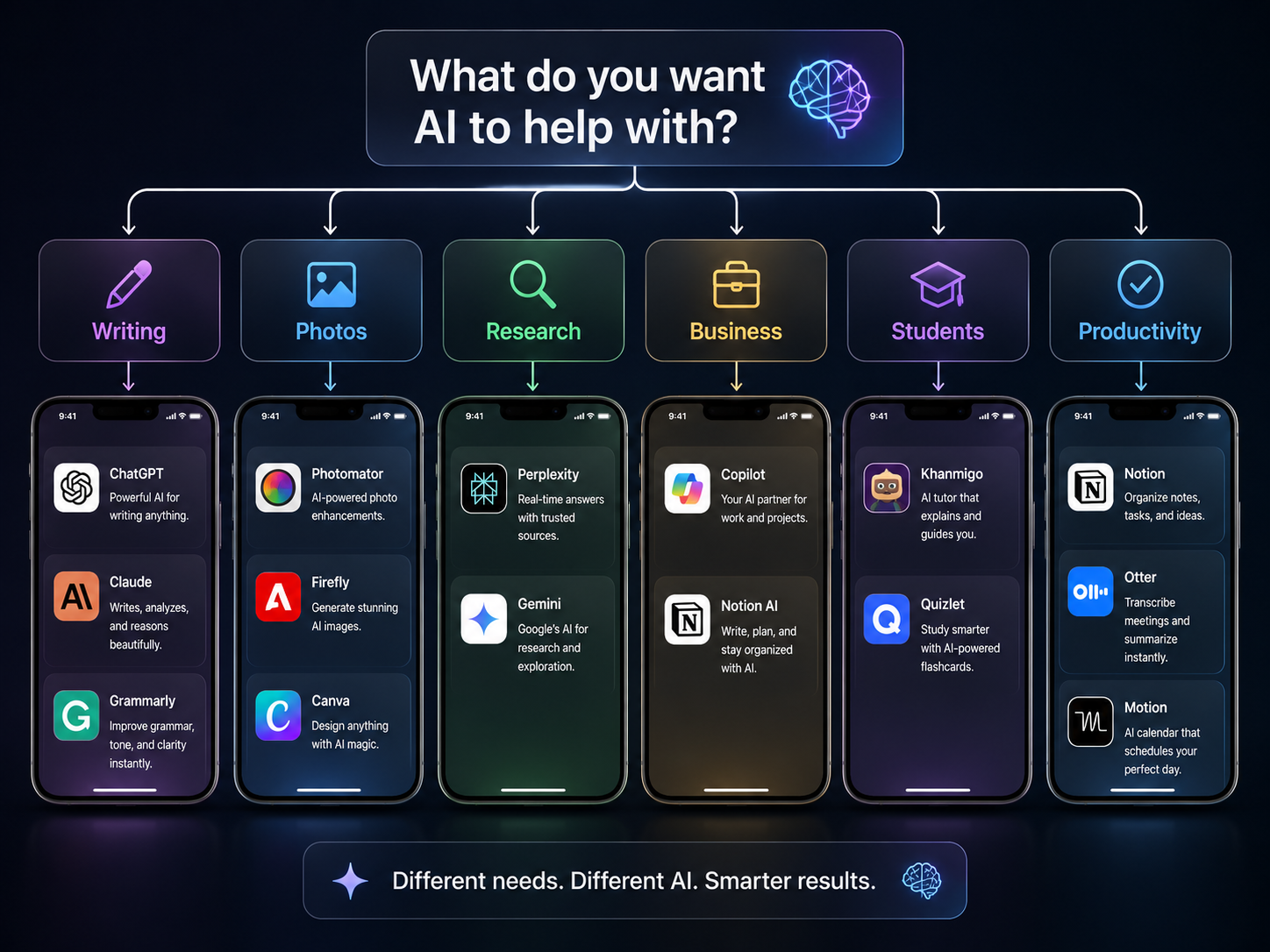
Now that you’ve got the rundown, the smarter move is building a small, focused stack rather than downloading a dozen apps that all do roughly the same thing. Start by identifying your one or two recurring tasks — writing, photo editing, studying, whatever eats the most time in your week. Then install one app per task category instead of three competing tools doing the same job.
Starting small lets you actually learn each app’s strengths before adding more to your home screen, and it keeps subscription costs from quietly creeping up. A reasonable starting stack looks something like: one general chatbot (ChatGPT or Claude), one productivity tool (Notion AI or Otter), and one creative app (Firefly or Canva) — expand only when you hit a genuine gap.
Conclusion
The best AI apps for iPhone in 2026 aren’t about picking one app that claims to do everything — they’re about building a small, deliberate stack that actually matches how you use your phone day to day. Apple Intelligence has genuinely closed the gap on quick, private, everyday tasks, but ChatGPT, Claude, Perplexity, and the specialized apps above still earn their spot for anything that requires real depth. Start small, test what you actually use after the novelty wears off, and build from there — that’s a far better strategy than downloading all 25 apps on this list at once.
Frequently Asked Questions
FAQ 1: Which AI app is best overall for iPhone?
ChatGPT is the strongest all-around pick because it balances writing, research, brainstorming, and coding help better than any single competitor.
FAQ 2: Is ChatGPT better than Apple Intelligence?
Not universally — they solve different problems. Apple Intelligence wins on privacy and quick, built-in edits; ChatGPT wins on depth and complex reasoning.
FAQ 3: Can AI apps work offline on iPhone?
Some Apple Intelligence features work offline; most third-party apps need a connection because their models run in the cloud.
FAQ 4: Are AI apps safe to use?
Generally yes, if downloaded from the App Store, but always check an app’s data policy before uploading anything sensitive.
FAQ 5: Which AI apps are completely free?
ChatGPT, Perplexity, Gemini, Grammarly, and Canva all offer capable free tiers, though advanced features typically sit behind a subscription.
FAQ 6: Which AI app is best for students?
Khanmigo, Quizlet AI, and Socratic cover tutoring, review, and homework help respectively.
FAQ 7: Which AI app is best for business?
Microsoft Copilot and Notion AI lead here, with Otter handling meeting transcription well.
FAQ 8: Does Apple Intelligence replace the need for ChatGPT?
No. It handles a lot of quick, everyday tasks, but ChatGPT still pulls ahead on research, longer writing, and multi-step problem solving.
Written by Tyler Morgan: Tyler Morgan is a technology content writer covering AI tools, mobile apps, and digital productivity for everyday users. His work focuses on making technology easier to understand through practical, well-researched content that helps readers discover useful digital tools and make informed decisions.
Reviewed by: Editorial Review Team & Technology Content Specialists.
Disclaimer: This article is based on publicly available information, official app documentation, feature updates, user feedback, independent testing, and market research available at the time of publication. App features, pricing, subscription plans, AI capabilities, platform compatibility, and availability may change over time as developers release updates. Readers are encouraged to verify the latest information on the App Store or the developer’s official website before making purchasing or subscription decisions. This content was initially drafted with AI assistance and has been carefully reviewed, edited, refined, and fact-checked by human editors to ensure accuracy, clarity, originality, and editorial quality.