
By Owen Mitchell | Technology Content Writer
Summarize this blog post with: ChatGPT | Perplexity | Claude | Grok
You’ve probably already spent time with AI tools — writing drafts, researching topics, maybe even debugging code — and you know they can be genuinely useful. But if you’ve ever stared at a response and thought “that’s not what I meant at all,” you’re not alone. Here’s the thing: the problem usually isn’t the AI. It’s the prompt. In this guide, you’ll learn exactly how to write better AI prompts using a repeatable framework, annotated real-world examples, and a few advanced techniques that most users never bother learning.
Key Takeaways
- AI prompts are structured instruction sets, not search queries — the best ones include a role, context, task, and output format in a single request.
- Most AI underperformance is a prompting problem, not a model limitation; small, deliberate changes to how you phrase a request can dramatically shift output quality.
- The RCTF Framework (Role, Context, Task, Format) gives you a repeatable structure that works across ChatGPT, Claude, Gemini, and most other AI tools.
- Specifying output format — bullet list, table, short paragraph, numbered steps — is one of the fastest ways to improve any prompt, yet it’s what most people skip.
- Iteration matters more than perfection — treat your first AI response as a rough draft, not a finished product.
- Common mistakes like vague tasks, missing context, and no format instructions cause the vast majority of disappointing outputs and are all straightforwardly fixable.
- A personal prompt library — a saved collection of prompts that consistently work — is one of the most underrated productivity habits for regular AI users.
What Is an AI Prompt, and Why Does Its Structure Matter?
An AI prompt is the complete instruction you give to an AI model — including the role you want it to play, the context it needs, the task you want done, and the format you expect — that determines the relevance and quality of everything it produces. Think of it like briefing a contractor rather than wishing on a star. The contractor can only work with what you give them. Leave out the blueprints and you’ll get something technically built, but probably not what you had in mind.
Most people treat prompts like Google searches: short, vague, and stripped of context. They type “write a blog post about AI” and genuinely expect something publication-ready. The gap between what they asked for and what they needed is wide — and the AI had no way to close it because the instructions weren’t there.
A well-structured prompt answers four basic questions before the AI has to guess: Who are you speaking as? What do you already know about this situation? What exactly needs to be produced? And what should it look like when it’s done? Miss any one of those and the AI fills the gap however it sees fit — which often means defaulting to something generic.
Why Writing Better AI Prompts Is Worth Your Time
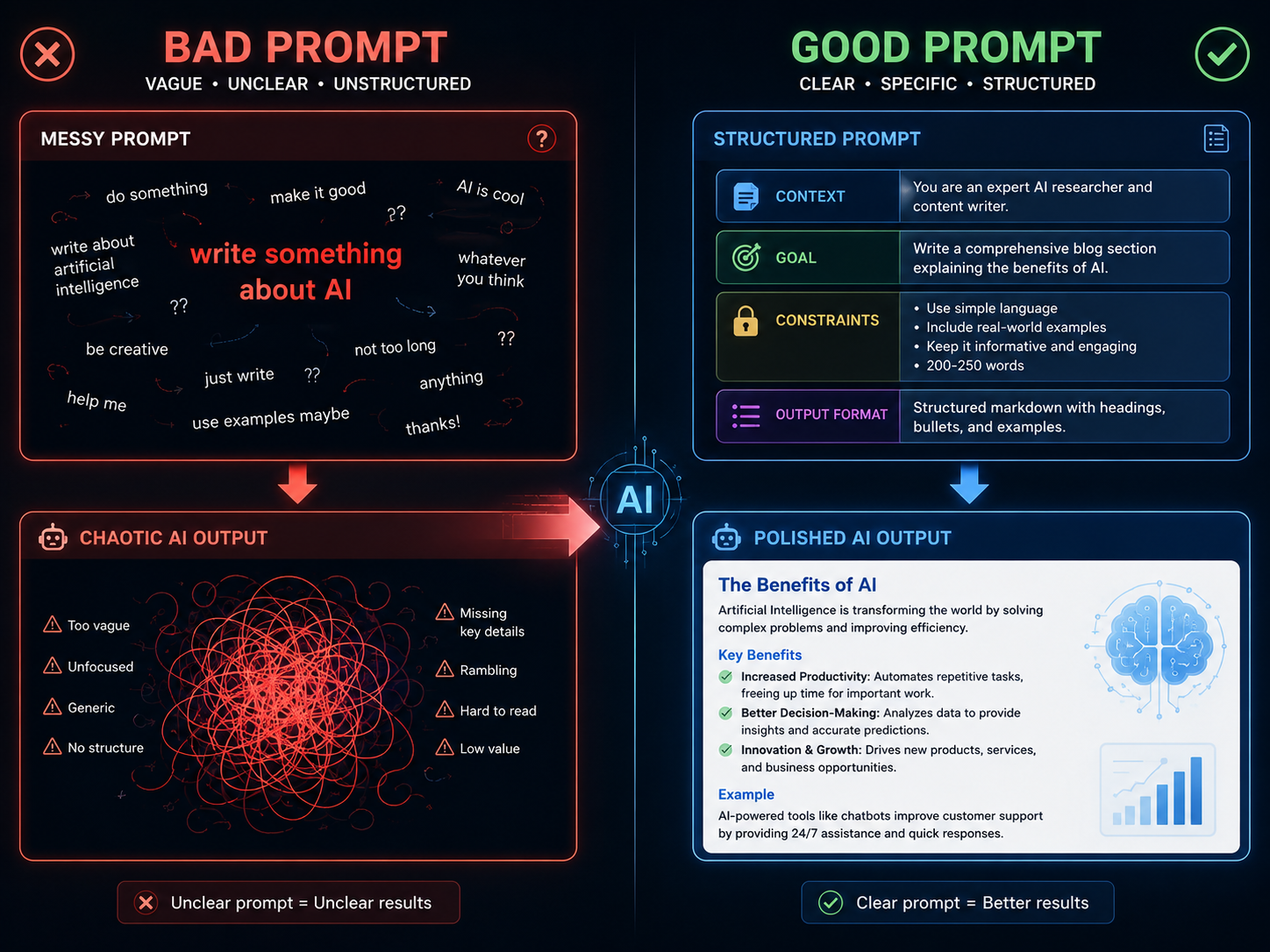
Poor prompts don’t just produce mediocre results. They produce results that feel subtly wrong — professional enough to be confusing, but not accurate enough to be useful. And when that happens repeatedly, people blame the AI and go back to doing things manually.
This is also why vague prompts are risky in high-stakes situations — when the AI is filling in gaps with assumptions, it can produce confident-sounding answers that are simply wrong. It’s a good reminder that AI isn’t infallible, even when it sounds certain. (Curious how far AI’s judgment actually extends? Our piece on whether AI can detect lies is worth a read.)
Structured prompting improved task performance by 6–30% across multiple real-world AI applications, according to research published in early 2026 — Source: ArXiv, 2026. That’s not a marginal gain. For anything you do frequently — writing, summarizing, researching, planning — that improvement compounds fast.
From what I’ve seen, the single biggest shift happens when people stop treating AI as a search engine and start treating it as a capable colleague who genuinely needs context. You wouldn’t walk up to a coworker and say “write something about marketing.” You’d give them the audience, the goal, the format, and the deadline. The same logic applies here.
It’s also worth noting that 92% of developers now use AI coding tools regularly in their workflow — Source: PrompTessor, 2026. That means prompting ability has quietly become a professional skill, not just a casual curiosity. The people who invest a little time in learning it now are the ones who’ll get measurably more out of AI tools six months from now.
The RCTF Framework: The Anatomy of an Effective AI Prompt
Effective AI prompting involves four core elements: assigning the AI a specific role, supplying relevant context, stating the precise task, and defining the expected output format — a structure known as the RCTF Framework. It’s not the only framework out there, but it’s the most practical for everyday use because it’s memorable and transferable across any AI tool or task type.
Here’s how each element works in practice:
Role — Tell the AI Who It’s Being
Assigning a role isn’t about role-play for its own sake. It calibrates the voice, expertise level, and assumptions the AI brings to a response. Ask ChatGPT to respond “as a senior financial analyst” versus “as a marketing copywriter” and you’ll get genuinely different outputs — even for the same underlying question. The role sets the entire frame.
Practically speaking, be specific. “You are an experienced UX writer who specializes in onboarding flows for SaaS products” gives the model far more to work with than “You are a writer.”
Context — Give the AI What It’s Working With
Context is the background information the AI needs to produce something relevant rather than generic. Without it, the model has to guess your audience, your purpose, and your constraints — and it usually guesses the most average possible interpretation of all three.
Good context answers: Who is this for? What’s the goal? What do they already know? What constraints or sensitivities matter here? Two or three sentences of context can transform a mediocre response into something you’d actually use.
Task — State Exactly What Needs to Happen
Most users only provide this element, and it’s not enough on its own. A task without context produces a technically correct but practically useless result. Be specific and use action verbs: write, summarize, compare, analyze, explain, generate, rewrite. Vague instructions like “help me with” or “tell me about” leave too much open.
Format — Define What the Output Should Look Like
Honestly, this is the most consistently underused element in everyday prompting. Telling the AI whether you want bullet points, a comparison table, a numbered list, a 200-word paragraph, or a formal email draft prevents it from making a structural choice you’ll have to undo. Format instructions are fast to write and immediately improve usability — Source: OpenAI Prompt Engineering Guide, 2024.
Anthropic’s official prompting guidance for Claude goes deeper on techniques like role assignment and chain-of-thought — worth bookmarking if you use Claude regularly.
Before RCTF:
“Write a pitch deck summary.”
After RCTF:
“You are a senior financial analyst with SaaS experience. I’m pitching a $12M Series A for a company with $2M ARR and 40% year-over-year growth to institutional investors. Write a three-paragraph executive summary justifying the valuation. Keep each paragraph under 80 words and use a confident but accessible tone.”
The difference in output quality isn’t subtle. The second prompt leaves almost nothing to interpretation.
Each AI tool also has its own strengths — Claude tends to handle nuanced, long-form tasks better, while ChatGPT is more versatile across general use cases. For a deeper look at how they compare, check out our 2026 AI assistant comparison guide.
How to Write a Better AI Prompt, Step by Step
Writing an effective AI prompt follows a process that — once it becomes habit — takes under two minutes and consistently outperforms anything improvised. Here’s the sequence:
- Clarify your goal before you type anything. What does a genuinely useful output look like for this task? Be honest with yourself if you’re not sure yet — that uncertainty usually shows up in the prompt and produces confused responses.
- Open with the role. Start with “You are a [specific expert].” It takes five seconds and changes the quality of everything that follows.
- Add 2–3 sentences of context. Audience, purpose, any constraints that matter. Don’t write an essay — just enough that the AI isn’t guessing the basics.
- State the task with an action verb. Write, summarize, create, explain, compare, generate.
- Specify the output format explicitly. Bullet list, table, paragraph, email — name it.
- Add tone or constraint instructions if needed. “Plain language,” “no jargon,” “under 300 words,” “persuasive but not salesy.”
- Treat the first response as a draft. Follow up with refinement: “Make the opening stronger,” “Cut this to half the length,” “Add a real example after the second point.”
Iteration isn’t a sign that your prompt failed. It’s how prompting actually works at a professional level.
The Most Common AI Prompting Mistakes — and How to Fix Them
The most common reason AI tools produce unhelpful outputs is prompt vagueness — specifically, giving the AI only a task with no context, role, or format instructions. In practice, five mistakes account for the vast majority of disappointing results:
| Mistake | What It Looks Like | The Fix |
|---|---|---|
| Too vague | “Write something about marketing” | Add role, specific task, target audience, and format |
| No context | “Summarize this document” | Specify who will read it, why, and at what length |
| No format specified | Receives a wall of unstructured text | Add “Format as bullet points / a table / numbered steps” |
| One-shot mindset | Accepts the first response without refinement | Follow up with specific improvement instructions |
| Treating AI like a search engine | “Best project management tools 2026” | Reframe as a task: “Compare Notion and Asana for a 5-person remote team, formatted as a comparison table” |
Here’s a quick illustration. Ask an AI to “explain machine learning” and you’ll get a Wikipedia-style overview. Ask it to “explain machine learning to a small business owner who’s never worked in tech, using a real-world example from retail, in 3 bullet points” and you’ll get something that actually helps a real person. Same topic, completely different utility.
Real Prompt Examples Across Common Use Cases
Real-world prompt quality improves fastest through practice with concrete examples. Here are six ready-to-adapt prompts, each annotated with what makes it work:
Writing:
“You are a content strategist. Write a 400-word LinkedIn post for a B2B SaaS founder explaining the ROI of investing in customer onboarding. Conversational tone, end with a thought-provoking question.”
→ Role + audience + task + format + tone = nothing left to guess.
Summarizing:
“You are an executive assistant. Summarize the following transcript into 5 bullet points covering key decisions only — no background context. Audience: C-suite executives with limited time.”
→ The constraint “key decisions only” prevents the AI from summarizing everything equally.
Email Drafting:
“You are a professional copywriter. Write a follow-up email to a client who went quiet after receiving a proposal. Tone: warm but direct. Length: under 150 words. End with a single, clear call to action.”
Brainstorming:
“You are a creative director. Generate 10 campaign concepts for a sustainable sneaker brand targeting Gen Z. Present each as a one-sentence idea plus a tagline.”
Learning a Concept:
“Explain compound interest to me as if I’m 16 years old, using a savings account example. Format it as a short story under 200 words.”
Creating a Plan:
“You are a project manager. Build a 30-day content calendar for a new SaaS blog. Format as a table: Week, Topic, Content Format, Target Keyword, Goal.”
Advanced Techniques That Improve Output Quality

Three techniques consistently produce better results on complex tasks, and none of them require any technical background:
Few-shot prompting means giving the AI one or two examples of what you want before asking it to produce more. If you want ten headlines in a specific voice, show it two headlines you like first. The model matches the pattern — it’s surprisingly reliable.
Chain-of-thought prompting asks the AI to reason through a problem before answering. Simply adding “Before answering, think through this step by step” to an analytical prompt measurably improves accuracy — particularly for anything involving logic, data interpretation, or multi-step decisions — Source: Wei et al., Google Research, 2022 — Chain-of-Thought Prompting Elicits Reasoning in Large Language Models — which found that prompting models to reason step-by-step significantly improved performance on complex tasks.
Prompt chaining breaks a complex task into a sequence of smaller prompts, each building on the previous output. Instead of asking the AI to produce a complete report in one go, you first get an outline, then develop each section separately, then refine. The overall quality is noticeably higher — and it’s easier to catch problems early.
Tools for Practicing and Testing Your Prompts
The best way to improve is deliberate practice, and the right tool depends on what you’re working on:
- Claude (Anthropic): Strong for long-form writing, nuanced instructions, and tasks that require careful reasoning. Responds well to detailed context.
- ChatGPT (OpenAI): Versatile across general tasks, great for iterative brainstorming, and handles coding prompts reliably.
- Perplexity AI: Best choice when your prompt needs real-time information or source-backed answers.
- Google AI Studio: A free platform for testing prompts with configurable parameters — useful if you want to experiment with system prompts or compare model behavior. If you want to experiment with prompt parameters directly, Google AI Studio pairs well with Google’s own introduction to prompt design, which walks through best practices for the Gemini model family.
- OpenAI Playground: Good for testing prompt variations side by side and seeing how small wording changes affect output.
Building a Personal Prompt Library: Your Best Long-Term Investment
A personal prompt library is a saved collection of tested, reusable prompt templates organized by task type — and it’s one of the most practical things you can do to get consistent value from AI tools over time. Every time a prompt produces output you’d actually use, save it. Over 90 days of regular use, you’ll build a resource that eliminates most of the trial-and-error from your AI workflow.
Organize by category: Writing, Summarizing, Research, Planning, Email, Learning. A Google Sheet works fine. Notion is better if you want to add notes or tags. For each entry, note which AI tool it works best on, what the use case is, and any refinements you’ve made.
The prompts that matter most to save are the ones you use repeatedly — weekly reports, client email templates, research outlines. Standardizing those saves real time.
Conclusion
Writing better AI prompts isn’t a specialized technical skill — it’s a communication skill. And like any communication skill, it improves with a clear structure and consistent practice. The RCTF Framework gives you that structure: Role, Context, Task, Format. Apply it to one prompt today — a recurring email, a weekly summary, anything you already ask AI to help with — and compare the output to what you’ve been getting.
The improvement will be immediate. The better you get at telling AI exactly what you need, the more useful every tool in this category becomes. That’s not a small thing.
Frequently Asked Questions
FAQ 1: Do I need a technical background to write better AI prompts?
Not at all. Prompting is fundamentally a communication skill. If you can write a clear email or brief a colleague, you have everything you need to write effective prompts — the RCTF Framework just gives you a structure to follow.
FAQ 2: Does the same prompt work across ChatGPT, Claude, and Gemini?
Mostly yes. The four elements — Role, Context, Task, Format — transfer across all major AI tools. That said, each model has its own tendencies: Claude often handles nuanced instructions better, while ChatGPT tends to be more flexible with open-ended tasks. Minor adjustments sometimes help.
FAQ 3: How long should an AI prompt be?
Long enough to include all the relevant context, short enough to stay clear. A sentence or two works for simple tasks. Multi-paragraph prompts are appropriate for complex, high-stakes work. Completeness matters more than length — a short but vague prompt will always underperform.
FAQ 4: What’s the quickest fix when a prompt isn’t working?
Add context and specify a format. Those two elements fix the majority of underperforming prompts. A sentence or two explaining the audience and purpose, followed by a clear format instruction, usually gets you most of the way there.
FAQ 5: Is prompt engineering the same thing as writing better prompts?
They’re related but not identical. Prompt engineering is a technical discipline that includes system prompt design, model fine-tuning, and API-level work. Writing better prompts is the practical, user-facing version of that skill — no code required, accessible to anyone.
FAQ 6: Can I reuse the same prompt template across different tasks?
Yes, and it’s one of the most efficient habits you can build. Keep the RCTF structure, swap out the specific context and task details, and you’ve got a reliable template for any recurring work.
Written by Owen Mitchell: Owen Mitchell is a technology content writer covering AI tools, digital productivity, and practical technology guides for everyday users. His work focuses on simplifying complex technology topics and helping readers better understand digital tools through clear, accessible, and research-driven content.
Reviewed by: Editorial Review Team & AI Content Specialists.
Disclaimer: This article is based on publicly available research, platform documentation, industry insights, and practical observations related to artificial intelligence tools and prompt engineering techniques available at the time of publication. AI models, capabilities, prompt behaviors, and platform features may evolve rapidly over time. Readers are encouraged to experiment with prompts, verify platform-specific capabilities, and stay updated with the latest developments before relying on AI-generated outputs for important tasks. This content was initially drafted with AI assistance and has been carefully reviewed, edited, refined, and fact-checked by human editors to ensure accuracy, clarity, originality, and editorial quality.