By Owen Parker | Technology Content Writer
Summarize this blog post with: ChatGPT | Perplexity | Claude | Grok
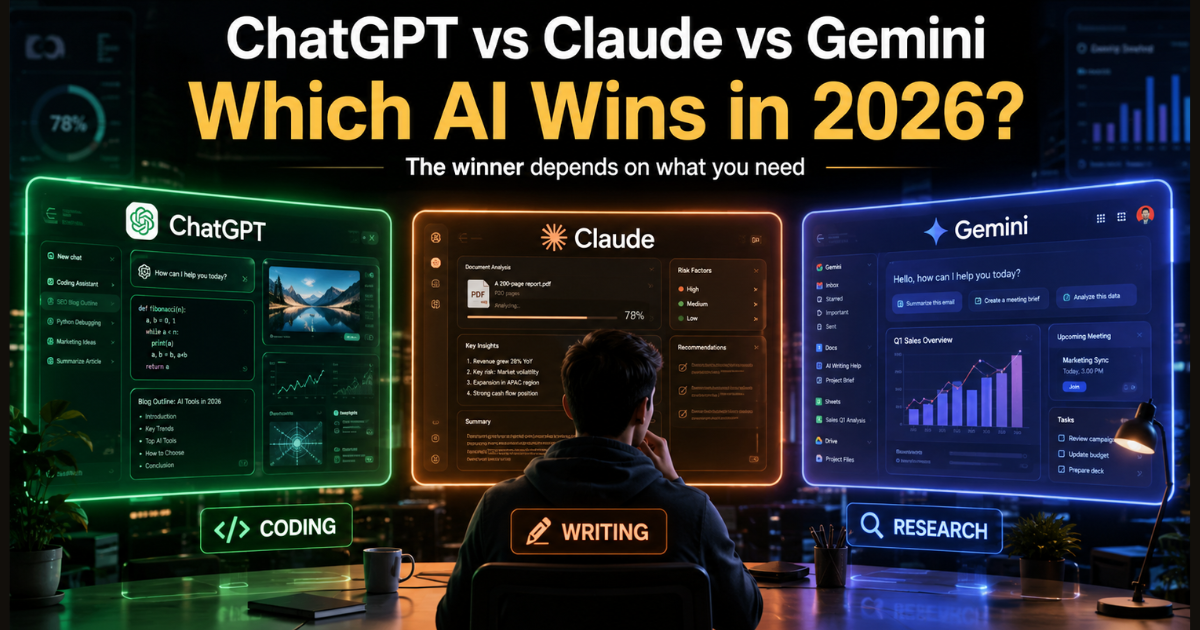
If you’ve spent any time online lately, you’ve probably seen the debate: ChatGPT vs Claude vs Gemini, and which one is actually “the best” in 2026. Here’s the honest answer — that question doesn’t have a single winner, and anyone who tells you otherwise is probably trying to sell you something. What you actually need is a clear picture of where each tool pulls ahead, where it falls flat, and how that maps onto the way you work. That’s what this guide is for.
Key Takeaways
- ChatGPT, Claude, and Gemini are AI assistants built by OpenAI, Anthropic, and Google, respectively — and despite looking similar on the surface, they behave quite differently in day-to-day use.
- No single tool wins across the board. ChatGPT tends to be the most versatile all-rounder, Claude stands out for long writing and document work, and Gemini benefits from living inside Google’s apps.
- Claude Opus 4.6 and Sonnet 4.6 now run a full 1-million-token context window at standard pricing, with no long-context surcharge — Source: Anthropic, 2026.
- Gemini 3.1 Pro also offers a 1-million-token input context window and is built directly into Gmail, Docs, Sheets, and Slides — Source: Google, 2026.
- GPT-5.5 supports a 1-million-token context window through the API and 400,000 tokens inside Codex, OpenAI’s coding environment — Source: OpenAI, 2026.
- A lot of professionals don’t pick just one anymore — they bounce between two or three tools depending on the task, and honestly, that’s probably the smartest approach right now.
- Before committing to a paid plan, it’s worth testing the free tiers of all three, since the gap between “good enough” and “best for this specific job” is often smaller than the marketing suggests.
What Are ChatGPT, Claude, and Gemini?
ChatGPT, Claude, and Gemini are AI assistants built on large language models (LLMs) — systems trained on enormous amounts of text that can hold a conversation, write content, analyze documents, and help with code. ChatGPT comes from OpenAI, Claude comes from Anthropic, and Gemini comes from Google DeepMind. On the surface, they all do roughly the same thing: you type something, and they respond in a way that feels conversational.
But spend a few weeks switching between them, and the differences start to show. ChatGPT feels like a Swiss Army knife — it’s everywhere, it plugs into everything, and it’s genuinely solid at a huge range of tasks. Claude feels more like working with a careful editor who actually reads the whole document before commenting. And Gemini feels less like a separate app and more like a feature that’s been quietly stitched into the Google tools you already use every day.
None of that is a knock on any of them — it’s just different design philosophy. OpenAI built a hub. Anthropic built a thinker. Google built an extension of its ecosystem. Which one fits “best” really comes down to where you spend most of your working day. If you’re new to prompting in general, it’s worth browsing “how to write effective AI prompts”, because a clearer prompt will noticeably improve results from any of these three — that part hasn’t changed.
Why Choosing the Right AI Assistant Matters in 2026
Here’s the thing — picking the wrong AI for a task doesn’t usually fail loudly. It just costs you time in small, annoying ways: you re-prompt three times, you copy-paste between tools, you end up editing the output more than you’d planned. Multiply that across a workweek and it adds up fast. It’s part of a broader shift in how work itself is changing — for a deeper look at which skills are being automated and which ones are holding steady, see our breakdown of how AI is reshaping jobs in 2026.
Part of the reason this matters more now than it did a couple of years ago is that the gap between these tools has narrowed in some areas and widened in others. Context window size used to be a clear differentiator — now all three offer roughly 1-million-token windows in their flagship models. Claude Opus 4.6 and Sonnet 4.6 run that 1M window at standard API pricing with no long-context surcharge, meaning a 900,000-token request costs the same per-token rate as a 9,000-token one — Source: Anthropic, 2026. Gemini 3.1 Pro matches the 1M input window and pairs it with native access to Google Search and Workspace — Source: Google, 2026.
Where the gap has widened is in specialization. Anthropic has leaned hard into reasoning and coding — Claude Opus 4.6 posted the highest score recorded on Terminal-Bench 2.0, a benchmark for autonomous debugging and multi-file code review — Source: Anthropic, 2026. OpenAI, meanwhile, has been folding its Codex coding environment more tightly into ChatGPT itself, which Business Insider reported is becoming a core part of OpenAI’s product strategy for developer retention. And Google has doubled down on making Gemini feel less like a chatbot and more like an ambient layer across Gmail, Docs, and Sheets.
There’s also a reliability angle that doesn’t get talked about enough. On June 10, 2026, Gemini experienced a multi-hour outage affecting users across the US, Europe, and Asia, with error codes 1076 and 1099 preventing prompts from completing — Source: TechRadar, 2026. Claude also saw some elevated error rates on its Haiku 4.5 tier around the same time. Nothing dramatic, but it’s a useful reminder: if your entire workflow depends on one AI provider, you’re exposed when that provider has a bad day. That’s one reason a lot of heavier users keep a second tool around — not because they need it daily, but because they’ve been burned once.
ChatGPT Explained: Strengths, Use Cases, and Examples
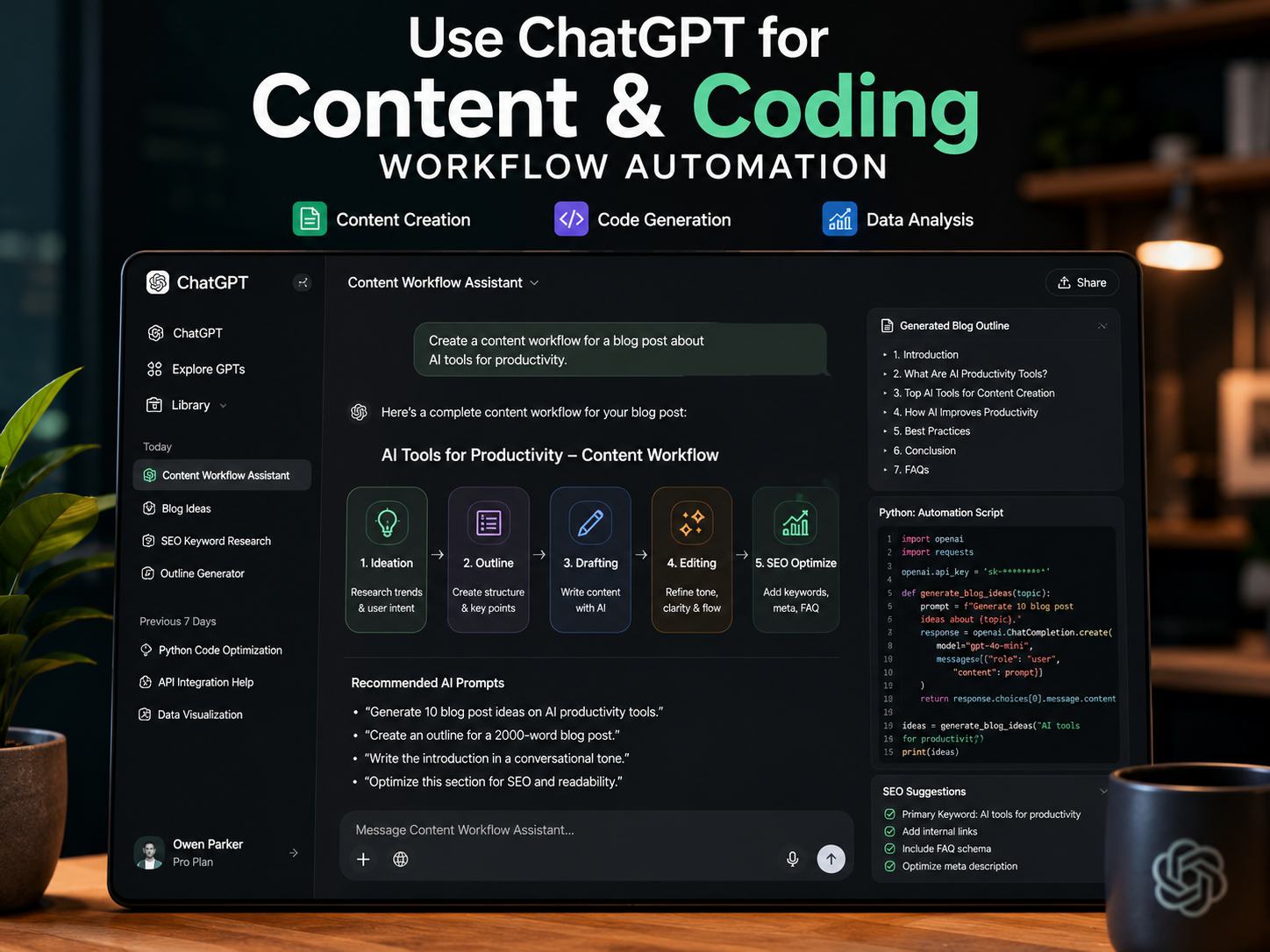
ChatGPT is OpenAI’s AI assistant, currently running on the GPT-5.5 family of models. If you had to describe its core identity in one word, it would be versatility. It’s the most widely used AI chatbot on the planet, and that scale shows up in how polished and feature-complete the product feels.
What Makes ChatGPT Stand Out
GPT-5.5 supports a 1-million-token context window through the API and a 400,000-token window inside Codex — Source: OpenAI, 2026. In practice, that means you can hand it a sizeable codebase or a long set of documents and it won’t lose the thread halfway through. What really sets ChatGPT apart, though, isn’t a single spec — it’s the ecosystem around it. Custom GPTs, voice mode, image generation, code execution, web browsing, and a sprawling plugin library all live under one roof.
Best Use Cases for ChatGPT
In my experience, ChatGPT earns its keep in situations where you’re jumping between different types of tasks in a single session. A few examples:
- Drafting an email, then immediately switching to debug a script, then back to brainstorming a campaign idea
- Quick coding help — boilerplate, syntax questions, explaining an error message
- Voice mode for hands-free brainstorming while you’re walking or commuting
- Generating images or quick visual mockups alongside written content
Where ChatGPT Falls Short
It’s not all upside. Long-form writing from ChatGPT can sometimes feel a little flat — competent, but generic, especially on essays or opinion pieces where tone matters. And while its long-context handling has improved a lot, it’s still not the tool I’d reach for first when I need to deeply analyze a 200-page document. For that, Claude tends to do better.
Claude Explained: Strengths, Use Cases, and Examples
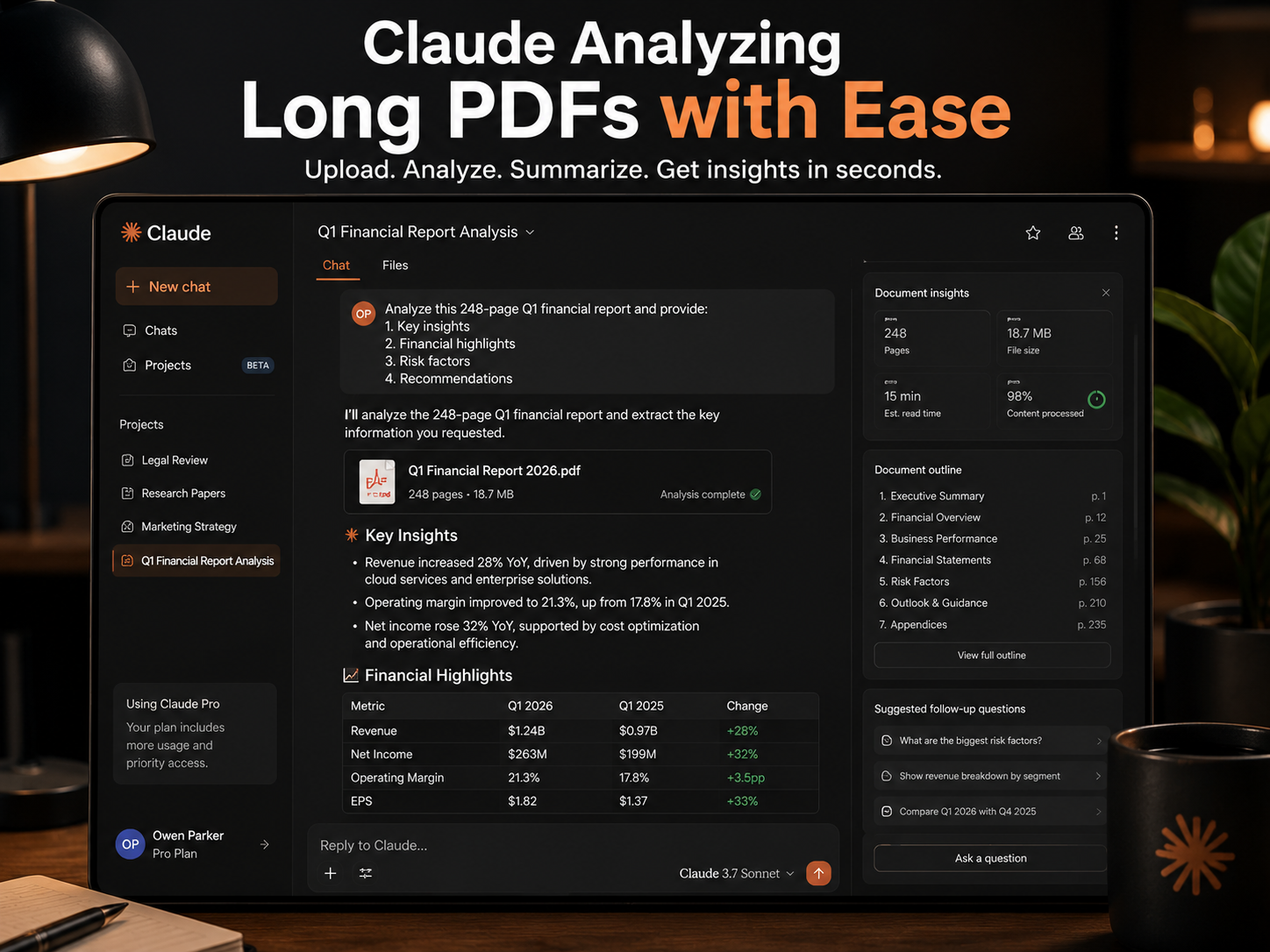
Claude is Anthropic’s AI assistant, built around models like Claude Opus 4.6 and Sonnet 4.6. If ChatGPT is the generalist, Claude is the specialist — particularly when it comes to reasoning carefully through long, complex material and producing writing that doesn’t sound like it came out of a template.
What Makes Claude Stand Out
The headline feature is the context window. Claude Opus 4.6 and Sonnet 4.6 both run a full 1-million-token context window at standard pricing, with no surcharge for going long — Source: Anthropic, 2026. What that means practically: you can drop in an entire contract, research paper, or codebase and Claude won’t need it chunked into pieces. Anthropic’s Adaptive Thinking feature also lets the model dial reasoning effort up or down depending on how hard the task actually is, which helps keep responses fast for simple questions and thorough for complicated ones.
Best Use Cases for Claude
From what I’ve seen, Claude is the tool people reach for when the quality of the writing or analysis matters more than the speed of getting an answer. Common scenarios:
- Reviewing a long legal contract or research paper and flagging specific sections that need attention
- Writing long-form articles, scripts, or strategy documents where tone needs to stay consistent over thousands of words
- Reviewing or refactoring a large codebase in one sitting without losing context between files
- Maintaining a particular voice across a long writing project — Claude tends to drift less than other models over long sessions
Where Claude Falls Short
Claude’s ecosystem is smaller. There’s no equivalent to the GPT Store, and integrations with third-party apps are more limited than what OpenAI or Google offer. Usage limits on lower-tier plans can also feel restrictive if you’re doing a lot of back-and-forth in a single day. If your work depends heavily on plugins, browser extensions, or deep integration with non-Google productivity tools, Claude alone might not cover everything.
Gemini Explained: Strengths, Use Cases, and Examples
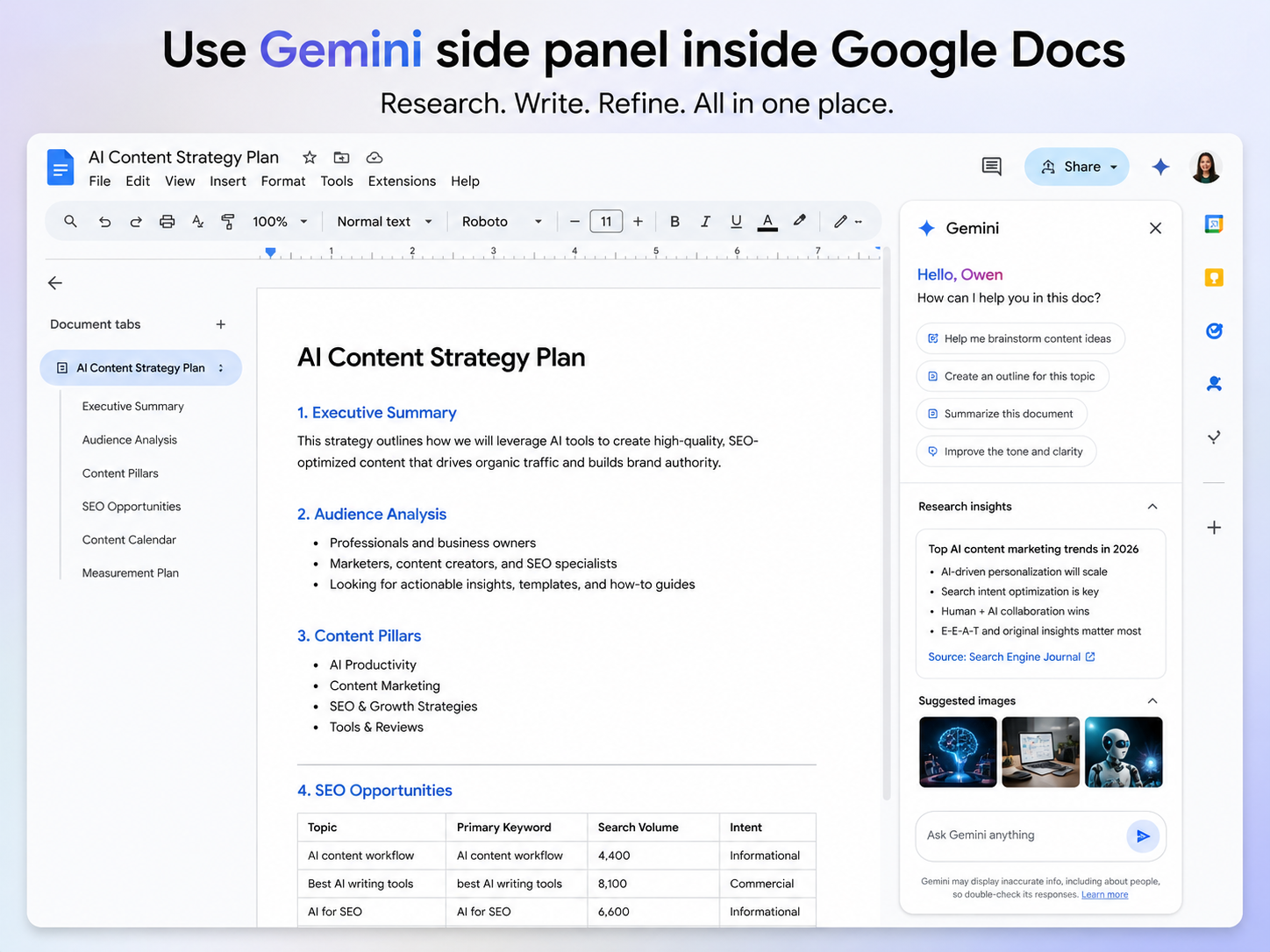
Gemini is Google DeepMind’s AI assistant, built on the Gemini 3 and 3.1 model families. Its defining trait isn’t raw capability — it’s placement. Gemini doesn’t really ask you to come to it; it shows up inside the apps you’re already using.
What Makes Gemini Stand Out
Gemini 3.1 Pro offers a 1-million-token input context window, covering long documents, codebases, and multimedia in a single session — Source: Google, 2026. But the bigger story is the side panel that now appears directly inside Gmail, Docs, Sheets, Slides, Meet, and Chat — Source: Google, 2026. You can ask it to summarize a long email thread, draft a reply in the same tone as the rest of the conversation, or build out a spreadsheet formula — all without opening a separate tab. Google AI Pro, at $19.99 per month in the US, bundles Gemini 3.1 Pro with the full 1M context window, generous usage limits, and Gemini Code Assist — Source: Google, 2026.
Best Use Cases for Gemini
If your day already runs through Google’s apps, Gemini’s advantage is hard to overstate. Strong use cases include:
- Summarizing long email threads and drafting replies directly inside Gmail
- Generating first-draft slide decks or spreadsheet formulas inside Workspace
- Research using Gemini’s Deep Search, which runs many searches in the background and returns a cited summary
- Working across mixed inputs — text, audio, video, and images — in one conversation
Where Gemini Falls Short
Creative writing and nuanced long-form content aren’t really Gemini’s strong suit — outputs can feel a bit more generic compared to Claude on the same prompt. And as that June 2026 outage showed, when Gemini goes down, it tends to take a chunk of Workspace functionality with it, which is worth keeping in mind if you’re betting your entire team’s workflow on it.
Side-by-Side Comparison: ChatGPT vs Claude vs Gemini
All three tools have converged on roughly similar context windows, but the real differences show up in coding benchmarks, ecosystem integration, and how pricing is structured. Here’s how they stack up as of mid-2026:
| Dimension | 🏆 ChatGPT (GPT-5.5) | ✍️ Claude (Opus 4.6 / Sonnet 4.6) | 🔍 Gemini (3.1 Pro) |
|---|---|---|---|
| Context Window |
1M tokens (API), 400K (Codex) Source: OpenAI, 2026 |
1M tokens, standard pricing, no surcharge Source: Anthropic, 2026 |
1M tokens input, 64K output Source: Google, 2026 |
| Coding | Strong general-purpose coding via Codex | Highest recorded Terminal-Bench 2.0 score | Improving fast, especially in agentic and spreadsheet tasks |
| Ecosystem | Plugins, custom GPTs, Microsoft 365 integration | Standalone app, API, Projects for persistent context | Embedded across Gmail, Docs, Sheets, Slides, Meet, Chat |
| Internet Access | Built-in browsing on free and paid tiers | Available via tool use on supported plans | Native via Google Search and Deep Search |
| Entry Pricing | Free tier + Plus/Pro paid plans | API from $3 / $15 per million tokens | Google AI Pro at $19.99/month |
Coding Capability
For coding work, both Claude and ChatGPT hold up well, but they shine in slightly different ways. Claude’s Terminal-Bench 2.0 result points to a real edge in autonomous debugging and reviewing changes across multiple files at once — Source: Anthropic, 2026. ChatGPT’s Codex environment, on the other hand, is tightly woven into the day-to-day ChatGPT experience, which makes it convenient if you’re already living in that interface.
Document and Context Handling
On paper, all three now handle roughly a million tokens of input. In practice, Claude’s pricing model — no premium for going long — makes it the more predictable choice if you’re processing large volumes of documents regularly — Source: Anthropic, 2026.
Ecosystem and Workflow Integration
This is where Gemini pulls ahead, simply by virtue of being already there. If your team lives in Gmail and Docs, the side panel removes a whole step from your workflow — Source: Google, 2026. ChatGPT and Claude, by comparison, are still mostly separate destinations you have to visit.
Which AI Is Best for Specific Use Cases?
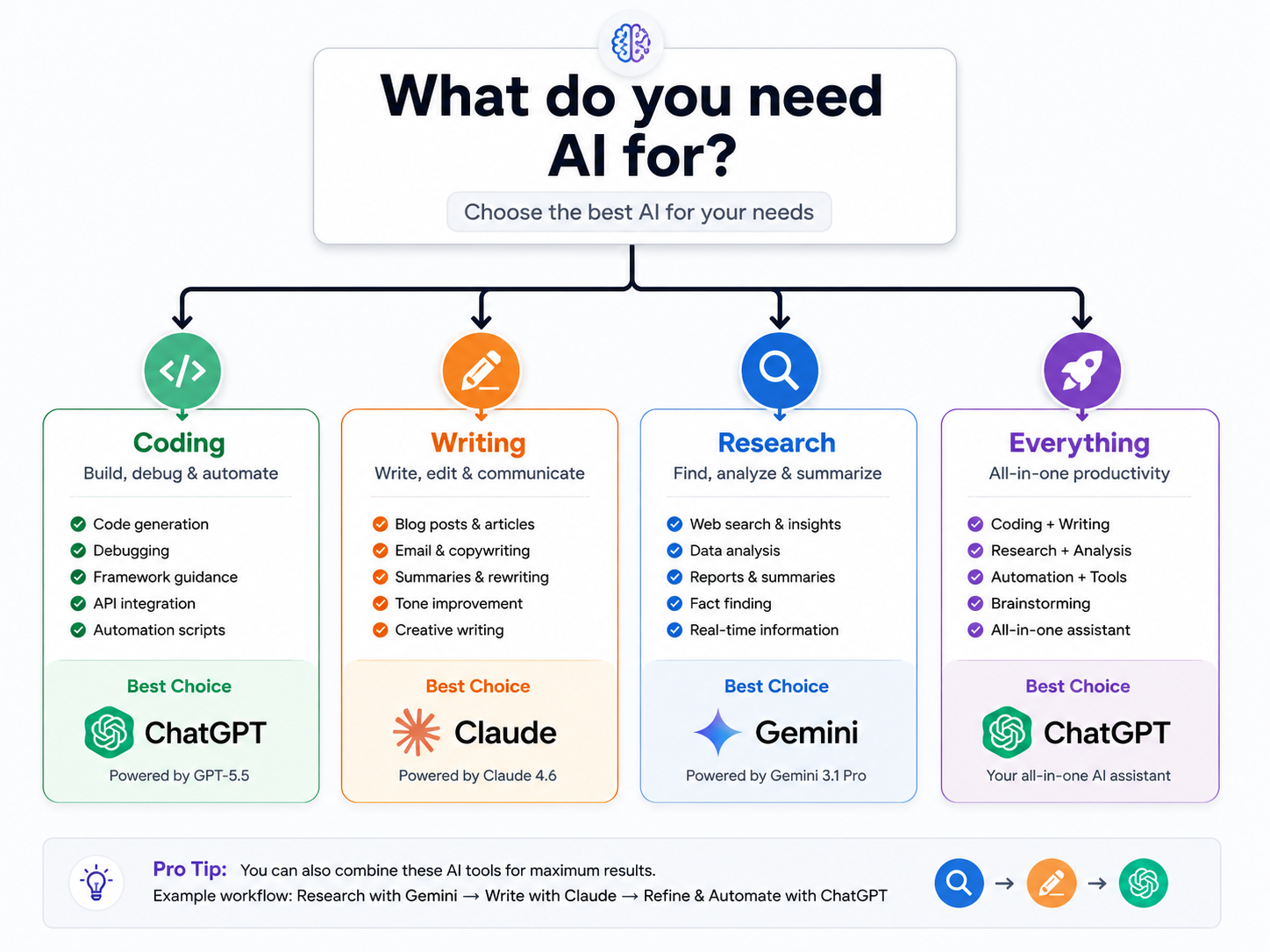
Rather than crowning an overall winner, it’s more useful to match each tool to the job. Here’s how I’d break it down based on what each one is actually good at.
Which AI Is Best for Coding?
For most day-to-day development, ChatGPT’s combination of Codex integration and broad language support makes it a solid default — it explains errors well and handles boilerplate quickly. That said, if you’re working with a large, multi-file codebase and need something to hold the whole picture in mind while debugging, Claude’s context window and Terminal-Bench performance give it a real edge — Source: Anthropic, 2026. For a closer look at how these models perform in real coding workflows beyond benchmarks, check out our honest guide to the best AI coding tools in 2026.
Which AI Is Best for Writing?
Claude is often recognized for handling long documents well and producing carefully reasoned, naturally structured written content. If you’re producing articles, scripts, or strategy memos where tone consistency matters over thousands of words, Claude tends to need less heavy editing afterward.
Which AI Is Best for Research?
Gemini’s integration with Google Search gives it real-time access to information, and its Deep Search feature can run a large number of searches and return a cited summary — Source: Google, 2026. That makes it a strong starting point for market research, competitive analysis, or general fact-finding where you want sources attached.
Which AI Is Best for Business Use?
This one really depends on what software your business already runs on. Teams on Google Workspace will get more out of Gemini’s side-panel integration than they would from a standalone tool. Teams on Microsoft 365 may find ChatGPT’s integrations more natural. And businesses processing large volumes of documents — contracts, reports, compliance material — may find Claude’s API pricing model more cost-predictable at scale.
Which AI Is Best for Students?
Honestly, this is one of the clearer cases for using more than one tool. ChatGPT is great for quick explanations and study help across a wide range of subjects. Claude is better suited to working through a long textbook chapter or research paper in depth. And if assignments live in Google Docs already, Gemini’s research tools fit naturally into that workflow.
Which AI Is Best for SEO Content Creation?
For SEO work specifically, a hybrid approach tends to work best in practice. ChatGPT is handy for quick ideation — keyword clustering, content briefs, meta description drafts. Claude’s strength is in turning those briefs into long-form drafts that don’t need three rounds of editing to sound human. Gemini, with its search integration, is useful for the research and competitor-analysis stage before either of the others gets involved.
Tools and Resources for Getting the Most Out of Each AI
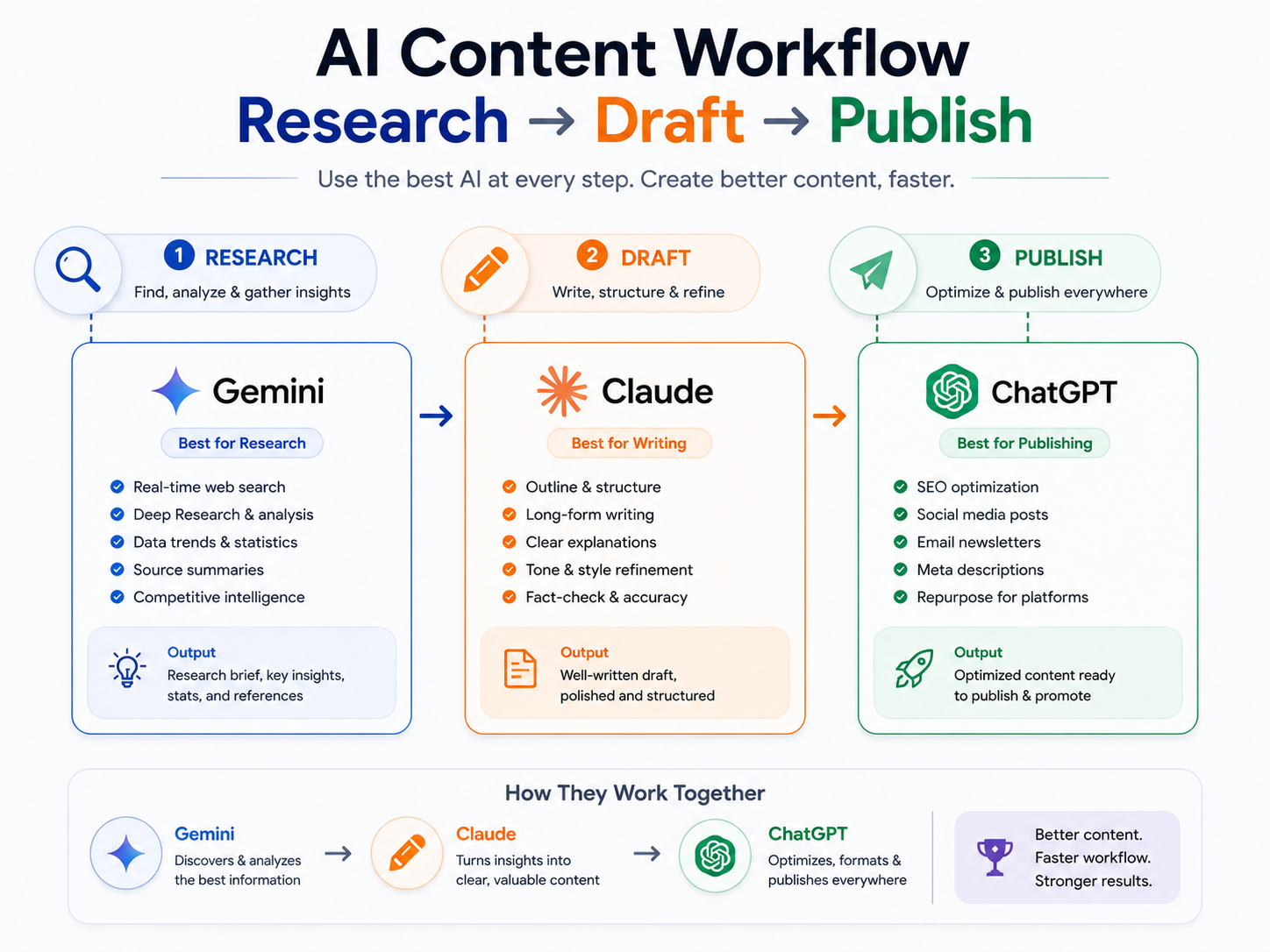
A lot of people get less out of these tools than they could, simply because they’re using the default chat window and nothing else. A few things worth knowing about each platform:
For ChatGPT, the GPT Store has specialized assistants built for coding, design, and marketing tasks — worth a look if you’re doing the same type of task repeatedly. For Claude, Projects let you upload reference documents that persist across a conversation, which is genuinely useful for long-running research or writing projects rather than re-uploading files every session.
For Gemini, most of the time savings come from the side panel inside Gmail and Docs rather than the standalone app — Source: Google, 2026. And if you want to test capabilities before paying for anything, Google AI Studio offers free access with daily limits, and ChatGPT’s free tier covers a surprising amount of everyday use — Source: OpenAI, 2026.
A practical way to combine all three: use Gemini for initial research and source-gathering, Claude for synthesizing that research into a draft, and ChatGPT for final formatting, ideation tweaks, or quick coding tasks that come up along the way. That kind of multi-tool setup is part of a bigger pattern — if you want more ideas for building AI into your daily routine beyond just chat windows, our roundup of AI productivity tools that actually transform your workflow covers a wider set of options.
What’s Next: How to Choose (or Combine) These AI Tools
Start by being honest about what you actually do most often. Pull up your last week of work and tag each task — drafting, researching, coding, summarizing, presenting — and you’ll probably notice patterns pretty quickly.
From there, it’s mostly a matching exercise. If your tasks lean heavily toward Google Docs and email, Gemini will save you real time. If you’re producing a lot of long-form written content, Claude is worth the learning curve. If your day is a mix of everything and you want one tool that covers most of it reasonably well, ChatGPT is the safer default.
You don’t need to commit to all three on day one. Test the free tiers first, see where the friction actually shows up in your workflow, and add a paid subscription only once you’ve found a clear gap that’s costing you time.
Conclusion
So, ChatGPT vs Claude vs Gemini — who actually wins? In practice, none of them, outright, because they’re not really competing for the exact same job. ChatGPT is the broad, dependable generalist that covers the most ground. Claude is the one you bring in when depth, nuance, and long documents matter more than speed. And Gemini is the quiet productivity boost for anyone whose work already runs through Google’s apps.
If you only want one tool, pick based on where you spend most of your time, not based on which one “won” some benchmark. And if you’ve got the bandwidth to use two, that combination — say, Gemini for research and Claude for writing, or ChatGPT for everything plus Claude for the occasional long document — tends to cover more ground than any single tool can on its own. That’s really the practical takeaway here: less about finding a winner, more about building a setup that fits how you actually work.
Frequently Asked Questions
FAQ 1: Which AI Handles Large Documents Better?
As of 2026, Claude, ChatGPT, and Gemini all support roughly 1-million-token context windows, but Claude’s pricing removes the long-context surcharge entirely, which makes it the more predictable option for processing large volumes of documents regularly — Source: Anthropic, 2026.
FAQ 2: Which AI Assistant Is Best for Students?
It depends on the task — ChatGPT works well for quick explanations and homework help across subjects, Claude is better for working through long readings in depth, and Gemini fits naturally if assignments are already in Google Docs.
FAQ 3: Which AI Is Best for Research?
Gemini’s Deep Search feature runs a large number of searches in the background and returns a cited summary, which makes it a strong starting point for research-heavy tasks — Source: Google, 2026.
FAQ 4: Which AI Is Best for Business Use?
The right pick depends on your existing software. Gemini suits Google Workspace-heavy teams, ChatGPT fits Microsoft 365-heavy teams, and Claude’s API pricing works well for businesses processing large document volumes.
FAQ 5: Can ChatGPT, Claude, and Gemini Access the Internet?
Yes — ChatGPT includes built-in browsing on its free and paid tiers, Gemini accesses the internet through Google Search and Deep Search, and Claude can access the internet through tool use on supported plans.
FAQ 6: Which AI Provides the Most Accurate Answers?
It depends heavily on the task. Claude Opus 4.6 leads on Terminal-Bench 2.0 for coding-related benchmarks — Source: Anthropic, 2026 — while ChatGPT and Gemini each lead on different benchmarks depending on whether the task involves general reasoning or long-context retrieval.
FAQ 7: Which AI Is Best for SEO Content Creation?
A hybrid approach tends to work best: ChatGPT for quick ideation and briefs, Claude for long-form drafts that need less editing, and Gemini for research and competitor analysis before drafting begins.
Written by Owen Parker: Owen Parker is a technology content writer covering AI tools, digital products, and technology trends for everyday users and professionals. His work focuses on helping readers understand new technologies through practical comparisons, accessible explanations, and research-driven insights.
Reviewed by: Editorial Research Team & Digital Content Strategy Contributors specializing in technology publishing, product analysis, fact-checking, and consumer-focused technology content.
Disclaimer: This article is based on publicly available information, official product documentation, independent research, and feature evaluations available at the time of publication. AI platforms, model capabilities, subscription plans, pricing structures, integrations, and performance characteristics evolve rapidly and may change without notice. The strengths and limitations discussed in this comparison reflect general observations and may vary depending on specific use cases, workflows, and user requirements. Readers are encouraged to verify the latest features, policies, and pricing directly from official sources before making purchasing or business decisions. This content was initially drafted with AI assistance and has been carefully reviewed, refined, and fact-checked by human editors to ensure accuracy, clarity, originality, and editorial quality.