
By Arjun Malhotra, a technology writer with experience covering AI tools, software development workflows, coding platforms, and practical productivity solutions for developers and tech professionals.
Summarize this blog post with: ChatGPT | Perplexity | Claude | Grok
Look, if you’ve spent any real time coding in the last couple of years, you already know AI has changed how this works. You’ve probably pasted a function into ChatGPT at 2am, or watched Copilot complete an entire function you were only halfway through typing. But here’s the thing — most developers are still using these tools the same way they used Stack Overflow: copy, paste, hope it works. The landscape in 2026 is genuinely different, and if you’re picking tools the same way you did in 2023, you’re leaving a lot of productivity on the table.
This guide is my attempt to cut through the noise. I’ve spent time actually working with these tools — not just reading the changelog — and I’ll tell you which ones are worth your time, which ones are overhyped, and most importantly, which one fits your specific workflow.
Key Takeaways
- AI coding tools are LLM-powered assistants that help developers write, debug, explain, and document code — reducing development time by up to 55% in controlled studies, according to GitHub Research, 2023.
- The best AI coding tools for developers in 2026 include GitHub Copilot, Cursor, Claude, ChatGPT, Tabnine, Amazon Q Developer, Codeium, Replit AI, Gemini Code Assist, and Sourcegraph Cody — each built for different use cases.
- The best AI tools for programmers who are free include Codeium (genuinely unlimited), Amazon Q Developer (free with security scanning), and GitHub Copilot (free for students and open-source maintainers).
- There’s no single “best” tool — the right pick depends on your IDE, languages, codebase size, and whether your team has data privacy requirements.
- AI-generated code isn’t production-ready by default — hallucinated APIs, outdated syntax, and insecure patterns are real problems you need to actively check for.
- Cursor and Sourcegraph Cody are the strongest choices for large, multi-file projects; Claude and ChatGPT are better for reasoning through complex logic and explaining unfamiliar code.
- The developers getting the most out of AI tools treat them as force multipliers — they use AI for boilerplate, documentation, and first drafts, then apply their own judgment to architecture and security decisions.
What Are AI Coding Tools and How Do They Actually Work?

AI coding tools are software applications powered by large language models that assist developers with code generation, autocompletion, debugging, documentation, and code explanation — operating either as IDE extensions or standalone conversational interfaces. That’s the clean definition, but honestly, what they actually feel like to use varies a lot more than that definition suggests.
There are two meaningfully different categories here. The first is AI code assistants — things like GitHub Copilot or Codeium that live inside your IDE and suggest code inline as you type. You don’t change your workflow much; the tool just makes your existing workflow faster. The second is AI coding chatbots — conversational tools like Claude or ChatGPT where you describe a problem, paste some code, and get a response back. These are more like having a knowledgeable colleague you can ask questions, rather than a tool that watches your keystrokes.
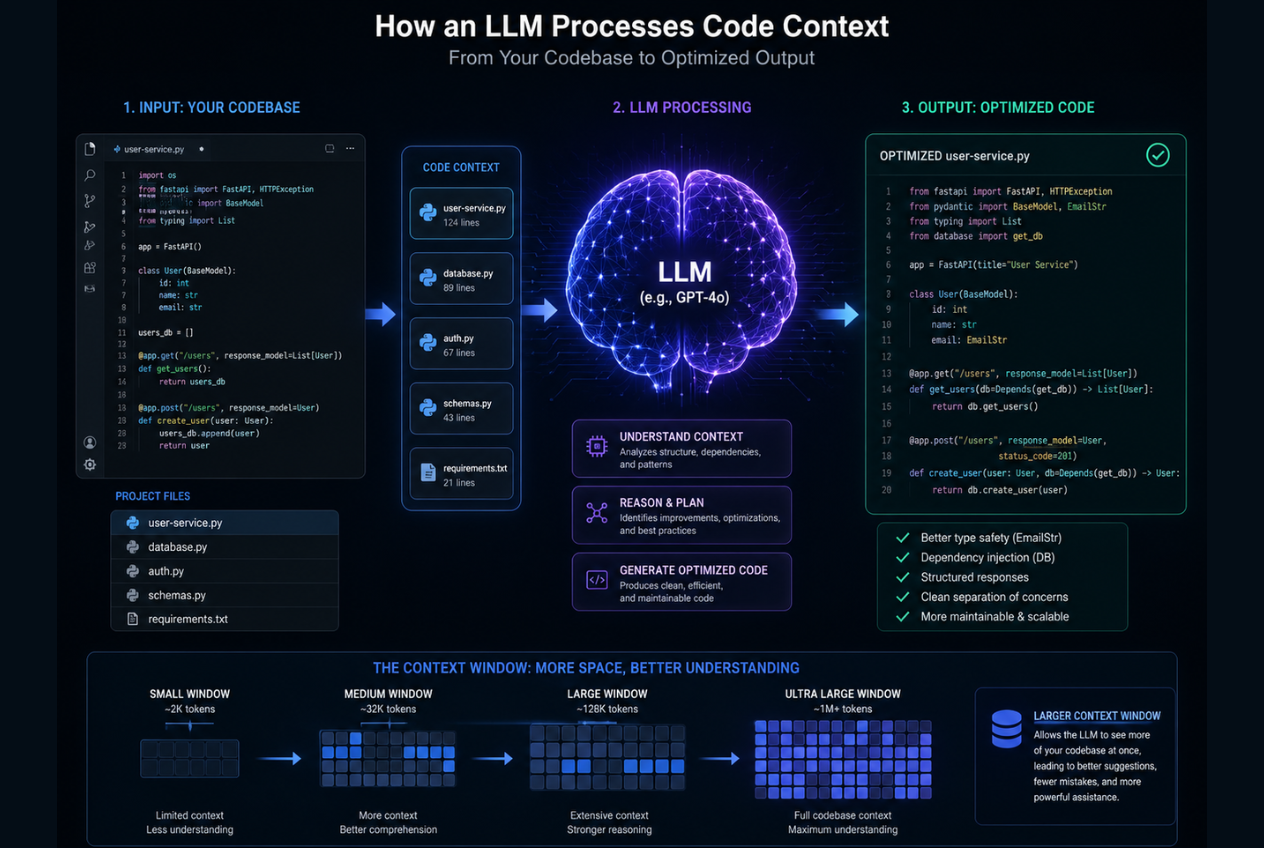
Under the hood, both categories work roughly the same way. They analyze surrounding context — open files, function signatures, comments, variable names — and predict what should come next using a code-trained large language model. The quality of that output depends heavily on how good the underlying model is and, more than most people realize, on how much context the tool can actually hold at once. A tool with a tiny context window will give you worse suggestions on a 50,000-line codebase than a tool with a 200K token window, full stop.
If you want to go deeper than just using these tools — and actually understand the transformer architecture that powers Copilot, Claude, and every other tool on this list — Build a Large Language Model (From Scratch) by Sebastian Raschka is the most practical book available on the subject. It walks you through building a GPT-style model on a standard laptop, step by step.
Why AI Coding Tools Matter More in 2026 Than They Did Two Years Ago
Honestly, if you’d asked me in 2022 whether AI coding tools were genuinely useful or mostly demos, I’d have been skeptical. The tools were impressive in screenshots but often frustrating in daily use — hallucinating APIs, losing context, suggesting Python 2 syntax for Python 3 projects. That’s changed.
The shift from novelty to professional standard happened fast. According to the Stack Overflow Developer Survey, over 76% of developers reported using or actively planning to use AI tools in their workflow — Source: Stack Overflow, 2024. That’s not “some developers are experimenting.” That’s majority adoption. And in 2026, most engineering teams don’t treat AI tools as optional extras; they’re closer to baseline expectations, the same way using git or a linter became non-negotiable over time.
The three things AI coding tools actually deliver well: speed on repetitive tasks (generating a CRUD endpoint or writing unit tests takes seconds, not minutes), quality improvement through early bug detection and pattern suggestions, and — this one gets undersold — learning. From what I’ve seen, junior developers who use Claude or ChatGPT to explain unfamiliar code actually learn faster than those who just Google it, because they can ask follow-up questions in context.
That said, there are real costs. A 2023 GitHub study found developers using Copilot completed tasks up to 55% faster — Source: GitHub Research, 2023 — but separate research from Stanford found those same developers wrote significantly less secure code when working under time pressure — Source: Stanford University, 2022. Speed and security don’t automatically come together. That tradeoff is worth understanding before you deploy AI-assisted code to production.
How We Evaluated These Tools (So You Know This Isn’t Just a Sponsored List)
Before getting into the rankings, here’s what I actually used to evaluate these tools: code output quality and accuracy, language and framework breadth, IDE integrations, context window size and codebase awareness, free tier generosity (not just “free tier exists”), privacy posture, and response latency. Tools that had impressive marketing pages but weak real-world output didn’t make the cut. Tools with genuinely useful free tiers got extra credit — a lot of developers on this list are students or solo builders who can’t expense a $20/month subscription.
The 10 Best AI Coding Tools for Developers in 2026
1. GitHub Copilot — Still the Gold Standard for Inline Autocomplete
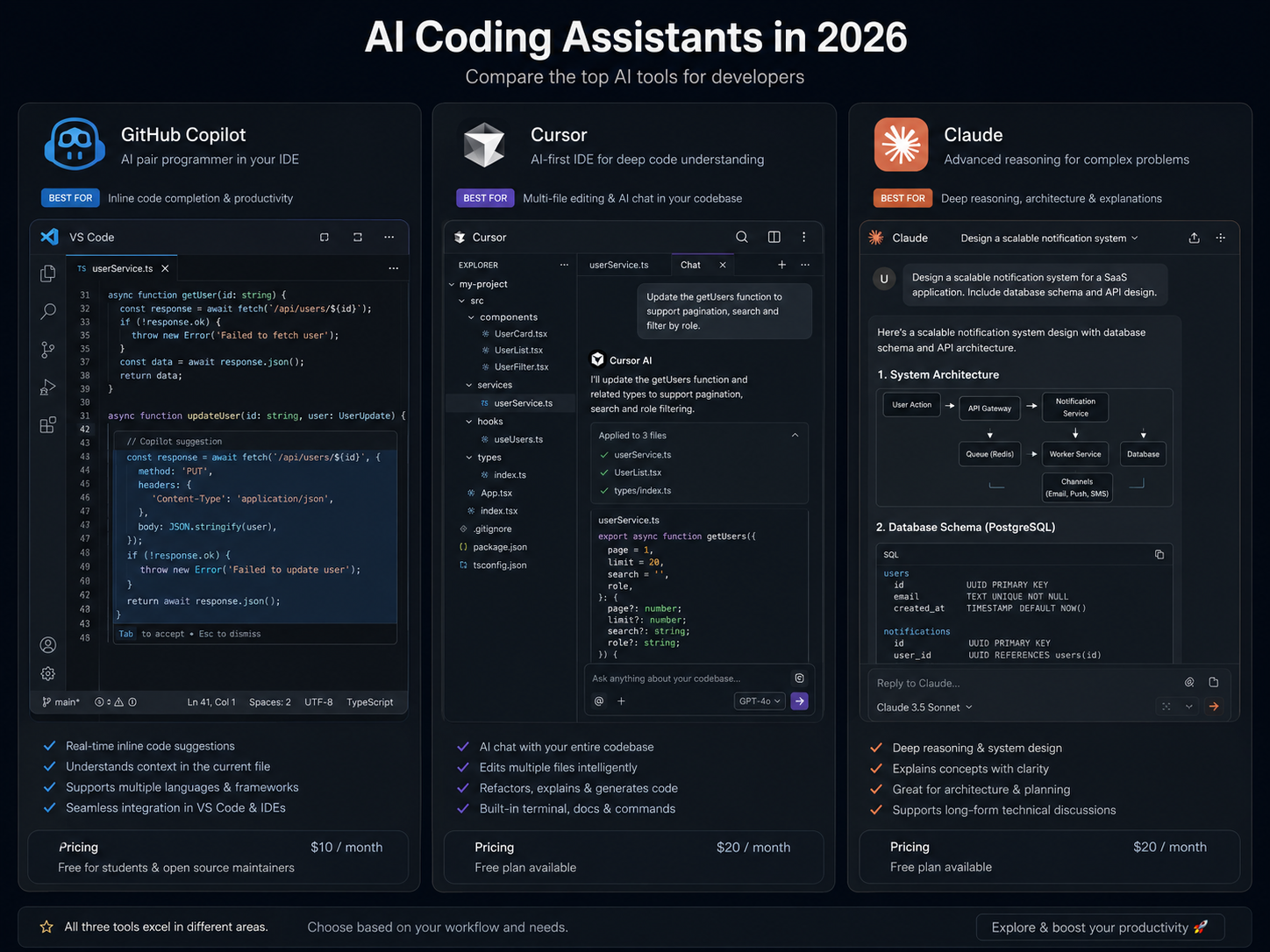
GitHub Copilot is an AI pair programmer developed by GitHub and OpenAI that provides real-time code suggestions and whole-function completions directly inside code editors including VS Code, JetBrains, and Neovim. It’s the most mature tool on this list by a wide margin, and for pure autocomplete inside an existing editor setup, nothing else quite matches it yet.
The experience of using Copilot well is hard to describe to someone who hasn’t tried it. It’s not just tab-completing variable names — it’s watching the tool suggest an entire Redux slice, or a full API handler with error handling, before you’ve finished typing the function signature. When it’s good, it’s genuinely uncanny.
GitHub’s enterprise productivity research confirmed these gains at scale — 85% of developers reported greater confidence in code quality when using Copilot.
Best for: Developers who want maximum autocomplete quality without changing their IDE or workflow.
Pricing: $10/month individual; free for verified students and open-source maintainers via GitHub Education.
Honest pros: Unmatched IDE coverage, fast, reliable on popular languages and frameworks.
Honest cons: Context is limited to the current file and nearby files — it doesn’t understand your whole codebase. There are also unresolved IP and licensing questions around training data that enterprise teams should discuss with legal before full adoption.
2. Cursor — The Best AI Tool for Code Writing Across Large Projects
Cursor differs from GitHub Copilot primarily in its whole-codebase awareness: while Copilot operates on the current file and immediate context, Cursor can index an entire repository and answer questions or generate code with knowledge of the full project structure. That distinction sounds minor until you’re working on a codebase with 200 files and you need to ask “where does this authentication logic actually live, and what calls it?”
Cursor is built on top of VS Code, so the transition from a standard VS Code setup is smoother than you’d expect. The .cursorrules file is genuinely useful — you can define your project’s conventions (preferred libraries, code style, API patterns) and the tool will generate code that fits your codebase rather than generic examples.
One practical note: Cursor and Cody shine brightest when you can keep the AI chat panel visible alongside your code editor. If you’re still working on a single screen, a dual monitor setup is the most cost-effective hardware upgrade for an AI-assisted developer workflow — it sounds basic, but it changes how you interact with these tools.
Best for: Multi-file projects, refactoring work, and developers who want to chat with their codebase.
Pricing: Free tier available; Pro at $20/month.
Honest pros: Whole-repo context is a real competitive advantage. The multi-file edit feature (where you describe a change and it modifies the relevant files) is impressive.
Honest cons: It’s heavier on compute than Copilot and has a steeper learning curve. The free tier is limited enough that serious users will need to pay.
3. Claude (Anthropic) — Best AI Tool for Coding Problems That Require Real Reasoning
Claude is my personal pick for the best AI tool for coding problems that require more than pattern completion. It’s the one I reach for when I’m debugging something genuinely confusing, trying to understand a design pattern I haven’t used before, or working through a complex algorithmic problem where I need to understand the reasoning, not just get the output.
Its 200K token context window is a practical advantage — you can paste an entire module, a full API spec, and several related files and still get a coherent response. For explaining code, it’s the clearest of the major tools I’ve tested. Ask it to walk you through a complex piece of code and you’ll get an explanation that reads like a senior developer wrote it.
Best for: Algorithmic problems, code explanation, large-context debugging, and developers who learn better through conversation.
Pricing: Free tier (Claude.ai); Pro at $20/month.
Honest pros: Explanation quality is genuinely best-in-class. Large context window. Strong on reasoning through ambiguous problems.
Honest cons: No native IDE integration — you’re copy-pasting in and out of a browser or API. For developers who want everything in their editor, that friction adds up.
If you want to see Claude used beyond a chatbot — an automated content delivery system built entirely on Claude generated $1,596 MRR in its first month running a local SEO micro-agency with under 3 hours of weekly input.
4. ChatGPT / GPT-4o — The Everyday Workhorse Most Developers Already Have Open
There’s a reason ChatGPT has a browser tab permanently open in most developer setups I’ve seen. It handles an enormous range of tasks reasonably well: debugging Python scripts, explaining error messages, writing regex, generating test cases, explaining an unfamiliar framework. It’s the “Swiss Army knife” of the group — not the best at any single thing, but reliable across almost everything.
Best for: General-purpose debugging, quick questions, developers who are already paying for ChatGPT Plus.
Pricing: Free (GPT-4o limited); Plus at $20/month.
Honest pros: Widest general knowledge base, massive community of prompting resources.
Honest cons: Context resets between sessions, which is annoying for ongoing projects. Hallucination rate is noticeably higher on niche or less-popular APIs. No IDE integration.
5. Codeium — The Best Free AI Tool for Programmers, Full Stop
If you want the best AI tools for programmers that are genuinely free — not “free with severe limitations” — Codeium is the answer. It supports over 70 languages, integrates with VS Code, JetBrains, Vim, Neovim, and more, and the free tier has no meaningful daily usage caps. For students, independent developers, or anyone who wants to try AI coding tools without a subscription commitment, Codeium is where to start.
From what I’ve seen, it’s not quite at Copilot’s level on complex multi-line completions, but it’s closer than the price difference would suggest.
Best for: Developers who want unlimited AI autocomplete without paying.
Pricing: Free (unlimited); Teams tier available.
Honest pros: Genuinely useful for free, broad language support, fast.
Honest cons: Accuracy on complex completions trails Copilot and Cursor. Smaller context window.
6. Amazon Q Developer — Best for AWS Developers
Amazon Q Developer (the tool formerly known as CodeWhisperer) is genuinely excellent if you’re writing code that touches AWS services. It understands the AWS SDK better than any other tool I’ve tested — the suggestions for IAM policies, Lambda handlers, and CloudFormation templates are noticeably more accurate than what Copilot produces for the same prompts. The free tier also includes security scanning, which is a meaningful feature most other free tiers don’t offer.
Best for: AWS-heavy development, infrastructure-as-code, cloud engineers.
Pricing: Free individual tier; Pro at $19/month.
Honest pros: Best AWS-specific suggestion quality, free security scanning.
Honest cons: If your work isn’t AWS-centric, the advantages disappear fast.
7. Tabnine — Best for Teams With Privacy Requirements
Tabnine isn’t the flashiest tool on this list, but it fills a specific and important need: it can run entirely on-premises. For teams handling sensitive IP, working in regulated industries, or operating under GDPR and similar data regulations, that’s not a nice-to-have — it’s a requirement.
Best for: Enterprise teams with data privacy requirements, GDPR-sensitive environments.
Pricing: Free tier; Pro at $12/month; Enterprise (on-prem) pricing varies.
Honest pros: On-prem deployment is a genuine differentiator. Strong on Java, Kotlin, JavaScript.
Honest cons: Multi-line completion quality trails Copilot and Cursor meaningfully.
8. Sourcegraph Cody — Best for Navigating Enterprise Codebases
Sourcegraph Cody is built on Sourcegraph’s code intelligence layer, which means it understands your codebase at a structural level that goes beyond just indexing files. If your team works on a large monorepo and you need to ask questions like “where is this API endpoint defined, and what services call it?” — Cody is better equipped for that than any other tool here.
Best for: Enterprise development teams, monorepo navigation, large-scale codebase questions.
Pricing: Free for individuals; Enterprise pricing on request.
9. Replit AI — Best for Learning to Code in a Browser
Replit AI’s biggest advantage is where it lives: inside a browser-based IDE that requires zero local setup. For students, beginners, and developers who want to prototype quickly without a configured local environment, that accessibility matters. The AI integration is tightly woven into the Replit experience, which makes it feel more cohesive than browser-based AI tools bolted onto traditional editors.
Best for: Students, beginners, quick prototyping, browser-only workflows.
Pricing: Free (limited); Core at $20/month.
10. Gemini Code Assist — Best for Google Ecosystem Developers
Gemini Code Assist integrates Google’s Gemini model directly into VS Code and JetBrains, with a notably large context window and solid performance on Python and Go. If your stack is Google Cloud-centric, it’s worth a look — the free individual tier is a reasonable entry point.
Best for: Google Cloud development, Python and Go codebases.
Pricing: Free individual tier available.
AI Coding Tools Side-by-Side: The Comparison Table
| Tool | Best For | Free Tier | IDE Support | Codebase Awareness | Privacy Mode |
|---|---|---|---|---|---|
| GitHub Copilot | Overall autocomplete | Students/OSS only | VS Code, JetBrains, Neovim | Current file | No |
| Cursor | Multi-file projects | Yes (limited) | VS Code fork | Full repo index | Yes |
| Claude | Complex reasoning & explanation | Yes (rate-limited) | None (web/API) | Paste-based | Yes |
| ChatGPT / GPT-4o | General problem-solving | Yes (rate-limited) | None (web/API) | Paste-based | No |
| Codeium | Free completions | Yes (unlimited) | VS Code, JetBrains, Vim | Limited | Yes |
| Amazon Q Developer | AWS workflows | Yes | VS Code, JetBrains | Limited | Yes |
| Tabnine | Privacy-first teams | Yes | VS Code, JetBrains | Limited | On-prem available |
| Sourcegraph Cody | Enterprise codebases | Yes | VS Code, JetBrains | Full repo | Yes |
| Replit AI | Browser-based development | Yes (limited) | Replit only | Project-level | No |
| Gemini Code Assist | Google ecosystem | Yes | VS Code, JetBrains | Limited | No |
What Are the Best Free AI Tools for Coding in 2026?
Let’s be specific here, because “free tier” can mean very different things. Codeium’s free tier is genuinely unlimited — no daily cap, no “you’ve run out of completions” messages. That’s rare. Amazon Q Developer’s free tier includes security scanning that most paid tools charge extra for, which makes it a strong pick for AWS developers on a budget. GitHub Copilot’s free tier is real but narrow — you need to be a verified student through GitHub Education or a maintainer on a qualifying open-source project.
ChatGPT and Claude both have free conversational tiers, but rate limits kick in quickly under heavy use. They’re fine for occasional debugging questions; they’re not a substitute for a paid plan if you’re using AI tools throughout your workday.
Whichever tool you pick, the harder question is how to use AI tools without becoming dependent on them — the developers who maintain the most leverage in 2026 are the ones who use AI to amplify judgment, not replace it.
Which AI Tool Is Best for Coding: A Decision Framework
The best AI coding tool for you depends on your workflow, not on any generic ranking. Here’s how I’d actually think through the decision:
- You use VS Code and want the best autocomplete available → GitHub Copilot or Cursor
- You’re working on a large multi-file project and need codebase-level understanding → Cursor or Sourcegraph Cody
- You need help reasoning through a complex algorithm or debugging a confusing issue → Claude or ChatGPT
- You want free, unlimited completions without any subscription → Codeium
- Your team has data residency or IP concerns → Tabnine on-prem
- Your stack is heavily AWS → Amazon Q Developer
- You’re learning to code and want zero-setup access → Replit AI
Are AI Coding Tools Safe for Production Code?
This is where I want to be honest, because a lot of tutorials gloss over it. AI-generated code can contain security vulnerabilities, hallucinated library names, and outdated API calls — which is why security researchers recommend treating all AI code output as an unreviewed first draft rather than production-ready code.
A Stanford-affiliated research on AI code security from 2022 found that developers using Copilot wrote significantly less secure code when working under time pressure — Source: Stanford University, 2022. The issue isn’t that the tools are bad; it’s that they’re fast, and speed creates a tendency to skip review steps you’d normally take. Over 60% of AI-generated code samples in some evaluations contained at least one bug or security issue — Source: various AI code safety studies, 2023–2024.
IP risk is also real. Copilot was trained on public GitHub repositories, and there are active legal questions about verbatim reproduction of copyrighted code. For enterprise adoption, this isn’t paranoia — it’s a legitimate concern worth discussing with your legal team before you commit.
A more recent ACM empirical study of security weaknesses in AI-generated code found that nearly 30% of Python snippets generated by AI tools contained identifiable security flaws.
How to Get More Out of Your AI Coding Tools
Getting better results from these tools isn’t magic — it’s mostly about treating prompting as a skill worth developing rather than something you either have or don’t.
The single biggest improvement most developers can make: give the model context before asking for code. “Write a Python function” produces generic, mediocre output. “Write a Python function that accepts a list of dictionaries, filters by a key-value pair, and returns a sorted list — raise a KeyError with a clear message if the key doesn’t exist” produces something genuinely useful. The model isn’t smarter when you do this; it just has more information to work with.
Second thing that actually helps: use AI for code review, not just generation. Paste a function and ask “what edge cases does this miss?” or “are there any security concerns here?” Claude and ChatGPT are especially good at this because they reason about code rather than just pattern-match on what should come next.
If you’re using Cursor, set up a .cursorrules file. Defining your project’s conventions (naming patterns, preferred libraries, error handling style) means the tool generates code that fits your actual codebase instead of generic boilerplate that you have to rewrite anyway.
And honestly — know when to turn it off. AI tools slow you down when the problem requires genuine architectural thinking, when you’re learning something new and the struggle is the point, or when the codebase context is too complex for the model to handle coherently.
One underrated aspect of getting more from AI coding tools: your physical setup matters. If you’re reviewing dozens of AI suggestions daily, a keyboard and mouse set built for precision and comfort makes a real difference.
Conclusion
There’s no single answer to which AI tool is best for coding and programming in 2026. If there were, this guide would be a lot shorter. The tools that make the biggest difference are the ones that fit how you actually work — your IDE, your language stack, your team’s privacy requirements, your budget. Start with one or two free tools this week. Codeium is the easiest entry point for inline completions. Claude or ChatGPT is the easiest entry point for conversational debugging. Get comfortable, then evaluate whether a paid tool earns its cost.
What I’ve consistently seen is that the developers getting the most out of AI tools aren’t using them the most — they’re using them deliberately. They know what to hand off to AI and what requires their own judgment. That’s the skill worth developing right now, more than knowing which tool has the highest benchmark score.
For more on building a high-productivity developer workflow, explore our best AI productivity tools for developers roundup.
Frequently Asked Questions
What are the leading AI code assistants for developers?
The leading AI code assistants for developers in 2026 are GitHub Copilot, Cursor, Claude, ChatGPT (GPT-4o), and Codeium. Copilot and Cursor are the strongest choices for IDE-integrated autocomplete and multi-file editing. Claude and ChatGPT are better for conversational debugging, code explanation, and complex reasoning. Codeium leads the free tier category with unlimited usage across 70+ languages.
Which AI software is recommended for debugging code effectively?
Claude (Anthropic) is widely considered the best AI tool for debugging complex code because of its large context window and strong reasoning capabilities — you can paste an entire module and get a coherent, detailed explanation of what’s going wrong and why. Cursor is also strong for debugging within multi-file projects, where tracing a bug across multiple services requires codebase-level awareness.
Where can I find AI-powered code generators online?
The most accessible AI-powered code generators online are ChatGPT (chat.openai.com), Claude (claude.ai), and GitHub Copilot (github.com/features/copilot). For a free, browser-based code generation environment with no local setup required, Replit AI (replit.com) is a strong option. Codeium also offers a web-based code generation interface alongside its IDE extensions.
What are the best AI tools for coding?
The best AI tools for coding in 2026 are GitHub Copilot for inline autocomplete, Cursor for whole-codebase editing, Claude for reasoning through complex problems, Codeium for free unlimited completions, and Amazon Q Developer for AWS-focused development. The right choice depends on your IDE, language stack, and whether you need IDE integration or conversational assistance.
What is the best AI code editor right now?
Cursor is currently considered the best AI-native code editor available, combining VS Code’s familiar interface with whole-repository indexing, multi-file AI editing, and codebase chat. For developers who prefer to stay in their existing editor setup, GitHub Copilot remains the best AI extension for VS Code and JetBrains. The “best” choice ultimately depends on whether you want to change your editor or enhance the one you already use.
Written by Arjun Malhotra: Arjun Malhotra is a technology writer specializing in AI tools, software development workflows, coding platforms, and modern productivity systems for developers and tech professionals. His work focuses on simplifying complex technologies into practical, real-world insights that help programmers, creators, and businesses improve efficiency, streamline workflows, and stay current with rapidly evolving AI-driven development trends.
Reviewed by: Editorial Research Team & Digital Content Strategy Specialists.
Disclaimer: This article is intended for informational and educational purposes only. The features, pricing, integrations, and capabilities of AI coding tools and developer platforms may change over time as technologies evolve rapidly. Readers are encouraged to independently verify the latest documentation, security practices, licensing terms, and compatibility requirements before adopting any software or workflow into professional development environments. This content was initially drafted with AI assistance and has been carefully reviewed, refined, and fact-checked by human editors and subject matter experts to ensure accuracy, clarity, originality, and editorial quality.