

By Ethan Brooks, a systems builder focused on AI agents, automation workflows, and creating low-maintenance online income streams.
Summarize this blog post with: ChatGPT | Perplexity | Claude | Grok
For a long time, I wanted a side hustle that didn’t depend on me constantly showing up. Something that could run in the background while I focused on other things.
But every option I tried had the same annoying problem. Either it needed too much manual effort, real technical skills, or constant optimization. Freelancing didn’t scale. Content creation ate time. And most “passive income” ideas weren’t actually passive, they were just “active income with better branding.”
Around the same time, AI tools started getting scary good, especially AI agents that could perform tasks, make decisions, and execute workflows automatically.
That’s when the idea clicked.
What if I could combine multiple AI tools into a system that actually runs a side hustle on autopilot?
This case study is the result of that experiment. It’s not theory. It’s what I built, what broke, what worked, and what I’d do differently if I started again today.
Quick promise: I’ll show the exact workflow (tools, automations, prompts, and the logic) so you can replicate it without guessing.
What I Built (In Plain English)
I built an automated “micro-agency” that sells simple SEO content packages to small businesses, but without me doing the usual heavy lifting.
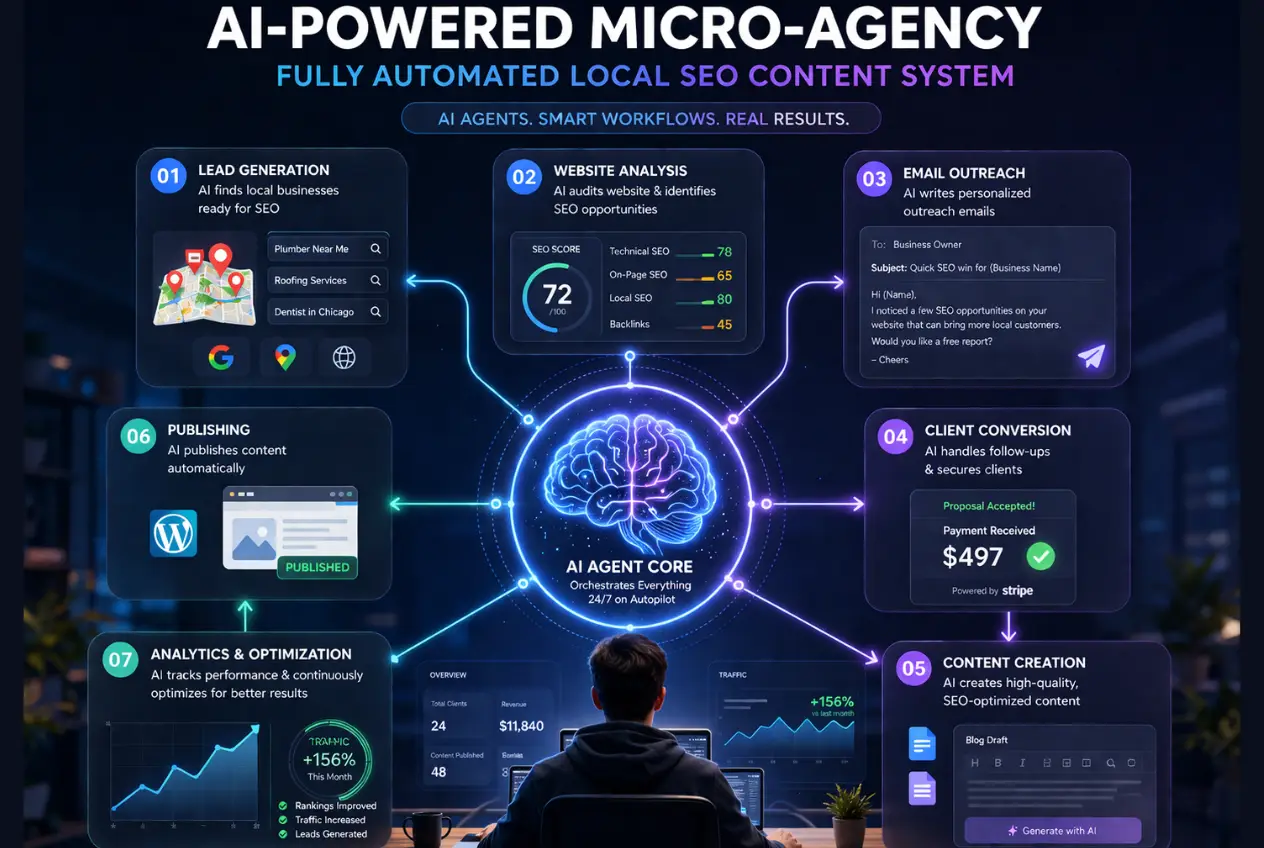
The system:
- Finds local businesses that clearly need content (weak websites, outdated blogs, low Google visibility).
- Generates a personalized content plan and a helpful mini-audit.
- Sends a tailored outreach email (not spammy, not generic).
- If they reply, it books a call or pushes them to a simple checkout.
- After purchase, it produces deliverables (blog drafts + metadata + internal links suggestions) and emails them for approval.
- If they approve, it formats and publishes (optional add-on) or sends final docs.
I’m still “in” the loop for quality control and edge cases, but here’s the thing: my involvement dropped to about 2 to 3 hours/week once it stabilized.
Statistic — Source: U.S. Bureau of Labor Statistics, 2024. (People with multiple jobs typically spend ~11 hours/week on their second job. My goal was to beat that.)
The Offer I Chose (And Why It Works With Automation)
Here’s what I’m selling:
“Local SEO Content Sprint”
- 4 blog posts/month (900 to 1,200 words)
- SEO titles + meta descriptions
- FAQ section + schema-ready Q&A
- Suggested internal links to their existing pages
- Optional: upload to WordPress for an extra fee
Price: $299 to $499/month depending on niche and whether they want publishing.
Honestly, I tried other offers first. Automated Etsy stuff. Affiliate sites. Even AI-generated lead magnets. This one stuck because it’s:
- easy to explain,
- easy to fulfill with AI,
- valuable to small businesses,
- and recurring.
Statistic — Source: BrightLocal, 2023. (87% of consumers used Google to evaluate local businesses. Local visibility is a real pain point.)
The Tech Stack (Tools I Actually Used)
I kept it boring on purpose. “Boring” is stable.
Core tools:
- AI agent framework: OpenAI (Assistants / Responses API style agent behavior) or Claude for writing QA
- Automation: Make.com (Zapier works too, but Make was cheaper for what I needed)
- Leads: Apollo + Google Maps scraping (I used a simple scraper tool; you can also do this via services)
- Database: Airtable
- Email: Gmail + Instantly (for sending at scale safely)
- Docs delivery: Google Docs + Drive
- Payments: Stripe payment links
- Scheduling: Cal.com
- Website: One-page Carrd site (yes, really)
Important: You can swap half of these and still replicate the system. The “magic” is the workflow design, not a specific SaaS.
The System Architecture (The Whole Workflow)
Here’s the workflow at a high level.
Step 1: Lead Collection (Automated)
I targeted businesses that:
- serve a local area (dentists, plumbers, med spas, roofers, law firms),
- have a website that looks like it hasn’t been touched in a while,
- and clearly aren’t publishing content.
The automation:
- Pulls business name, website, email, location, category.
- Saves it into Airtable.
- Marks duplicates and filters out junk.
Airtable fields I used:
- Business Name
- Category
- City
- Website
- Contact Email
- “Website quality score” (AI-generated)
- “Content gap score” (AI-generated)
- Status (New → Enriched → Contacted → Replied → Closed Won/Lost)
Statistic — Source: Top Design Firms, 2023. (Around 50% of consumers say website design affects a business’s credibility. Outdated sites are a signal.)
Step 2: Enrichment + Website Snapshot
Next, an agent visits the website and extracts:
- services offered,
- any existing blog content and last publish date,
- location pages,
- tone/brand style,
- obvious SEO gaps (missing H1s, thin pages, no FAQs, no internal linking).
This part is semi-technical, but not insane. I used a simple “fetch page HTML → extract sections” approach, then passed that to the agent.
The output is a neat “business profile” object stored in Airtable.
The AI Agents (What Each Agent Does)
This is where it gets fun.
Instead of one mega-agent doing everything badly, I split them into specialists.
Agent A: The Auditor (Finds Opportunities)
Input: website snapshot + business category + location
Output: 5 to 7 bullet audit + 3 content ideas + a “why this matters” summary
It’s trained to be practical and not nitpicky. No one cares about your Lighthouse score in a cold email. They care about calls and bookings.
Agent B: The Outreach Writer (Personalizes Email)
Input: audit + business profile
Output: 1 short cold email + 1 follow-up + subject line variants
Rules I enforced:
- Must reference something real from their site.
- No cheesy compliments.
- No “I hope you’re doing well.”
- One clear CTA.
Agent C: The Sales Concierge (Handles Replies)
Input: inbound reply text
Output: recommended next step:
- answer question,
- propose a call,
- send Stripe link,
- or disqualify politely.
This agent is basically a triage nurse. It keeps my inbox clean.
Agent D: The Content Producer (Creates Deliverables)
Input: chosen topics + business profile + internal link targets
Output: blog post drafts + metadata + FAQ
I also added a “brand voice” doc for each client (one-time generation after onboarding). That made the content feel less templated.
Agent E: The QA Editor (Catches Issues)
Input: draft content
Output: revisions for:
- factual risk,
- overclaiming,
- repetitive AI patterns,
- missing local references,
- and anything that sounds like it was written by a toaster.
This agent saved me more time than I expected.
Statistic — Source: Gartner, 2023. (Organizations cite data quality and trust as top barriers to AI value. QA is not optional.)
The Exact Automation Flow (Make.com Scenario)
Here’s the sequence in Make:
- Trigger: New lead added to Airtable (Status = New)
- HTTP module: Fetch website homepage + services page (if found)
- OpenAI module: Agent A generates audit + topic ideas
- OpenAI module: Agent B writes cold email + follow-up
- Instantly module: Add lead + enqueue email sequence
- Webhook trigger: If reply comes in
- OpenAI module: Agent C classifies reply + drafts response
- Gmail module: Draft response (not auto-send, I approve)
- If payment link clicked and paid (Stripe webhook):
- Generate onboarding doc + content calendar
- Agent D produces first batch drafts
- Agent E QA edits
- Upload to Google Drive + send delivery email
Yes, it looks like a lot. But you build it once, then it just… runs.
The system relies heavily on a few AI productivity tools that actually improve your workflow, especially for automation.
The Prompts (Real Examples)
I’m not going to dump 40 prompts here, but I’ll show you the ones that made the biggest difference.
Auditor agent prompt (core excerpt)
You are an SEO auditor for local service businesses.
Your goal: identify high-leverage website and content improvements that can increase calls/leads.
Constraints:
- Only reference information that appears in the provided site text.
- Do not mention technical SEO tools or scores.
- Output must be short and skimmable.
- Deliver:
- 5 bullet audit findings (plain English)
- 3 blog topics tailored to their services + city
- One paragraph explaining why content helps local SEO
Outreach prompt (core excerpt)
Write a cold email under 120 words.
Must include:
- One specific reference to their website text
- One “quick win” from the audit
- One offer: 4-post Local SEO Content Sprint
- CTA: “Want me to send 3 topic ideas tailored to [CITY]?”
- Avoid: hype, buzzwords, manipulation, false urgency.
Reply triage prompt (core excerpt)
Classify reply as one of: Interested, Price Question, Not Now, Wrong Contact, Unsubscribe, Confused.
Draft a response that is polite, short, and moves the deal forward.
If price question: give range and ask one qualifying question.
From what I’ve seen, tight constraints beat “be a helpful assistant” every single time.
Results (What Happened After 30 Days)
I’ll give you the real numbers from my first month after the workflow stopped breaking every day.
- Leads contacted: 612
- Replies: 47
- Positive replies: 19
- Calls booked: 11
- Closed clients: 4
- Monthly recurring revenue added: $1,596
That’s not “Lambo money,” but it’s a real automated side hustle that kept paying into month two.
Statistic — Source: HubSpot, 2024. (Average cold email reply rates often fall in the 1% to 5% range depending on targeting. My overall reply rate was ~7.7%, mostly because personalization was real.)
And here’s the part I didn’t expect: client retention was decent once I added a simple monthly reporting email. People like seeing what they’re paying for, even if it’s basic.
What Broke (And How I Fixed It)
A few honest problems:
1) The outreach started sounding “samey”
Even with personalization, patterns emerged. I fixed it by:
- rotating 5 different email “frames,”
- adding a rule to reference a specific service page,
- and injecting one sentence of “human texture” (like a quick observation).
2) AI hallucinated local details
This is a big one. It would sometimes mention neighborhoods or services that weren’t on the site.
Fix: I forced the agent to only use the provided website text and city name. No freelancing.
3) Publishing to WordPress was messier than expected
Different themes, plugins, editors. It’s not truly standardized.
Fix: I made publishing an add-on and only supported:
- standard WP block editor,
- no page builders,
- and clients must provide an author account.
Honestly, saying “no” here saved the system.
4) Spam risk and deliverability
If you blast emails like an idiot, Gmail will humble you quickly.
Fixes I used:
- warmed inboxes,
- limited daily sends,
- verified domains,
- and used Instantly’s deliverability tools.
The Weekly “Human” Work (My Ongoing Role)
Once running, here’s what I do weekly:
- approve drafted replies (15 to 20 minutes/day)
- spot-check content quality (30 to 45 minutes/client)
- update client voice doc if needed
- handle edge cases
That’s it. The agents do the heavy lifting, but I stay close enough to keep quality high. If you fully remove yourself, quality drifts. That’s just reality right now.
Cost Breakdown (So You Can Budget It)
My monthly costs (roughly):
- Make.com: $10 to $29
- Instantly: $37 to $97 (depending on volume)
- Airtable: $0 to $20
- AI usage: $30 to $120 (depends on model + volume)
- Scraper/Apollo: variable
So call it $100 to $250/month to operate, depending on scale.
With 4 clients paying $399/month average, margins were still solid.
If you’re thinking long-term, understanding how to stay ahead of AI in your career is just as important as building side income.
How To Replicate This (The Simple Build Order)
If you want to rebuild this without pain, do it in this order:
- Pick one niche (don’t start broad)
- Build the lead list pipeline
- Build the audit agent (get output quality right first)
- Build outreach agent
- Connect to sending tool
- Add reply triage
- Add payments + onboarding
- Add content production + QA
- Only then consider publishing automation
If you try to build all of it on day one, you’ll hate your life by day three. Ask me how I know.
The “Autopilot” Reality Check
Here’s the thing. It’s not fully passive in the “I never touch it” way. It’s more like a well-designed machine that needs occasional tuning.
But compared to freelancing where you sell hours, this feels different. The system brings leads, nurtures them, produces deliverables, and keeps things moving even when I’m busy.
And that was the whole point.
Conclusion
Building an automated side hustle like this micro-agency is entirely achievable with the right approach and tools. By focusing on one niche, developing a reliable lead pipeline, and gradually layering in automation — from auditing to outreach, sales, content creation, and quality assurance — you can create a system that runs smoothly with minimal ongoing effort. While it’s not completely hands-off, this model significantly reduces the time and stress compared to traditional freelancing or manual client work. With patience, thoughtful setup, and occasional tuning, you’ll have a powerful machine generating leads, closing sales, and delivering value consistently — freeing you up to focus on growth or other priorities. Start small, build smart, and watch your automated side hustle thrive.
FAQs (Frequently Asked Questions)
What is the automated side hustle described in the case study?
The case study describes an automated “micro-agency” that sells simple SEO content packages to small local businesses. This system uses AI tools and automation to handle lead generation, personalized content planning, outreach, sales, content creation, and delivery with minimal manual involvement, reducing the owner’s time commitment to about 2-3 hours per week.
How does the automated system find and qualify potential clients?
The system automatically scrapes local businesses serving specific niches (like dentists, plumbers, law firms) from sources like Google Maps and Apollo. It evaluates their websites for quality and SEO content gaps using AI-generated scores stored in Airtable, filtering out duplicates and low-potential leads before proceeding to outreach.
What kind of SEO content packages are offered through this micro-agency?
The offer is called “Local SEO Content Sprint,” which includes 4 blog posts per month (900-1,200 words each), SEO-optimized titles and meta descriptions, FAQ sections with schema-ready Q&A, suggested internal links to existing pages, and optional WordPress publishing services. Prices range from $299 to $499 per month depending on niche and add-ons.
Which tools and technologies power this automated side hustle?
Key tools include AI agent frameworks like OpenAI or Claude for writing and analysis; Make.com for automation workflows; Apollo and Google Maps scraping for lead generation; Airtable as a database; Gmail combined with Instantly for scalable email outreach; Google Docs and Drive for content delivery; Stripe payment links; Cal.com for scheduling; and a simple Carrd one-page website as the sales funnel.
How does the AI agent contribute to creating personalized content plans?
An AI agent visits each prospect’s website to extract services offered, existing blog content status, location pages, brand tone/style, and SEO gaps such as missing H1 tags or lack of FAQs. It generates a detailed business profile used to create a personalized content plan and mini-audit that informs tailored outreach emails.
What are the benefits of using this AI-powered automated micro-agency model compared to traditional side hustles?
This model minimizes manual effort and technical skill requirements by automating lead generation, outreach, content creation, and delivery. Unlike freelancing or manual content creation that demands constant attention, it runs mostly on autopilot with only 2-3 hours weekly involvement. It offers scalable recurring revenue with a valuable service tailored for small businesses’ local SEO needs.
Written by Ethan Brooks: Ethan Brooks is an AI automation strategist and digital systems consultant with over a decade of experience in workflow design, no-code technologies, and scalable online business infrastructure. His work focuses on building reliable, efficiency-driven systems that help professionals and creators reduce manual effort and operate more effectively using AI-powered tools.
Reviewed by: AI Automation Editorial Board & Independent Digital Systems Experts.
Disclaimer: This article is based on practical implementation and testing of AI tools within real-world workflows. While every effort has been made to ensure accuracy and clarity, software features, pricing, and capabilities may change over time. Readers are encouraged to independently verify current details before making decisions. This content was initially drafted with AI assistance and has been rigorously reviewed, edited, and fact-checked by human editors to meet standards of accuracy, originality, and editorial integrity.