
By James Carter, a productivity expert with 10+ years of experience specializing in AI tools, workflow automation, and digital efficiency strategies.
Summarize this blog post with: ChatGPT | Perplexity | Claude | Grok
Look, I’ll be upfront with you. When I started seriously testing AI productivity tools back in late 2023, I wasn’t expecting much. I’d already watched too many “game-changing” platforms become expensive clutter within a quarter. Teams would adopt five new tools, nobody would learn any of them properly, and somehow productivity dropped. I’ve lived that story more than once.
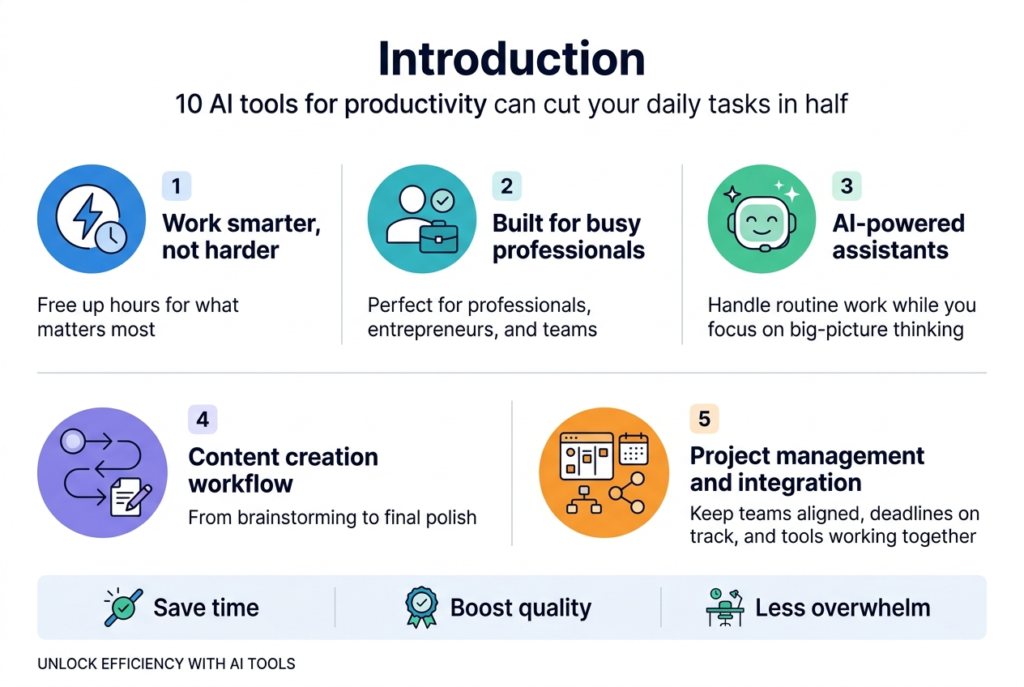
So I’m not going to write one of those breathless listicles that calls everything revolutionary. Some of these tools genuinely are. Others are useful only in specific situations — and knowing the difference is exactly what most guides skip over, which is why people end up with bloated tech stacks and the same old frustrations.
What I can tell you, based on real use across real workflows, is this: the right combination of AI productivity tools, used consistently and with some actual intention behind them, does change the texture of your workday. Things that used to eat a Tuesday afternoon now take 25 minutes. That’s not a line from a sales deck — it’s just what happens when you stop fighting these tools and start working with them properly.
Alright. Let’s get into it.
AI-Powered Communication Tools: Can You Actually Reclaim Your Inbox?
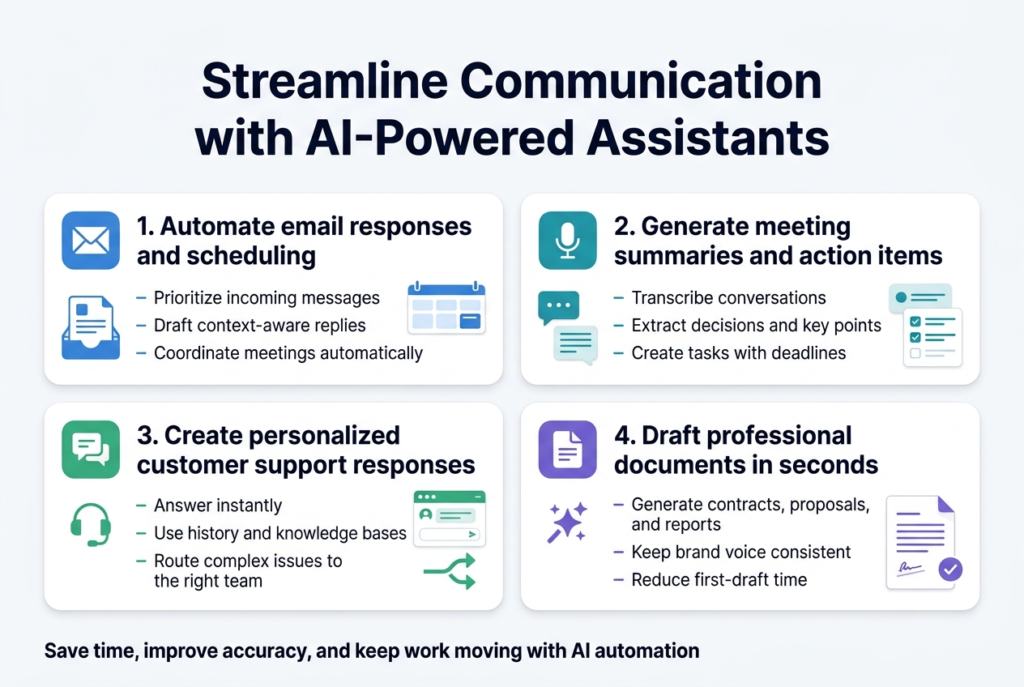
Here’s something that doesn’t get talked about enough — the average professional spends somewhere between two and a half and five hours a day on email. Email consumes roughly 28% of the average worker’s week — Source: McKinsey Global Institute, 2023. That’s not a productivity problem. That’s a structural crisis most people have quietly accepted as just… normal.
AI communication tools attack this from a few different angles. And honestly, this is where I’ve seen the most immediate, measurable time savings in practice.
Scheduling Automation: The Unsung Hero
Tools like Boomerang, Calendly’s AI scheduling, and Clara do something deceptively simple — they take the back-and-forth out of booking meetings. If you’ve ever spent 45 minutes coordinating a 30-minute call with four people across three days, you understand exactly why this matters.
What impressed me about the better tools is the natural language understanding. You can tell Clara something like “find 30 minutes with Sarah next week, mornings preferred” and it handles the coordination without you touching it again. For anyone juggling a heavy meeting load, that’s not a minor convenience. It’s legitimately freeing.
The smart email drafting features are worth mentioning too. They learn your writing style over time and draft replies that actually sound like you — not like a slightly formal stranger who happened to gain access to your inbox. The caveat: give them enough examples of your real communication style upfront, or the outputs will feel generic. Shortcut that step and you’ll end up editing everything anyway.
AI Meeting Transcription and Follow-Up
This is the sleeper hit of the communication category. Tools like Otter.ai, Fireflies, and Grain transcribe meetings automatically and — more importantly — pull out the actual decisions and action items from the noise.
I started using one of these about 18 months ago. The shift was immediate. Instead of ending every meeting with a vague sense of what might have been agreed, there’s a searchable record with real names attached to real commitments. The best of these integrate directly with project management platforms, so a decision made in Tuesday’s standup surfaces automatically as a task on your project board — no manual entry required.
That gap between conversation and execution is where a shocking amount of work quietly disappears. These tools close it.
AI Writing Tools for Content Creation: Hype vs. What Actually Works
Over 85% of content marketers now use AI writing tools as part of their workflow — Source: Content Marketing Institute, 2024. So the question isn’t really whether people are using them — it’s whether they’re being used well.
Honestly, the quality gap between people who use AI content creation tools effectively and those who don’t is enormous. I’ve seen teams produce work indistinguishable from their best human writing. And I’ve seen others produce floods of generic copy that quietly damaged their credibility. The difference is almost entirely in how they prompt and edit — not in which tool they chose.
Generating Blog Posts, Social Content, and Marketing Copy
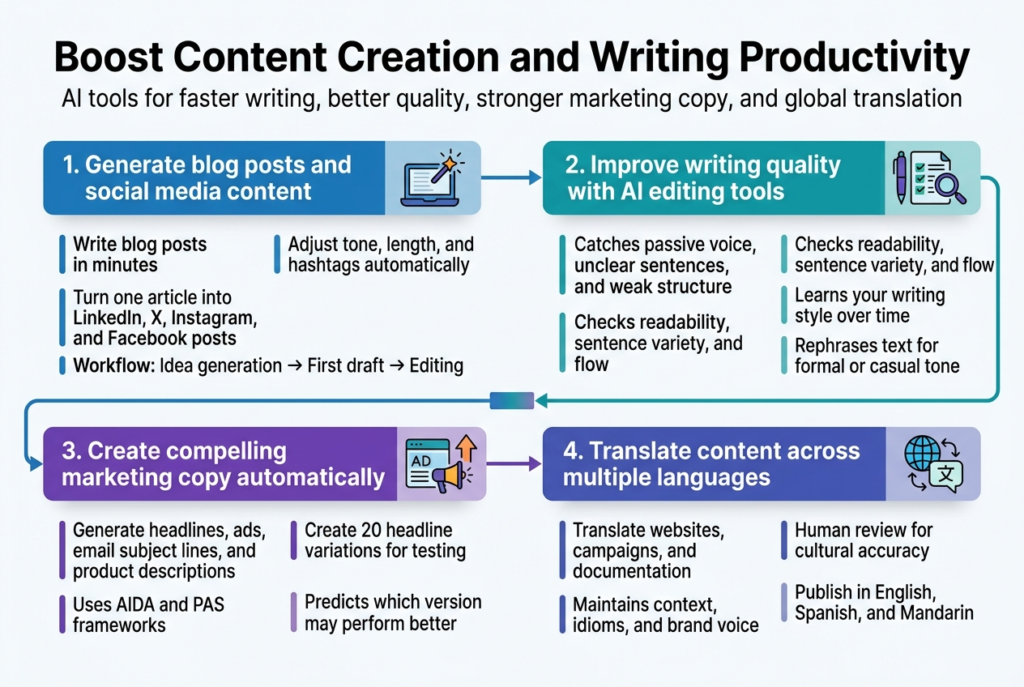
Tools like ChatGPT, Claude, and Jasper can produce solid blog post drafts in the time it takes to make coffee. The key is treating the output as a strong first draft — because that’s what it is. The AI gives you structure and momentum. You bring the voice, the specific examples, and the judgment about what actually serves your audience.
For social media specifically, tools like Lately and Buffer’s AI Assistant do something clever. Feed them a 2,000-word article and they’ll generate LinkedIn posts, Twitter threads, and Instagram captions — each adapted for the platform’s rhythm. From what I’ve seen, this saves content teams around 3–4 hours per content piece when they actually use the outputs rather than generating them and immediately rewriting everything from scratch.
Jasper and Anyword are worth a special mention for conversion-focused copy. They understand frameworks like AIDA and PAS, generate multiple headline variations for testing, and Persado even predicts performance before you run anything. If you’re paying for ads, that last feature is genuinely valuable — not just clever.
Editing, Style, and Quality Improvement
Grammarly has quietly evolved from a spelling checker into something closer to a writing coach. It catches passive voice overuse, flags unclear structures, and gives you a read on tone. ProWritingAid goes deeper on style analysis, and Hemingway Editor is specifically great for tightening dense prose.
Where these tools shine most for serious writers is consistency checking across longer documents. They’ll catch when you’ve been writing “AI tool” for 3,000 words and suddenly switched to “artificial intelligence solution” — the kind of drift that human editors miss more often than they’d like to admit.
AI Design Tools: Do You Really Need a Designer Anymore?
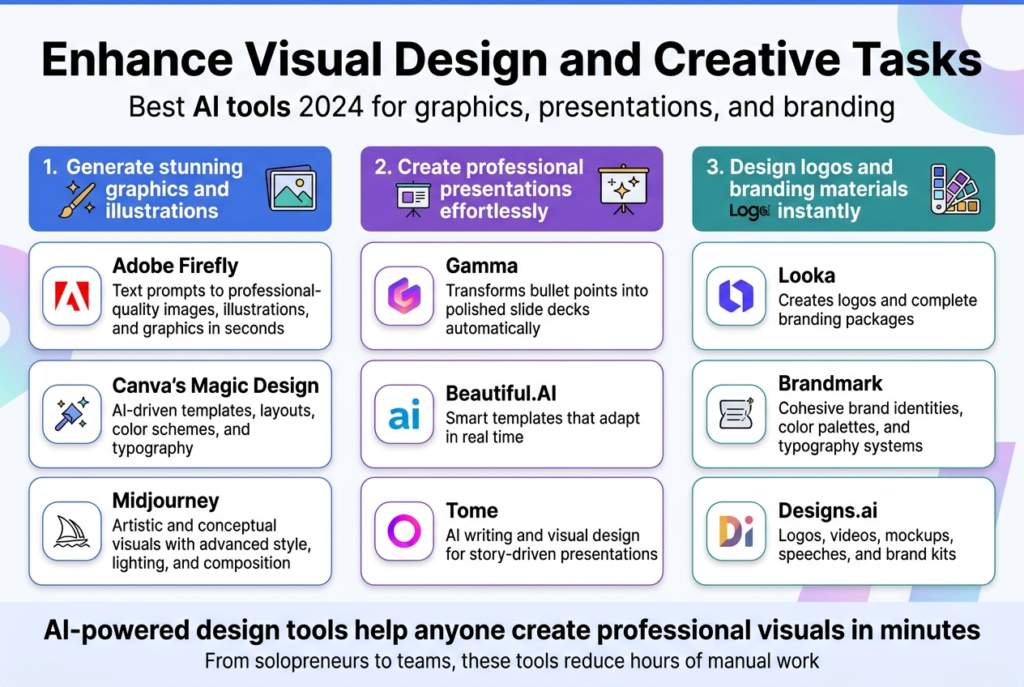
Here’s the thing — AI design tools have genuinely democratized something that used to require years of training. Adobe Firefly, Midjourney, and Canva’s Magic Design can produce visuals that would have cost serious money to commission just two years ago.
Adobe Firefly is particularly useful for commercial work because it was trained on licensed content. That matters if you want to avoid intellectual property complications — which, if you’re producing content at scale, you absolutely should care about. Describe what you need (“clean product lifestyle photo, neutral background, natural lighting”) and you’ll have multiple options back in seconds.
Canva’s AI features have made the tool dramatically more capable than it used to be. The Magic Design function analyzes your content and suggests layouts that actually make visual sense — not just templates you force-fit your content into. Teams I’ve worked with consistently report cutting presentation design time by 50–70%. That number sounds like marketing fluff, but it’s been pretty consistent with what I’ve actually seen.
What About Logos and Brand Identity?
Looka and Brandmark have made professional-quality logo creation accessible to businesses that can’t justify a $5,000 agency engagement. They analyze successful brands in your industry and generate options with full brand kits — colors, typography, business card templates, the works. For early-stage businesses or side projects, this is a genuine unlock.
The caveat — always — is that none of these tools replace strategic thinking. They handle production. The thinking about what you want to communicate and to whom is still on you.
How Are AI Tools Changing Data Analysis for Non-Data People?
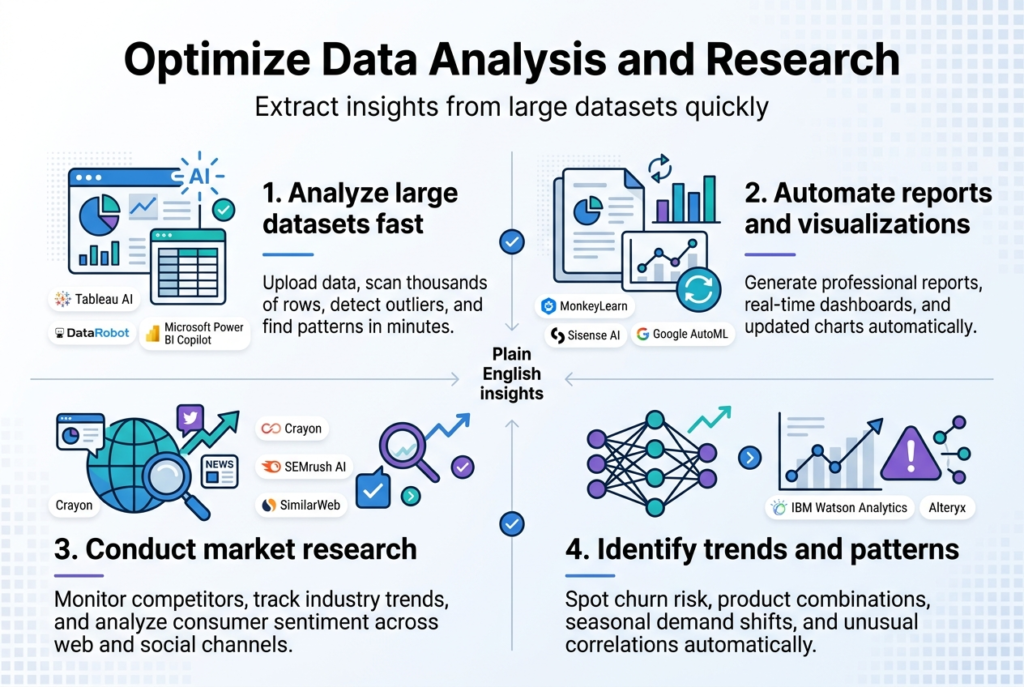
Data professionals spend an average of 45% of their time on data preparation rather than actual analysis — Source: Anaconda State of Data Science Report, 2023. AI data tools are specifically attacking that number — and they’re making data analysis more accessible to people who aren’t data scientists.
Tools like Tableau AI, Microsoft Power BI with Copilot, and DataRobot can surface patterns from datasets that would have taken a dedicated analyst days to process manually. And crucially, the outputs speak plain English. Ask “where did Q3 revenue underperform?” and get a chart with a breakdown — not a pile of raw numbers you have to make sense of yourself.
Automated Reporting That Actually Saves Time
MonkeyLearn and Sisense AI create dashboards that update themselves and flag anomalies without waiting for someone to notice them. If sales drop in a particular region or customer satisfaction scores shift, the system surfaces it — ideally before it becomes a crisis.
The practical impact here is hard to overstate for anyone who’s managed teams that run on regular reporting cycles. The hours spent gathering data, building decks, and chasing updates can largely disappear. What remains is the interpretation — which is still thoroughly human work, and probably where your energy is better spent anyway.
AI Project Management: Can Algorithms Actually Help Teams Hit Deadlines?
I’ll be honest — I was skeptical that AI project management features would deliver much beyond what a good spreadsheet and a weekly standup already provide. I was partially wrong.
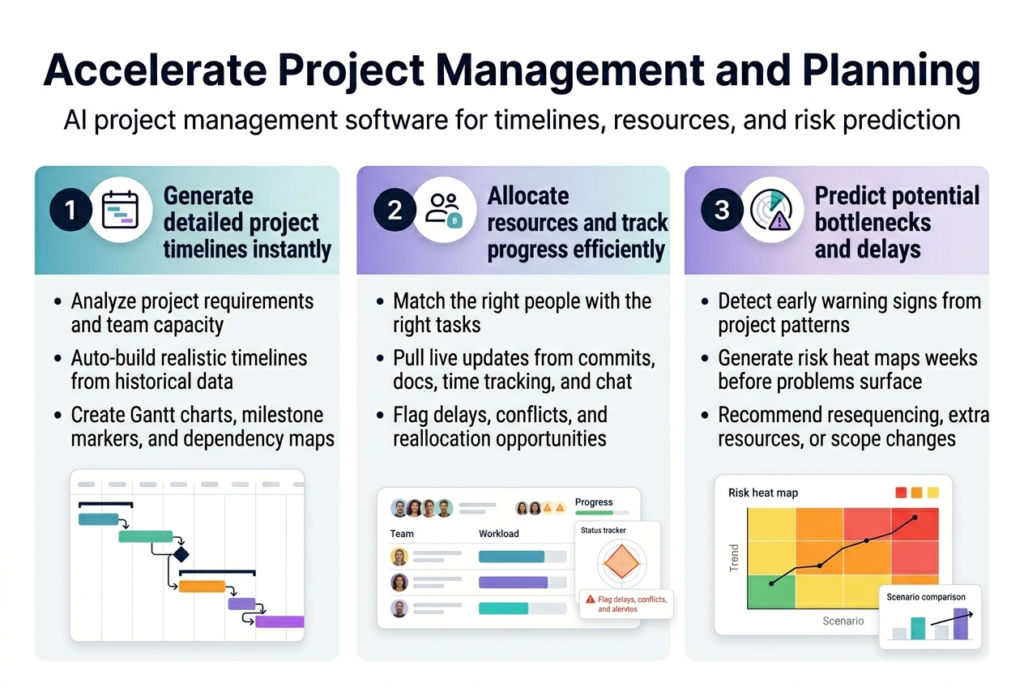
Monday.com AI and ClickUp Brain do something genuinely useful with timeline generation. They draw on historical project data to build schedules that reflect reality rather than optimism. And this distinction matters enormously — the average project overruns its original timeline by 27% — Source: Project Management Institute, 2023. Traditional planning is optimistic. AI-assisted planning tends to be more accurate because it’s pulling from what actually happened in similar projects, not what everyone hoped would happen.
Smarter Resource Allocation and Risk Spotting
Resource Guru AI and Forecast match tasks to team members based on actual capacity and skill sets — not just who’s technically available on paper. That’s subtle but important. The human knowledge of who’s actually good at what gets codified and scaled.
Predictive risk tools like Clarizen AI and Wrike Intelligence create risk heat maps weeks before issues surface. They’re watching communication frequency, task velocity, and dozens of other signals across multiple projects simultaneously. Any individual manager might miss these patterns because they’re too close to the work. That outside-in view has real value.
AI Sales Tools: Spending More Time Actually Selling
Sales reps spend only about 28% of their week actually selling — Source: Salesforce State of Sales Report, 2024. Everything else is admin, data entry, research, and coordination. AI sales tools are designed to claw that time back.
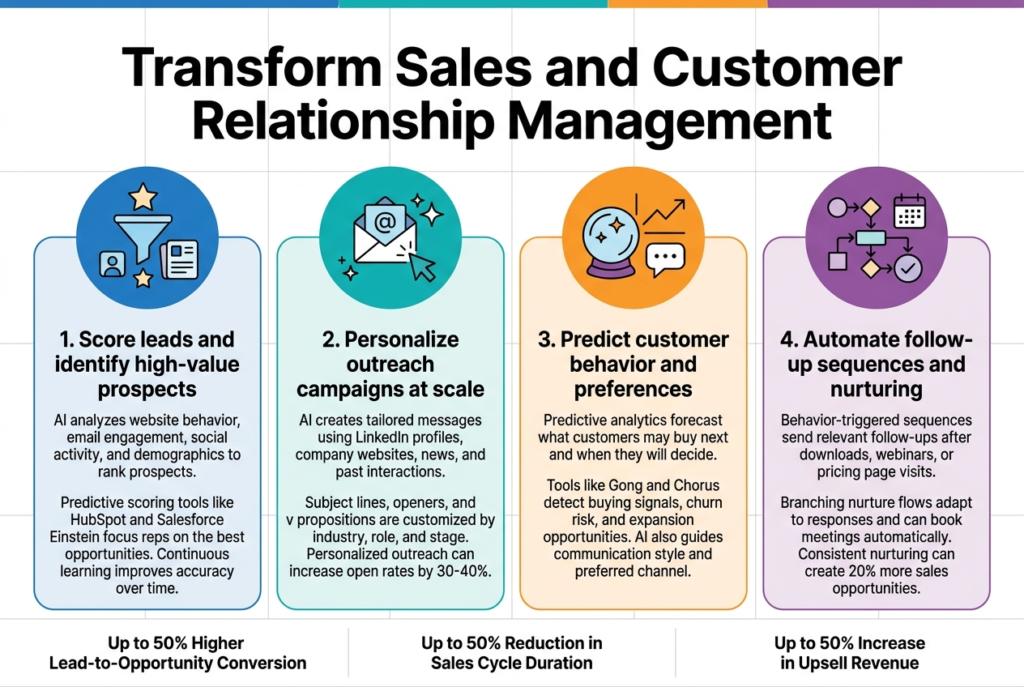
HubSpot’s predictive lead scoring and Salesforce Einstein analyze behavioral signals to rank prospects by conversion likelihood — and critically, they get more accurate over time as the loop closes. Teams using AI lead scoring consistently report better conversion rates than those relying on gut instinct or manual prioritization.
Personalized Outreach at Scale
Outreach.io and Apollo pull from LinkedIn profiles, company news, and previous interactions to generate outreach that’s actually relevant. The difference between referencing something specific to a prospect versus sending a generic template shows up clearly in response rates — typically a 30–40% improvement in open rates — Source: Outreach.io Internal Data, 2023.
From what I’ve seen, the reps who get the most out of these tools treat the AI output as a starting point. They customize the last 20% — which is usually the part that makes the message actually land.
The automated follow-up tools (Klaviyo, Marketo, Pardot) deserve mention too. They create branching sequences that adapt based on prospect behavior. If someone engages with content about a specific feature, the sequence shifts toward that feature instead of just continuing a generic drip. Companies using AI-powered lead nurturing see roughly 20% more sales opportunities — Source: Marketo Research, 2023. Not from working harder. From being more responsive to what prospects are actually telling you.
AI Learning Platforms: Does Personalized Training Actually Retain Better?
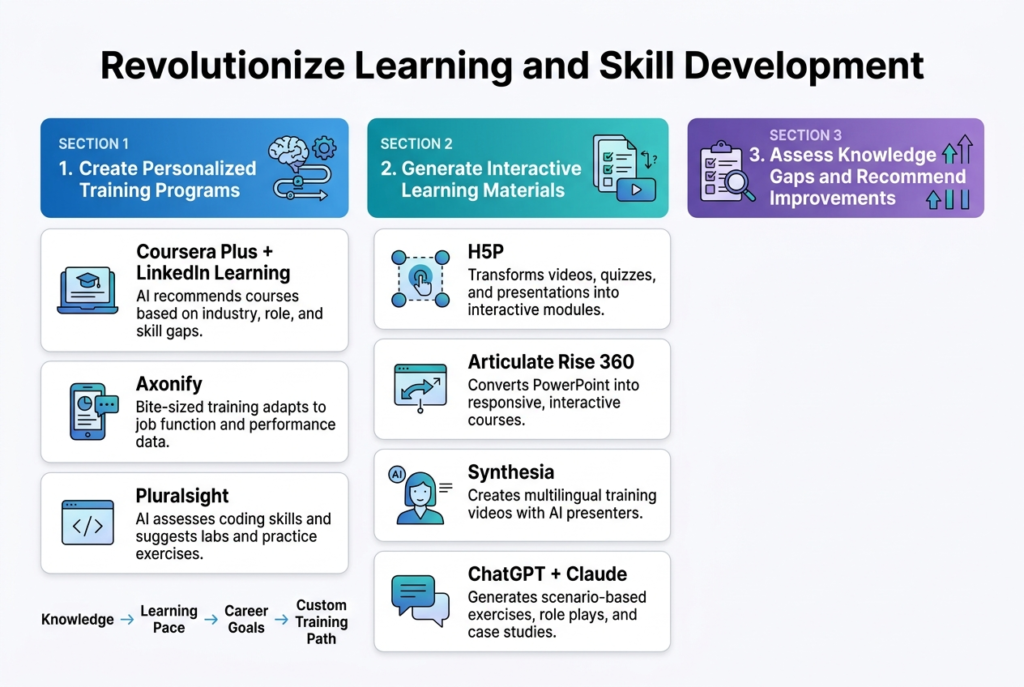
The traditional corporate training model — sit in a room, watch slides, take a quiz, forget everything by Thursday — has a well-documented retention problem. AI-powered learning platforms address this with personalization and spaced repetition, and the results genuinely hold up.
Coursera Plus and LinkedIn Learning now use AI to suggest learning paths based on your role, skill gaps, and where your industry is heading. Axonify takes this further with microlearning sessions timed to when retention is most likely — based on actual cognitive science rather than just calendar convenience.
Cerego uses AI-optimized spaced repetition to schedule review sessions precisely when you’re most likely to forget something. Area9 Lyceum does something particularly clever: it identifies not just what you don’t know, but what you think you know but actually don’t. In high-stakes professional contexts — compliance, safety, technical skills — that distinction matters enormously.
For creating training content, Synthesia generates video training with AI avatars in multiple languages. For global organizations that need consistent onboarding without filming everything multiple times, that’s a genuine operational unlock.
And if you’re wondering how these tools affect your long-term employability, here’s a realistic look at how to future-proof your career with AI.
AI Financial Tools: Cutting the Admin Work Nobody Enjoys
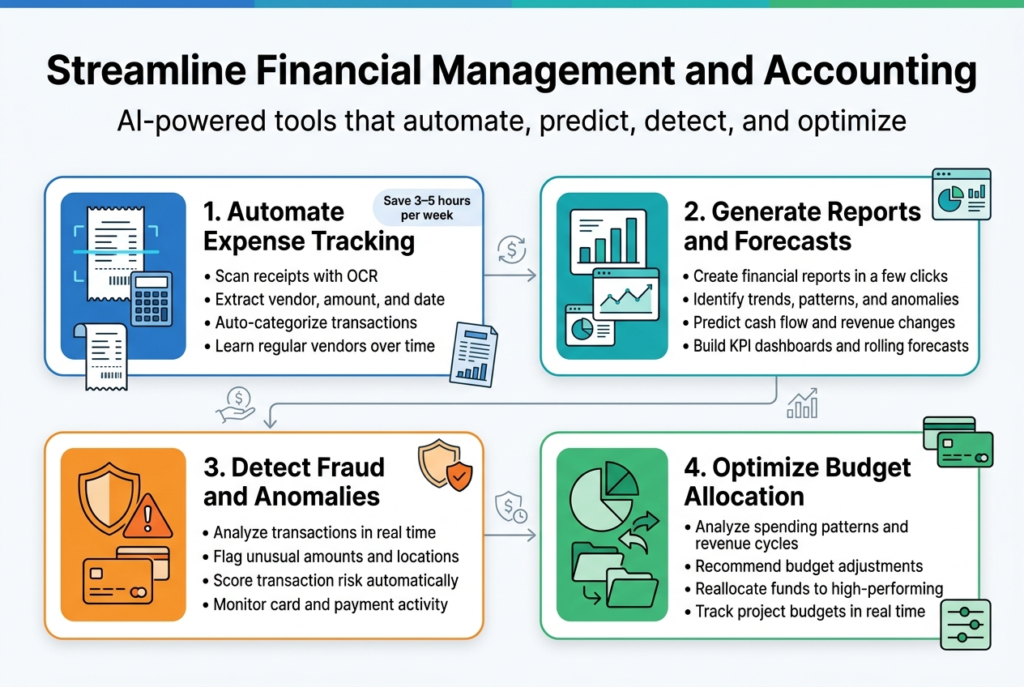
Small businesses spend an average of 120 hours per year on administrative financial tasks — Source: Intuit QuickBooks Research, 2023. AI financial tools exist almost entirely to cut into that number.
Expensify, Receipt Bank, and QuickBooks AI handle expense categorization automatically — scanning receipts, extracting vendor names and amounts, assigning categories based on learned patterns. After a few months, these systems know your spending well enough that manual categorization becomes an exception rather than the main event.
Xero and FreshBooks pull from bank feeds in real-time and match transactions to receipts without manual intervention. Teams that implement this properly typically save 3–5 hours per week on expense management alone. Hours that tend to get redirected to things that actually matter.
Fraud Detection and Cash Flow Forecasting
Sage Intacct and QuickBooks Advanced generate rolling forecasts that update as new data comes in. For cash flow management, this real-time visibility is genuinely useful — seeing projected cash flow two months out and course-correcting before a shortfall becomes a crisis is worth a lot to any small business owner.
On fraud detection: tools like Kount and DataVisor analyze thousands of variables in real-time, creating risk scores that no manual review process could realistically replicate at scale. Ramp and Divvy bring this level of monitoring to small business corporate card management — an area that was genuinely underserved until pretty recently.
AI Coding Assistants: Why Non-Engineers Should Understand These Too
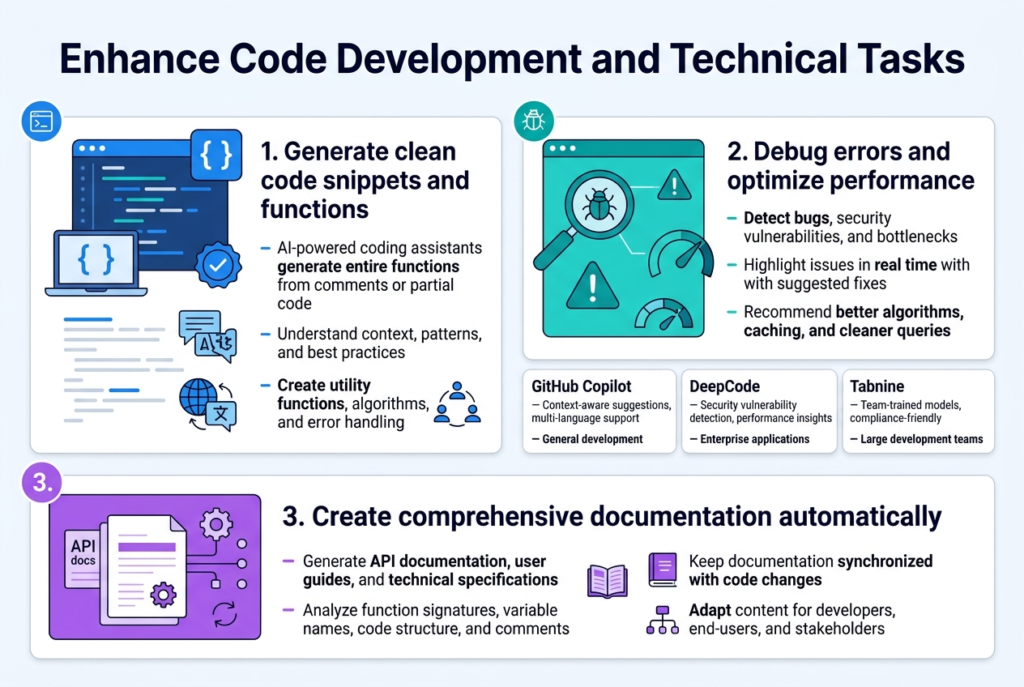
Even if you’re not a developer, understanding what AI coding tools do is increasingly relevant — especially if you manage technical teams or work in organizations where software is part of the product.
GitHub Copilot, Tabnine, and CodeT5 generate contextually appropriate code from comments and partial snippets. For experienced developers, this feels like having a fast, tireless collaborator who knows your codebase. For organizations, it means meaningful reductions in time-to-feature — which translates to real competitive advantage.
DeepCode and Snyk catch security vulnerabilities before they ship. Catching a vulnerability in development is dramatically cheaper than catching it in production — both financially and reputationally. As software security becomes a competitive differentiator rather than just a technical checkbox, tools like these are quietly becoming essential.
The documentation side is where I think these tools are most underappreciated. Mintlify and Swimm generate technical documentation directly from code and keep it synchronized as the code changes. If you’ve ever worked somewhere where documentation was perpetually out of date — and who hasn’t — you understand exactly why this is valuable.
Workflow Integration: Making Your AI Tools Actually Talk to Each Other
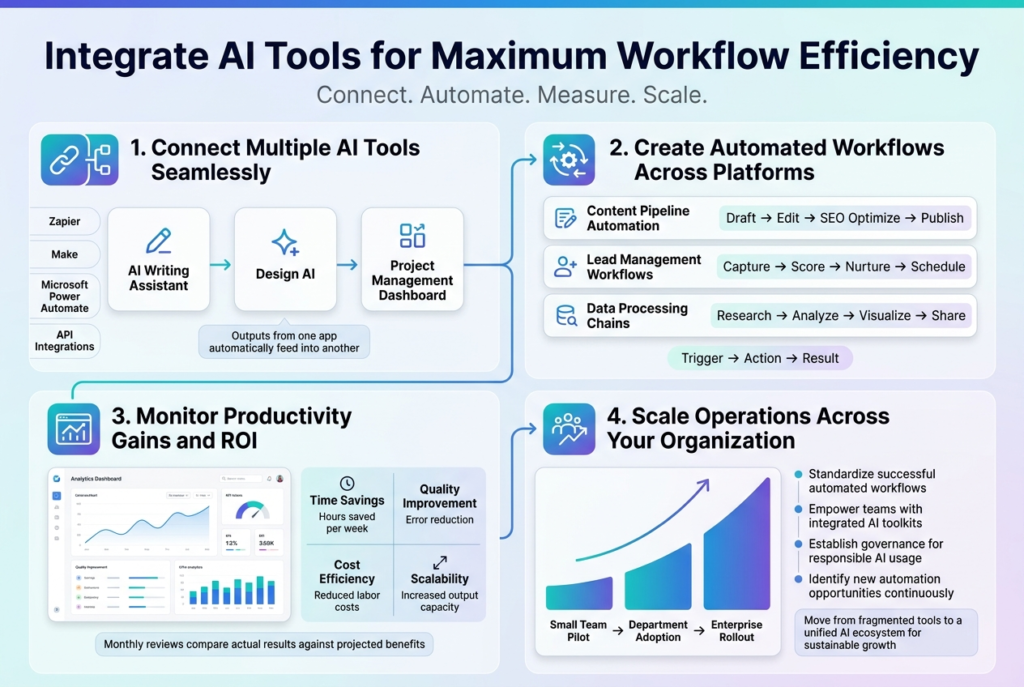
Here’s what most AI productivity tool guides get completely wrong. They treat each tool in isolation, as if the value is simply additive. Add tool A, save X hours. Add tool B, save Y hours. Add them all up, go home early.
Real workflow optimization doesn’t work like that. The actual leverage comes from tools talking to each other — outputs from one automatically feeding inputs to another, with humans intervening only at the decision points that genuinely require judgment.
Zapier, Make (formerly Integromat), and Microsoft Power Automate are the connective tissue here. A finished blog post from your AI writing tool can trigger your design AI to create social graphics, which triggers a scheduling tool to queue everything up, which updates your project board. That whole sequence might have taken 45 minutes of coordination manually. Connected properly, it runs in the background.
Where to Start Without Getting Overwhelmed
Start with one clear trigger-action-result chain. Don’t try to automate your entire operation at once. Map one repetitive process, automate it, make sure it actually works reliably, then build the next one. The organizations that fail at automation almost universally tried to implement too much simultaneously and ended up with a complex system nobody trusted.
One more thing — measure ROI, because most teams skip this step entirely. Establish baseline metrics before you implement anything. Task completion time, error rates, output volume — whatever’s relevant to your work. Then measure the same things three months later. The tools that deliver real value will show up clearly. The ones that don’t are worth reconsidering regardless of how impressive they seemed in the demo.
Conclusion: Where Should You Actually Start With AI Productivity Tools?
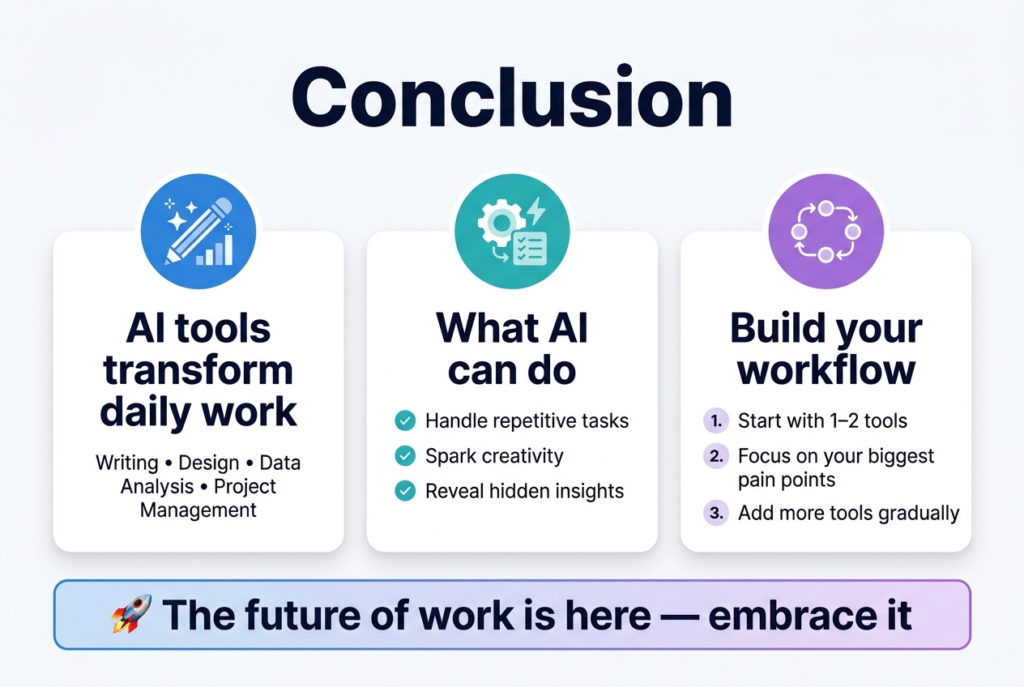
If you’ve read this far and you’re wondering where to begin — here’s the honest answer. Pick one problem that genuinely costs you time every single week, and find one AI productivity tool that specifically addresses it. Not ten tools. One.
If email is the thing that’s killing you, start with a scheduling assistant. If you’re drowning in meeting follow-up, start with an AI transcription tool. If content creation is the bottleneck, spend a month getting good at prompting an AI writing tool before adding anything else to the stack.
From what I’ve seen, the professionals who extract real value from AI productivity tools share one characteristic — they commit to using something consistently long enough to push through the learning curve. Most people quit during that awkward middle period when the tool’s potential is visible but fluency hasn’t arrived yet. Push through that window, and the payoff tends to be real and lasting.
The goal was never to build an impressive stack of AI tools. It’s to have your Tuesday afternoons back.
Frequently Asked Questions:
What are the best AI productivity tools for professionals in 2025?
The most impactful AI productivity tools for professionals include Otter.ai for meeting transcription, GitHub Copilot for coding, Jasper for content creation, HubSpot’s predictive lead scoring for sales, and Zapier for workflow automation. The best starting point depends on where you’re losing the most time — pick one problem, solve it with one tool, and build from there.
How do AI tools actually save time in a daily workflow?
AI tools save time by automating repetitive tasks like email scheduling, meeting summaries, expense categorization, and data reporting — freeing professionals to focus on work that requires human judgment. When tools are connected through platforms like Zapier or Make, the savings compound because outputs from one tool automatically feed into the next.
Are AI writing tools good enough to replace human content writers?
Not entirely — and they work best when they don’t try to. AI writing tools like Claude, ChatGPT, and Jasper are excellent at generating structured first drafts quickly, but the voice, specific examples, and editorial judgment still need to come from a human. Teams that treat AI output as a starting point consistently outperform those that publish it unedited.
What is the best AI tool for managing emails and scheduling?
For email scheduling and coordination, tools like Clara, Calendly’s AI scheduling, and Boomerang are among the most effective. They handle back-and-forth scheduling through natural language commands and integrate with most calendar systems, significantly reducing coordination overhead for busy professionals.
How do AI project management tools help teams meet deadlines?
AI project management tools like Monday.com AI and ClickUp Brain use historical project data to generate more realistic timelines, recommend buffer time for high-risk tasks, and flag warning signs like drops in communication frequency or task velocity — often weeks before an issue becomes a crisis.
Is it worth using AI tools for financial management in a small business?
Yes, particularly for expense categorization and cash flow forecasting. Tools like Expensify, Xero, and QuickBooks AI can save small business owners 3–5 hours per week on financial admin alone. Over a year, that adds up to over 120 hours — time better spent on growth than on manual data entry.
What’s the easiest way to start using AI productivity tools without getting overwhelmed?
Start with one problem that costs you real time every week and find one tool that specifically solves it. Avoid building a large tech stack upfront. Get genuinely fluent with one tool first — most people quit during the learning curve before the payoff arrives — then layer in additional tools once the first is delivering consistent value.
Can AI tools improve sales team performance?
Yes. AI-powered tools like Salesforce Einstein and HubSpot’s lead scoring help sales teams prioritize high-conversion prospects, while platforms like Outreach.io personalize outreach at scale. Studies show AI-assisted outreach can improve email open rates by 30–40%, and AI-powered lead nurturing generates roughly 20% more sales opportunities compared to generic drip sequences.
How do AI design tools help non-designers create professional visuals?
Tools like Canva’s Magic Design, Adobe Firefly, and Looka allow non-designers to generate professional-quality visuals, logos, and presentations by describing what they need in plain language. Adobe Firefly is particularly safe for commercial use since it was trained on licensed content, reducing intellectual property risk.
What is workflow automation and how does it connect AI tools?
Workflow automation uses platforms like Zapier, Make, or Microsoft Power Automate to connect multiple AI tools so they pass outputs to each other automatically — without manual handoffs. For example, a finished blog draft can trigger a design tool to create social graphics, which then triggers a scheduling tool, all without human intervention between steps.
Written by James Carter: James Carter is a productivity strategist with 10+ years of experience in AI tools, workflow automation, and digital efficiency systems. He helps professionals and creators streamline their daily workflows using smart technology and practical automation strategies.
Reviewed by: Digital Productivity Editorial Team & Automation Specialists.
Disclaimer: This article reflects hands-on experience with AI productivity tools across real-world workflows. Tool features and capabilities evolve quickly — always verify current functionality before committing to any platform. This article was initially drafted with AI assistance and has been thoroughly reviewed, refined, and fact-checked by human editors and subject matter experts to ensure accuracy, originality, and practical relevance.