By Benjamin Reed | Technology Content Writer
Summarize this blog post with: ChatGPT | Perplexity | Claude | Grok
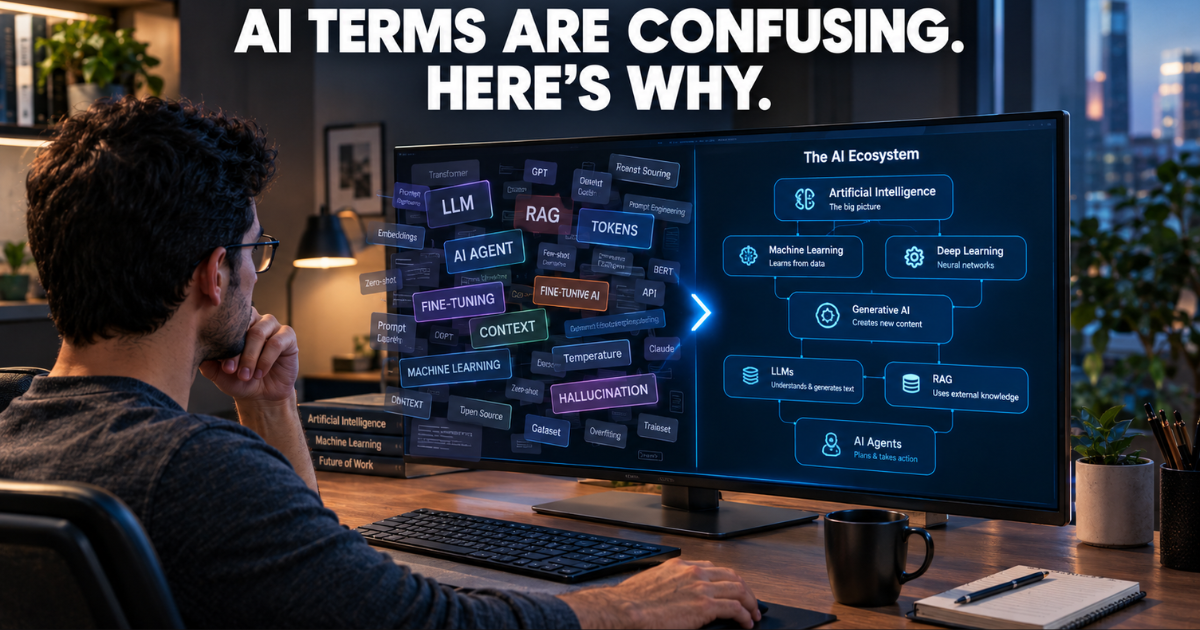
If you’ve spent any time around ChatGPT, Claude, or Gemini, you’ve probably nodded through a conversation about “tokens,” “hallucinations,” or “fine-tuning” without really knowing what any of it meant. Honestly, that’s normal. A lot of AI vocabulary got borrowed from computer science, statistics, and neuroscience, then flattened into buzzwords for marketing copy — and the result is a pile of terms that sound related but mean very different things.
This guide walks through the AI terms that trip people up most often: what they actually mean, how they connect, and where you’ll run into them in tools you already use. You don’t need a computer science degree to follow along. You just need a working mental model — once you have that, new terms stop feeling like a foreign language.
Key Takeaways
- Artificial intelligence is the broad umbrella field. Machine learning and deep learning are narrower approaches that sit inside it, not separate technologies competing with it.
- A large language model (LLM) is trained on huge amounts of text to predict and generate language — it doesn’t “know” facts the way a person does.
- Tokens, context windows, and parameters describe different technical limits on how a model processes information; none of them alone determines how good a model is.
- Prompt engineering, fine-tuning, and retrieval-augmented generation (RAG) solve three different problems and aren’t interchangeable fixes for “the AI isn’t giving me good answers.”
- Hallucination refers to an AI system stating incorrect or fabricated information confidently enough that it sounds true.
- AI agents differ from chatbots because they can take multiple steps, use tools, and act on your behalf — not just respond in a chat window.
- Building AI literacy works better as an ongoing habit than a one-time glossary read — you pick most of this up by using tools and noticing where they go wrong.
What Is Artificial Intelligence, Really?
Artificial intelligence is the broad field of building computer systems that can do things normally associated with human thinking — recognizing patterns, understanding language, making predictions, or generating content. That’s a deliberately wide definition, and it has to be, because a spam filter, a voice assistant, and a chatbot like ChatGPT all technically count as “AI,” even though they work in completely different ways.
Here’s the thing that trips most people up: not all AI learns from data. Some older AI systems just follow a long list of hard-coded rules. Machine learning is the part of AI where systems learn patterns from examples instead of being explicitly programmed for every scenario. Deep learning is a more specific slice of machine learning that uses layered structures called neural networks, and it’s what powers most of the AI you interact with today — image recognition, speech-to-text, and the language models behind chatbots.
A simple way to picture it: think of three nested circles. AI is the outer circle, machine learning sits inside it, and deep learning sits inside that.
| Term | What It Actually Means | Everyday Example |
|---|---|---|
| Artificial Intelligence | The broad field of building systems that mimic aspects of human intelligence | A recommendation engine or spam filter |
| Machine Learning | AI that learns patterns from data instead of fixed rules | Fraud detection, demand forecasting |
| Deep Learning | Machine learning using multi-layered neural networks | Image recognition, speech processing |
| Algorithm | The set of steps a system follows to solve a problem | The logic behind a search ranking |
| Model | The trained system that applies what it learned to new inputs | An image classifier or chatbot |
In practice, a traditional machine learning model might predict housing prices from a spreadsheet of past sales. A deep learning model, on the other hand, is what lets a phone camera recognize a face in a photo. Same broad category, very different jobs.
Why This Vocabulary Actually Matters
It’s tempting to treat this as trivia, but understanding these terms changes how you use AI tools day to day. For one, when you know what a “prompt” actually is, you stop giving up after one mediocre response and start iterating on your wording instead. That alone fixes a huge share of complaints people have about AI output quality.
There’s also a trust angle. AI systems can produce fluent, confident-sounding text that’s completely wrong, and knowing terms like hallucination and grounding helps you know when to double-check something instead of taking it at face value. This has become a workplace skill, not just a hobbyist one — Stanford’s AI Index found that 88% of surveyed organizations reported using AI in 2025 — Source: Stanford HAI, 2026. The same report found generative AI specifically was already in use in at least one business function at 70% of surveyed organizations — Source: Stanford HAI, 2026.
That said, adoption doesn’t automatically mean smooth adoption. IBM’s research found that 83% of surveyed CEOs believed AI success depended more on people actually using the technology than on the technology itself — Source: IBM Institute for Business Value, 2026. In other words, the tech matters less than whether people understand it well enough to use it properly — which is basically the whole point of this article.
That vocabulary gap also has career implications — professionals who understand what these tools can and can’t do tend to adapt faster as AI reshapes job requirements, a topic we unpack in our realistic guide to becoming AI-proof in your career.
What Is Generative AI, and How Does an LLM Fit In?
Generative AI is a category of AI that creates new content — text, images, audio, video, code — rather than just classifying or predicting something. A spam filter sorts an email into “spam” or “not spam.” A generative AI tool writes the reply instead.
A large language model (LLM) is a specific type of AI model trained on massive amounts of text to understand and generate human-like language. When you ask an LLM a question, it isn’t pulling from some internal, verified encyclopedia. It’s predicting the most statistically likely next chunk of text based on patterns it picked up during training. That’s exactly why an LLM can write something beautifully fluent while still getting a fact completely wrong — fluency and accuracy are two different things under the hood.
Here’s a distinction worth keeping in your back pocket: an LLM is a model, but a chatbot is a product built around one. ChatGPT, Claude, and Gemini are all built on LLMs, but the chat app itself adds a bunch of other stuff on top — conversation memory, safety filters, document retrieval, tool access, a user interface. The model is more like the engine; the chatbot is the whole car.
Tokens, Context Windows, and Parameters — The Numbers Nobody Explains Well
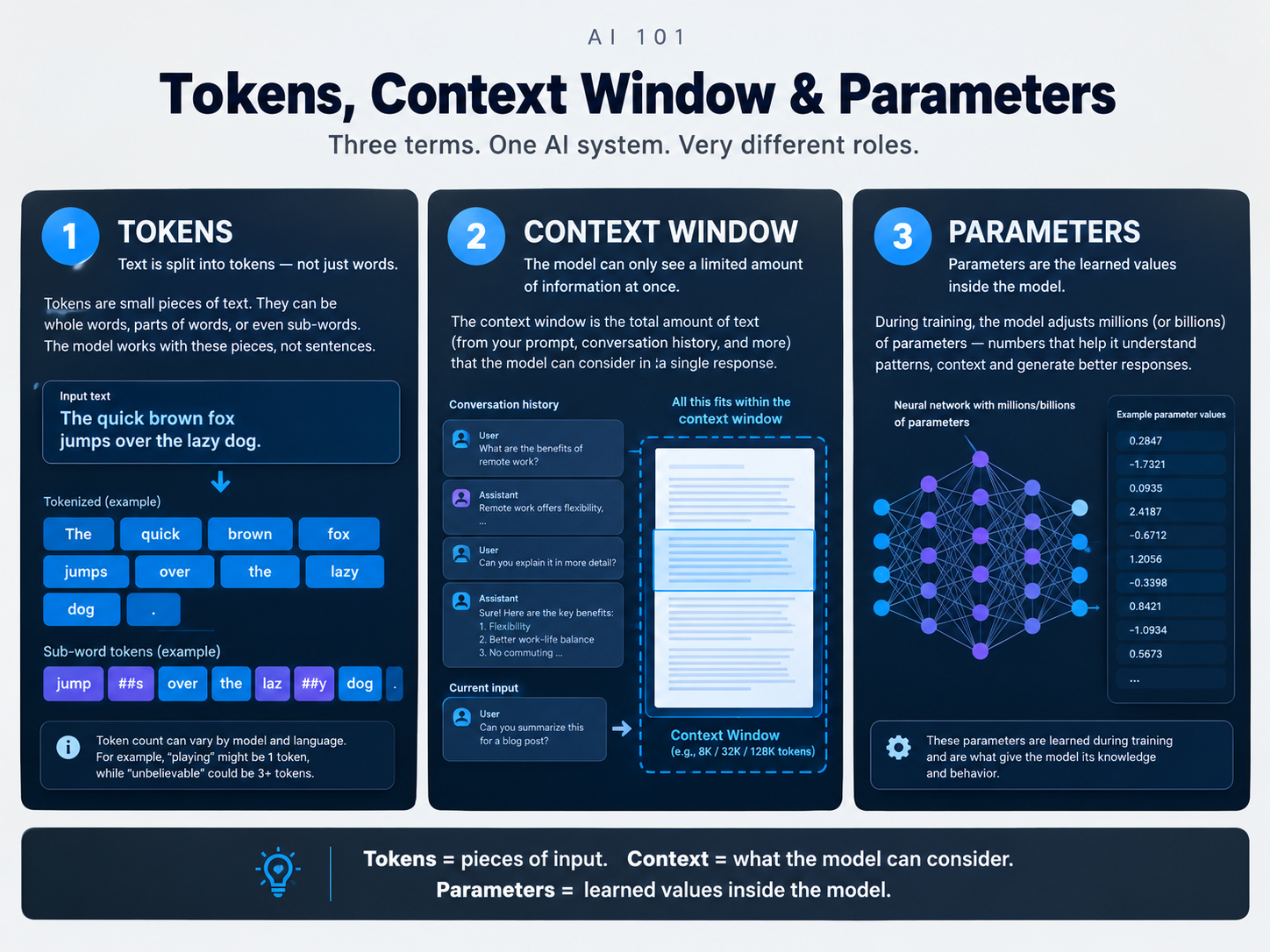
A token is the basic chunk of text an AI model processes — roughly a word or part of a word, though the exact split depends on the model’s tokenizer. A long or unusual word like “unbelievable” might get split into two or three tokens instead of counting as one. This matters in practice because most AI tools price usage and set length limits based on token counts, not word counts — so a “10,000 token limit” isn’t the same thing as a 10,000-word limit. To see tokenization in action rather than just read about it, OpenAI’s tokenizer tool lets you paste any text and watch it get split into tokens in real time.
A context window is the maximum amount of text a model can consider at once — measured in tokens — when generating a response. If you’ve ever pasted a long document into a chatbot and noticed it seems to “forget” something from the beginning by the time it reaches the end, that’s usually a context window limit at work, not the AI genuinely losing track of information the way a person would. Bigger context windows help with long documents and long conversations, but — and this is worth remembering — a bigger context window doesn’t automatically make a model smarter or more accurate. It just means it can hold more in view at once.
Parameters are the learned numerical values inside a model that shape how it turns an input into an output. You’ll often see AI companies brag about parameter counts, as if bigger automatically means better. In practice, that’s an oversimplification — architecture, training data quality, and how the model was fine-tuned all matter just as much as raw size. A smaller, specialized model can outperform a much larger general one on a narrow task.
What Is an AI Hallucination, and Why Does It Happen?
An AI hallucination is when a model generates information that sounds confident and plausible but is factually incorrect or made up entirely. This might be an invented statistic, a citation that doesn’t exist, a fabricated legal case, or a wrong quote attributed to a real person.
It happens because LLMs generate text based on statistical patterns, not verified facts. A sentence that “sounds right” based on the patterns in its training data isn’t the same as a sentence that’s actually true. In practice, hallucinations tend to show up more with obscure topics, very specific numbers, or anything outside what the model was trained on. NIST uses the term “confabulation” to describe this same phenomenon — AI systems generating confidently stated but erroneous content, and fluent output is not evidence of factual correctness — Source: NIST, 2024.
The practical takeaway: if you’re using AI for anything with real stakes — legal, medical, financial, or anything you’d cite publicly — verify names, dates, numbers, and quotes against a primary source instead of trusting the citation the AI gave you.
Prompt Engineering, Fine-Tuning, and RAG — Three Different Fixes for Three Different Problems
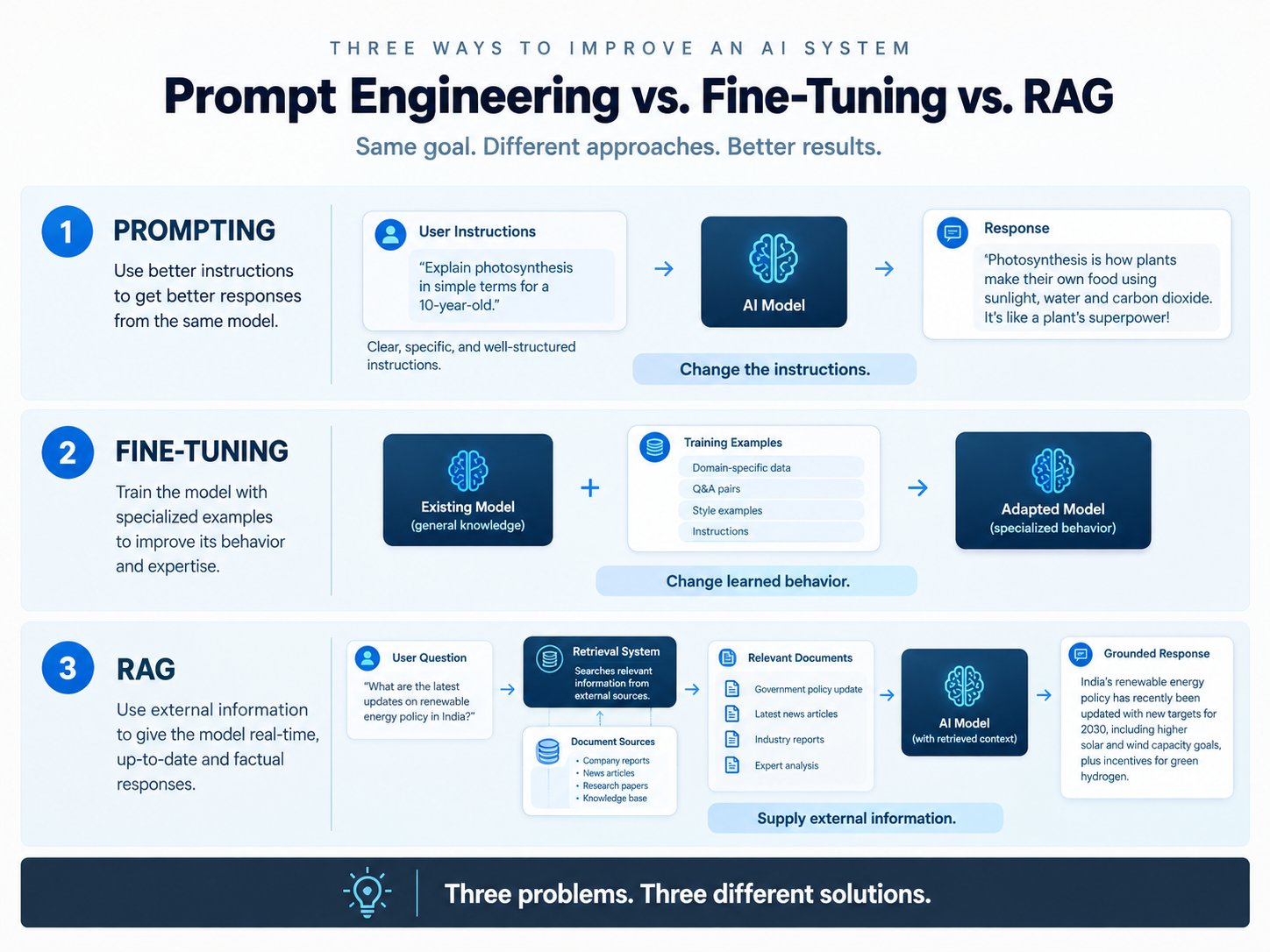
People throw these three terms around interchangeably, and it causes a lot of confusion, because they solve genuinely different problems.
Prompt engineering is the practice of writing clearer, more specific instructions to get a better response from an AI model. Compare “write about AI” to “write a 200-word explainer of AI agents for a nontechnical manager, using one workplace example.” The second version gives the model a target to aim at. This is the cheapest and fastest lever to pull, and in my experience it solves the majority of “the AI just isn’t giving me good answers” complaints before you need anything fancier.
Fine-tuning is the process of further training an existing model on a smaller, specialized dataset so it performs better on a specific task. Unlike prompting, which only changes your input, fine-tuning actually adjusts the model itself. A company might fine-tune a general-purpose model on legal documents so it responds more precisely to legal questions. It’s more resource-intensive than prompting and requires good training data — bad examples teach the model bad habits.
Retrieval-augmented generation (RAG) retrieves relevant information from an external source — like a database or document library — and feeds it to the model before it generates an answer. Picture an HR chatbot connected to an employee handbook: when someone asks about parental leave, the system pulls the relevant section of the handbook and hands it to the model as context, rather than relying purely on what the model memorized during training. RAG is especially useful for information that’s private, frequently updated, or too large to paste into every prompt.
| Approach | What It Changes | Best For | Example |
|---|---|---|---|
| Prompting | The instructions given to the model | Controlling a single response | Asking for a specific tone or format |
| RAG | Information supplied at the moment of use | Current or private knowledge | An internal policy assistant |
| Fine-tuning | The model’s learned behavior | Specialized, repeatable tasks | Consistent classification or style |
None of these guarantees accuracy on their own — RAG can retrieve the wrong document, fine-tuning can bake in bad patterns, and a great prompt can’t fix a model that simply doesn’t know something. They’re tools for different jobs, and the best systems often combine more than one.
What Is an AI Agent, and How Is It Different From a Chatbot?
An AI agent is a system that pursues a goal through multiple steps, often using tools, external data, and permitted actions — not just answering a single question. A basic chatbot might explain how to schedule a meeting. An agentic system could, if it has the right integrations, actually check a calendar, spot conflicts, propose times, create the event, and send the invites.
If agentic systems sound like a niche technical concept right now, they’re moving into the mainstream faster than most people expect — our deep dive on what agentic AI actually is and how it’s already reshaping work breaks down where this shift is showing up first.
The word “could” is doing a lot of work in that sentence. “AI agent” gets used pretty loosely in marketing right now, and not every product labeled that way has the same level of real autonomy. Google Cloud describes agents as systems that pursue goals using capabilities like reasoning, planning, memory, and tool use — Source: Google Cloud, 2026 — but the actual permissions and guardrails vary enormously between products.
| Capability | Basic Chatbot | AI Agent |
|---|---|---|
| Conversational responses | Yes | Yes |
| Multi-step task execution | Limited | Common |
| Tool use | Sometimes | Central to the design |
| External actions | Usually restricted | May be supported |
| Human approval required | Usually present | Varies by system |
Interestingly, actual agent deployment is still pretty early. Stanford’s 2026 analysis found AI-agent deployment remained in the single digits across nearly all business functions — Source: Stanford HAI, 2026. So while “agentic AI” is dominating headlines, it’s worth keeping the hype separate from what’s actually running in production right now.
From what I’ve seen, the useful question isn’t “does this sound autonomous?” It’s: what tools can it access, what data can it read, what actions can it take without approval, and what happens when a step fails?
Where All of This Shows Up in a Real AI Tool
None of these concepts live in isolation — a modern AI product usually stacks several of them together. Take a customer-support assistant as an example. A rough flow might look like: your question becomes a prompt, the system retrieves relevant documents using embeddings (numerical representations that help match your question to related content even if the wording doesn’t match exactly), the language model generates a response during inference, and if the system needs to take action — like updating a ticket — an agent layer coordinates that step.
Suddenly the vocabulary has a job to do: the LLM interprets language, tokens break the text into processable units, the context window limits how much it can consider at once, RAG supplies outside information, and hallucination is the failure mode you’re watching out for the whole time.
That layered view is more useful than treating AI as one mysterious black box. When you’re evaluating a new AI product, ask what model it’s using, what information it can access, where that information comes from, what tools it can call, and what happens when it gets something wrong. Those questions reveal far more than a label like “AI-powered.”
Which Terms Should You Actually Learn First?
You don’t need to absorb all of this at once. If you’re starting from zero, these ten cover most of what you’ll run into: artificial intelligence, machine learning, deep learning, generative AI, LLM, prompt, token, context window, hallucination, and AI agent. Once those feel natural, terms like RAG, fine-tuning, embeddings, multimodal AI, and inference become much easier to slot into place, because you already understand the categories they belong to.
A practical way to build this up: connect each term to a real moment where it caused you trouble. Long document giving you weird results? That’s a context window issue. AI invented a source? That’s a hallucination. Answers feel too generic? Work on your prompting. Need the AI to know your company’s current policies? That’s a RAG problem. Want it to actually take multi-step action instead of just talking? That’s agent territory.
Conclusion
AI terminology feels overwhelming mostly because people encounter it in fragments — a headline here, a product feature there — without ever seeing how the pieces connect. Once you see the shape of it, it’s actually a fairly small set of ideas: AI is the umbrella, machine learning and deep learning are approaches within it, generative AI and LLMs handle creation and language, and terms like tokens, context windows, and parameters describe the mechanics underneath. Prompting, fine-tuning, and RAG are three different levers for improving results, hallucination is the thing to watch out for, and agents extend all of this into multi-step action.
You don’t need to memorize every acronym that shows up in tech news. You need enough of a mental map that when a new term appears, you can ask where it fits — and that habit will take you a lot further than trying to keep a running glossary in your head.
Frequently Asked Questions
FAQ 1: What’s the difference between AI and machine learning?
AI is the broad field of building systems that mimic human-like capabilities. Machine learning is one specific approach within that field, where systems learn patterns from data instead of following fixed rules.
FAQ 2: What does LLM stand for?
Large language model — an AI model trained on massive amounts of text to understand and generate human-like language.
FAQ 3: What is a token in AI, in simple terms?
A token is the basic chunk of text — often a word or part of a word — that an AI model reads and generates, and most AI pricing and limits are based on token counts rather than word counts.
FAQ 4: What is a context window?
It’s the maximum amount of text, measured in tokens, that a model can consider at one time. A bigger context window helps with long documents and conversations but doesn’t automatically make a model more accurate.
FAQ 5: Is RAG better than fine-tuning?
Neither is universally better — they solve different problems. RAG supplies external or frequently changing information at the moment it’s needed. Fine-tuning changes the model’s underlying behavior through additional training, which suits specialized, repeatable tasks.
FAQ 6: What causes an AI hallucination?
Hallucinations happen because language models generate text based on statistical patterns rather than verified facts. A sentence can sound completely plausible and still be fabricated, especially on obscure topics or very specific details.
FAQ 7: What’s the real difference between a chatbot and an AI agent?
A chatbot mainly responds in conversation. An AI agent can take multiple steps, use external tools, and carry out actions toward a goal — though the actual level of autonomy varies a lot between products.
FAQ 8: Does a bigger AI model always perform better?
No. Parameter count is just one factor. Training data quality, architecture, and how well a model is tuned for a specific task all matter as much as raw size.
FAQ 9: Do I need to know how to code to understand AI terminology?
Not at all. Basic AI literacy is about understanding concepts, not writing software. Coding becomes relevant only if you want to build AI applications or work directly with APIs.
FAQ 10: How do I keep up with new AI terms as they come out?
Learn the fundamentals first, then look up unfamiliar terms as you encounter them in real use. Hands-on practice with a couple of AI tools tends to build retention faster than reading through a long glossary in one sitting.
Author & Editorial Information
Written by Benjamin Reed: Benjamin Reed is a technology content writer covering artificial intelligence, digital tools, emerging technologies, and everyday technology topics for general readers. His work focuses on explaining technical concepts, terminology, and technology developments in a clear, simple, and accessible way.
Reviewed by: Technology Content Editors & AI Research Specialists.
Disclaimer: This article is based on publicly available information, general research, technology documentation, and commonly used AI terminology available at the time of publication. AI technologies, terminology, models, tools, and capabilities continue to evolve, and definitions or usage may vary between platforms and contexts. The information provided is intended for general educational purposes and should not be considered professional, technical, legal, or financial advice. Readers are encouraged to consult current and reliable sources when additional context or technical detail is required. This content was initially drafted with AI assistance and has been reviewed, edited, refined, and fact-checked by human editors to improve accuracy, clarity, originality, and editorial quality.