By Ethan Brooks | Technology Content Writer
Summarize this blog post with: ChatGPT | Perplexity | Claude | Grok
You’ve probably been using ChatGPT, Claude, Gemini, or one of the other AI assistants for a while now. And maybe you’ve noticed something frustrating: you ask a question, the AI gives you a response that’s technically correct but utterly generic — the kind of answer you could have found in 30 seconds on Google. Here’s the thing: that’s not really the AI’s fault. In almost every case, the problem is the prompt, not the model.
The way you instruct an AI determines everything about what it gives back to you. In this guide, you’ll find the 15 most powerful AI prompts everyone should know, organized by use case, with copy-ready templates and honest explanations of why each one actually works.
Key Takeaways
- AI prompts are the instructions you give a model — their quality directly determines whether you get a generic response or something genuinely useful.
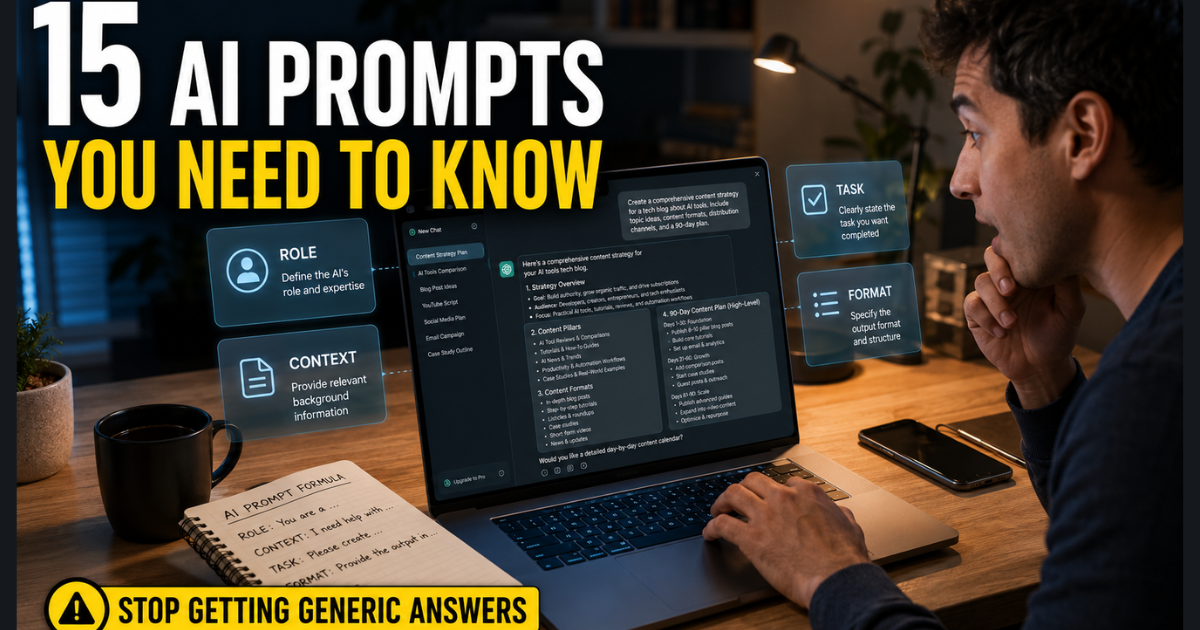
- A powerful prompt typically combines four elements: a role for the AI, relevant context, a specific task, and a defined output format.
- The 15 prompts here span writing, critical thinking, research, productivity, learning, career development, and creative work.
- You don’t need to be a prompt engineer — each template uses simple placeholders you swap for your own details.
- Prompt reuse compounds over time: saving and refining your best prompts is one of the highest-return habits for regular AI users.
- Different AI tools respond differently to the same prompt — knowing which platform suits which task helps you get better results faster.
- AI-generated outputs should always be reviewed for accuracy, especially for research, factual claims, or consequential decisions.
What Is an AI Prompt and Why Does It Matter So Much?
An AI prompt is the specific instruction or input you provide to a generative AI model, and its structure directly determines the quality, relevance, and usefulness of the model’s response. It’s not just a question — it’s a brief for a contractor. The more clearly you define the job, the better the output.
Think about it this way. Asking an AI to “write something about marketing” is like walking up to a contractor and saying “build something.” Compare that to: “Act as a senior content strategist. Write a 250-word LinkedIn post for a B2B SaaS audience explaining why email marketing outperforms paid social, using a confident but conversational tone.” One prompt produces vague filler. The other might produce something you’d actually post.
The gap between those two prompts isn’t technical sophistication — it’s just specificity. And that’s the main thing worth internalizing before we get into the 15 prompts.
Why Prompt Quality Determines Your AI Results
Honestly, most people write prompts the same way they type a Google search: short, keyword-driven, and without much context. That worked fine for search engines. AI models are different animals.
A well-structured prompt gives the model the same information a skilled collaborator would need before starting a task: who the output is for, what it should accomplish, how it should be presented, and what constraints apply. Remove any of those elements and the model fills in the blanks with its most generic defaults.
According to Google’s official prompting guidance, effective prompts include clear instructions, relevant context, examples, and iterative refinement — the same principles that apply to briefing a human team member. And 75% of knowledge workers surveyed in Microsoft and LinkedIn’s 2024 Work Trend Index reported already using AI at work, with many citing time savings as the primary benefit — Source: Microsoft and LinkedIn, 2024.
The point isn’t to find a magical sentence. The real advantage comes from learning to communicate your desired outcome clearly — and then refining based on what comes back.
The RCTF Framework: What Makes a Prompt Actually Work
Before diving into the 15 prompts, it’s worth understanding the structural logic behind them. Most high-performing prompts follow what’s often called the RCTF framework: Role, Context, Task, and Format.
| Element | What It Does | Example |
|---|---|---|
| Role | Tells the AI what expert persona to adopt | “Act as a senior UX researcher” |
| Context | Gives the AI the background it needs | “I’m redesigning a mobile checkout flow” |
| Task | Specifies exactly what you want | “Identify the top 3 friction points users face” |
| Format | Defines the shape of the output | “Return a numbered list with one-sentence explanations” |
If you want to go deeper on prompt structure beyond these templates, our guide on how to write better AI prompts walks through the full process with additional examples across different task types.
Role-based prompting is a technique where you instruct the AI to adopt a specific expert persona before responding, which measurably improves the depth and accuracy of the output for specialized topics. It’s not a trick — it anchors the model’s behavior to a specific domain rather than letting it default to a generic generalist mode.
You don’t need to use all four elements every time. But the more of them you include, the less guesswork the model has to do — and the less cleanup you’ll have to do afterward.
The 15 Most Powerful AI Prompts Everyone Should Know
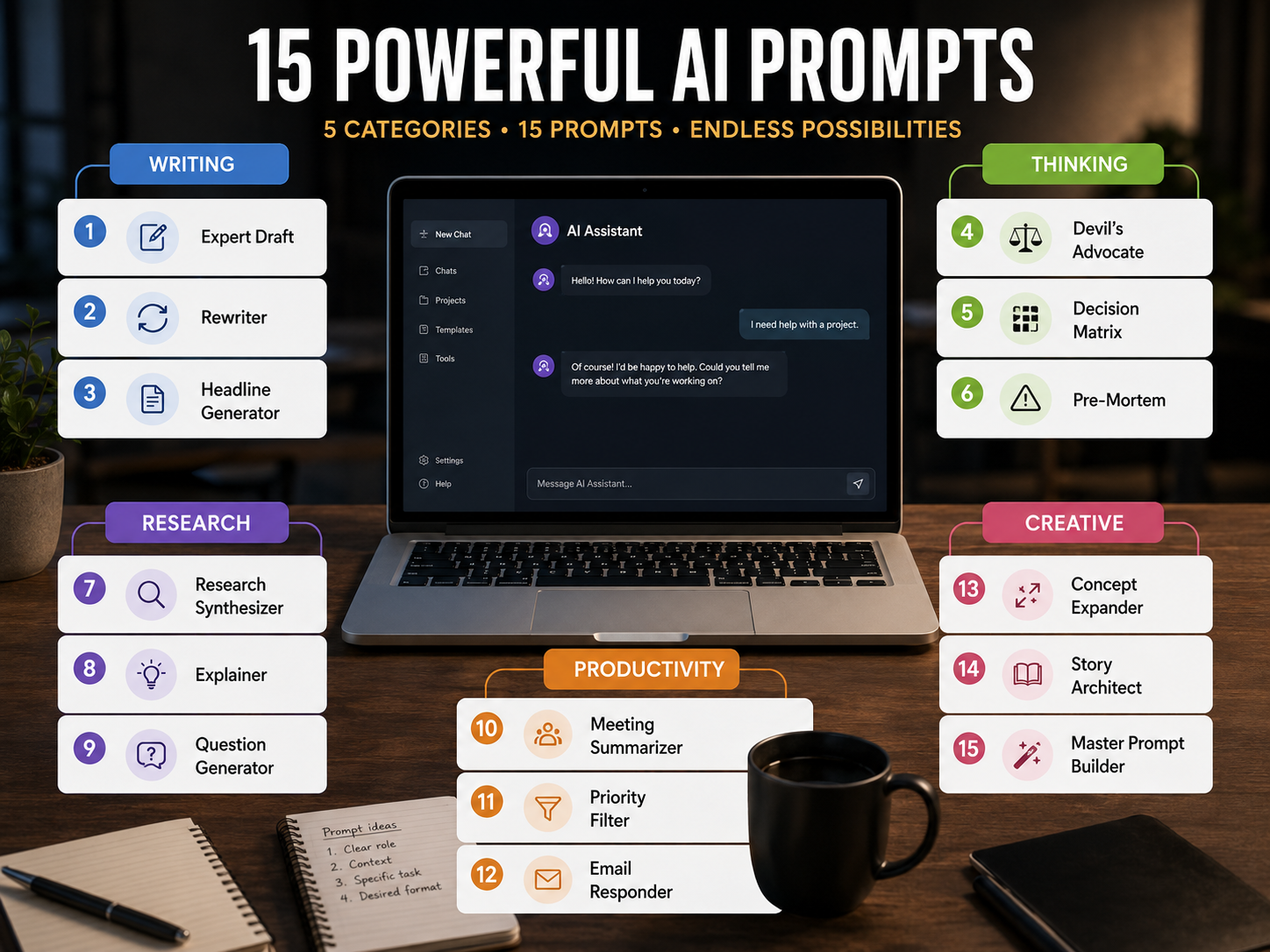
These prompts are organized into five categories: Writing, Thinking, Research, Productivity, and Creative. Each includes a ready-to-use template with placeholders, a brief explanation of why it works, and a practical example.
Writing Prompts
Prompt 1 — The Expert Draft
Act as a [expert role]. Write a [format: article / email / script]
for [audience] about [topic]. Tone: [tone]. Length: [word count].
Include [specific elements, e.g., a hook, a CTA, a statistic].
Why it works: This covers all four RCTF elements in a single sentence. The AI has no ambiguity to fill with defaults. Use it for blog posts, email campaigns, sales scripts, or anything where “write me something” produces disappointingly vague results.
Prompt 2 — The Rewriter
Rewrite the following text so that it sounds like [target voice:
e.g., a TED Talk, a plain-English newsletter, a legal brief].
Keep all original facts intact. Text: [paste text]
Why it works: Transformation prompts with a named style reference produce far more consistent results than “make it better.” The constraint about keeping facts intact is important — without it, AI can quietly swap in plausible-sounding but invented details.
Prompt 3 — The Headline Generator
Generate 10 headline options for a [format] about [topic],
targeting [audience]. Use a mix of: How-to, Number list,
Question, and Surprising stat formulas. Flag the top 3
with an asterisk and explain why they'd perform well.
Why it works: Asking the AI to self-evaluate forces a second pass of reasoning. You end up with both variety and prioritization, which is more useful than a flat list of 10 options.
Thinking Prompts
Prompt 4 — The Devil’s Advocate
I believe [your position or plan]. Argue the strongest possible
case against this view. Don't soften the critique — I want
the best counterarguments available, not polite objections.
Why it works: Most people use AI to confirm ideas, not stress-test them. Deliberately inverting that dynamic produces the kind of critical feedback that’s genuinely hard to get from colleagues who’d rather be agreeable.
Prompt 5 — The Decision Matrix
I'm deciding between [Option A] and [Option B] for [specific goal].
Create a comparison table evaluating both across these criteria:
[list 4–5 criteria]. Then write a two-sentence recommendation
based on what the table shows.
Why it works: Building the table first makes the AI’s reasoning transparent. You can push back on a specific cell rather than arguing against a vague conclusion.
Prompt 6 — The Pre-Mortem
Assume it's 12 months from now and [your project or decision]
has failed completely. Describe the 5 most likely reasons it
failed, in order of probability. Be specific, not generic.
Why it works: Pre-mortem analysis is a validated technique from project management. Framing failure as a given — rather than something to predict — produces more honest and specific risk assessments than asking “what could go wrong?”
Research Prompts
Prompt 7 — The Research Synthesizer
Here is a collection of information on [topic]: [paste text or facts].
Synthesize this into a coherent 3-paragraph summary for [audience].
Put the single most important insight in the first sentence.
Do not add information not supported by the source material.
Why it works: Synthesis prompts give the AI raw material rather than asking it to generate from memory — which significantly reduces the risk of hallucination. Giving it source material and telling it not to go beyond that material is one of the best guardrails you can add.
Prompt 8 — The Explainer
Explain [complex concept] to me as if I have zero background in [field].
Use a real-world analogy in the first paragraph.
Then follow with a plain-English explanation in under 150 words.
Why it works: The analogy instruction grounds abstract concepts in familiar experience. The word limit forces concision — which eliminates the padding that makes so many AI explanations feel longer than necessary.
Prompt 9 — The Question Generator
I'm preparing for [interview / exam / meeting / presentation] on [topic].
Generate the 10 most likely challenging questions I'll face,
along with a one-sentence answer framework for each.
Why it works: From what I’ve seen, preparation prompts are among the highest-ROI uses of AI. This one produces both the questions and the skeleton of answers, so you’re preparing strategically rather than just brainstorming blindly.
Productivity Prompts
Prompt 10 — The Meeting Summarizer
Here are my notes from a meeting: [paste notes].
Write a structured summary with three sections:
Key Decisions Made, Action Items (with owner and deadline if mentioned),
and Open Questions. Use bullet points throughout.
Why it works: Specifying the output structure means the AI doesn’t have to guess what “summary” means to you. The three-section format maps directly to what meeting follow-ups actually need — which means less editing afterward.
Prompt 11 — The Priority Filter
Here is my task list for [today / this week]: [paste list].
Rank these tasks by impact-to-effort ratio.
Flag any that should be delegated or dropped entirely.
Explain your reasoning in one sentence per task.
Why it works: Most to-do lists are unfiltered dumps organized by recency or anxiety. This applies an actual prioritization framework — impact-to-effort — and asks the AI to justify its ranking, which you can then agree with or override.
Prompt 12 — The Email Responder
Here is an email I received: [paste email].
Draft a professional reply that [accepts / declines / asks for clarification / buys time].
Tone: [brief and direct / warm / formal]. Maximum length: [X sentences].
Why it works: Context, intent, tone, and length constraints — that’s the full RCTF framework applied to a task most people do dozens of times a day. This is one of the most reusable prompts in everyday work.
Creative Prompts
Prompt 13 — The Concept Expander
Here is a rough idea: [describe concept in 1–2 sentences].
Expand it into 3 distinct creative directions, each with a different
angle, audience, or execution approach. For each, write a one-paragraph pitch.
Why it works: Asking for three distinct directions prevents the AI from defaulting to its most predictable output. Forcing it to vary the angle across all three means you actually get options — not the same idea presented three ways.
Prompt 14 — The Story Architect
Write a narrative outline for a [length] [format: short story / case study / brand story]
about [topic or protagonist]. Use a three-act structure: Setup, Conflict, Resolution.
Include 3 specific details that make it feel real, not generic.
Why it works: The “3 specific details” instruction is the most important part of this prompt. Specificity is what separates compelling AI-generated narratives from forgettable ones, and making that instruction explicit forces the model to supply it rather than staying vague.
Prompt 15 — The Master Prompt Builder
I want to create an effective AI prompt for this task: [TASK].

Before writing the final prompt, identify the information you
need about: goal, context, audience, constraints, tone,
output format, examples, and success criteria.

Ask me only the most important questions. After I answer,
create a reusable prompt with clearly marked placeholders.
Then provide one completed example.
Why it works: This one’s different from the others — instead of doing the task, it builds you a custom prompt for the task. Use it when none of the other templates quite fit your workflow, or when you want to turn a one-time AI interaction into a repeatable system.
How to Customize These Prompts for Your Work
The most effective way to personalize any prompt is to replace generic placeholders with your specific role, audience, and constraints. Every template above uses bracketed variables — [topic], [audience], [tone] — that you can swap out in seconds.
In practice, the biggest improvement usually comes from one specific change: replacing [audience] with an extremely specific description. “CMOs at B2B SaaS companies with 50–200 employees” produces very different output than “business leaders.” “16-year-old students with short attention spans and no prior programming knowledge” produces different output than “beginners.”
You can also stack constraints. The more specific and bounded your instructions, the more the output converges on what you actually need. If a response still feels too generic after your first prompt, add information rather than just making the prompt longer.
Which AI Tools Work Best With These Prompts?
These prompts are designed to work across major platforms, but it’s worth knowing the differences:
- ChatGPT (GPT-4o): Handles long, multi-part prompts well. Strong for decision matrices, research synthesis, and email generation. The memory feature is useful for storing your role, tone preferences, and recurring context.
- Claude: Excels at nuanced writing, careful reasoning, and following complex formatting instructions. System prompts in Claude let you set persistent role and tone instructions at the conversation level, which is worth learning if you use it regularly.
- Gemini: Strong for tasks that benefit from Google integration. Best for research prompts where current information matters.
- Perplexity: Purpose-built for sourced research. Use the Research Synthesizer prompt here when you need citations alongside the synthesis.
- Microsoft Copilot: Best integrated into Microsoft 365 workflows — the productivity prompts (10–12) work particularly well directly in Outlook and Teams.
If you’re curious about how AI tools are evolving beyond simple chat interactions, it’s worth reading about what agentic AI is and how it’s already reshaping work — because the prompts you build today will increasingly be used to instruct AI agents, not just chat windows.
According to Google’s official AI developer documentation, newer Gemini reasoning models respond well to precise, explicit instructions and benefit from controlled verbosity settings — Source: Google AI for Developers, 2024.
How to Build a Personal Prompt Library That You’ll Actually Use
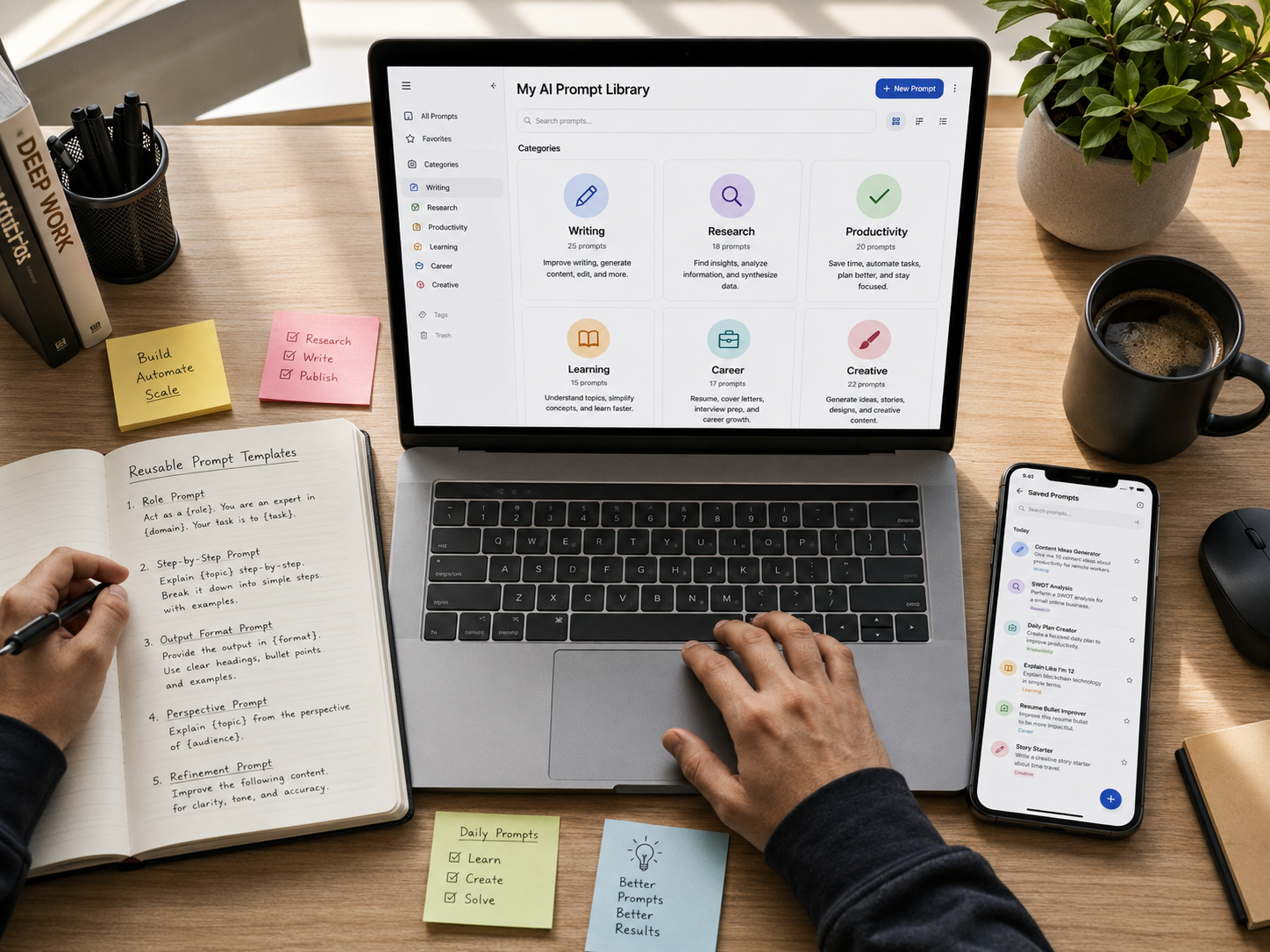
A personal prompt library is a curated collection of your best-performing prompts, organized by use case, that you can access and reuse without starting from scratch each time.
The simplest setup: a Google Doc or Notion table with four columns — Prompt Name, Use Case Category, The Prompt Template, and Last Updated. Every time a prompt works well, paste it in. Every time an output disappoints you, note what was missing and update the template.
Useful categories to organize around: writing, research, productivity, learning, career, and creative. Most people need about 8–12 prompts to cover the majority of their recurring AI tasks. Research from major AI platform usage patterns suggests that the most common reason users receive poor AI outputs is an underspecified prompt, not a limitation of the model itself.
McKinsey’s research on generative AI’s economic potential estimates it could add $2.6 trillion to $4.4 trillion in value annually across industries — the majority of which depends on workers knowing how to instruct AI tools effectively, not just having access to them.
Prompt reuse and refinement — the practice of saving, testing, and iterating on your best-performing prompts — is one of the highest-leverage productivity habits for regular AI users. It’s also the thing most people skip, which is why they keep starting from scratch.
The Most Common AI Prompting Mistakes (And How to Avoid Them)
The biggest prompting mistakes are vague goals, missing context, unclear output requirements, and failure to evaluate the response critically.
Here are the ones worth watching for:
- Vague objectives: “Make this better” leaves the AI guessing. Specify whether you mean shorter, clearer, more persuasive, or more formal.
- Missing context: If the AI doesn’t know who the output is for, it defaults to a generic audience.
- No format specification: Without this, you often get prose when you wanted bullet points, or bullet points when you needed a table.
- Too many unrelated instructions in one prompt: Break complicated workflows into logical stages rather than asking for everything at once.
- Blind trust in the output: AI-generated content should always be reviewed for accuracy when it involves factual claims, calculations, citations, or decisions with real consequences.
Conclusion: The 15 Most Powerful AI Prompts Are a Starting Point, Not a Ceiling
The gap between a frustrating AI experience and a genuinely useful one is almost always the prompt — not the tool. The 15 most powerful AI prompts in this guide give you a tested, structured starting point across every major use case.
More importantly, once you understand the structural logic behind them — the RCTF framework, role assignment, format constraints, variable replacement — you can apply those principles to any prompt you write. These 15 aren’t the destination; they’re the beginning of building your own toolkit.
Start with two or three that match your most common tasks. Test them against real work this week. Refine based on what comes back. The best prompt is always the one you’ve actually iterated on — and that process starts now.
Frequently Asked Questions
FAQ 1: What is the most effective AI prompt structure?
The most effective AI prompts follow the RCTF framework: Role (who the AI should be), Context (the relevant background), Task (exactly what you want), and Format (how the output should look). Using all four elements gives the model enough direction to produce specific, usable results rather than generic defaults.
FAQ 2: Do these AI prompts work with free versions of ChatGPT and Claude?
Yes — the majority of these prompts work on free tiers of major AI platforms including ChatGPT, Claude, and Gemini. Some features, such as extended context windows or web search integration, may require a paid subscription, but the core prompt structure works regardless of the plan.
FAQ 3: How many prompts do I actually need to know?
In practice, most people cover the majority of their recurring AI tasks with 8–12 well-crafted prompts. Rather than memorizing a large library, focus on building a small set of templates you understand well and can adapt quickly — that’s more useful than knowing 50 prompts superficially.
FAQ 4: Why does the same prompt produce different results on different AI tools?
AI models are trained differently, have different context windows, and may or may not have access to real-time web data. The same prompt can produce noticeably different outputs across ChatGPT, Claude, and Gemini — which is why it’s worth experimenting with the same prompt across platforms and noting which tool handles which task type best.
FAQ 5: Can I use these prompts for professional or business work?
Yes, and many of them are specifically designed for professional use cases — the Meeting Summarizer, Email Responder, Decision Matrix, and Expert Draft prompts all have direct workplace applications. That said, any AI-generated output used in a professional context should be reviewed for accuracy before being shared or acted on.
FAQ 6: How do I know if my AI prompt is good?
A good prompt produces an output you can use with minimal editing. If you find yourself significantly rewriting the AI’s response, that’s a signal to add more specificity to the prompt itself — usually by clarifying the audience, tightening the task description, or specifying the format more precisely.
FAQ 7: What’s the difference between prompt engineering and just writing good prompts?
Prompt engineering typically refers to more systematic, technical approaches to optimizing AI instructions — often in development or research contexts. For most everyday users, “writing good prompts” is a more accurate description. The principles overlap significantly: clarity, context, specificity, and iteration are central to both.
Author & Editorial Information
Written by Ethan Brooks: Ethan Brooks is a technology content writer covering AI tools, digital trends, and practical technology guides for general readers. His work focuses on explaining useful technology concepts and everyday digital developments in a clear, accessible, and practical way.
Reviewed by: Editorial Review Team & Technology Content Specialists.
Disclaimer: This article is based on publicly available information, product documentation, general research, and practical examples available at the time of publication. AI tools and their capabilities can change frequently as platforms introduce new models, features, and updates. The prompts and examples included in this article are intended for general informational purposes and may produce different results depending on the AI tool, model, settings, and context in which they are used. Readers are encouraged to review the latest capabilities and usage policies of their chosen AI platform before relying on generated results. This content was initially drafted with AI assistance and has been carefully reviewed, edited, refined, and fact-checked by human editors to improve accuracy, clarity, originality, and editorial quality.